


總覽
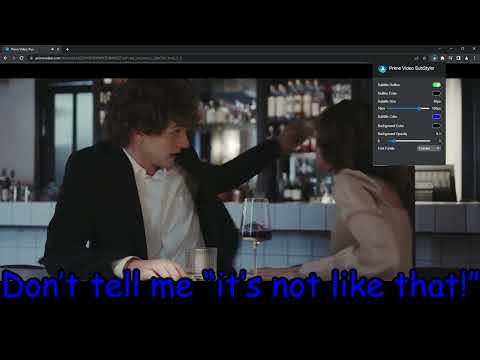
用於在 Prime Video 上自訂字幕與標題的擴充功能。可調整文字大小、字型、顏色並添加背景。
Wake up your inner artist and express your creativity by customizing PrimeVideo subtitle style. Even though you usually don’t use movie captions, you may consider starting after checking out all the settings this extension has to offer. Now you’re able to: - Choose custom text color, - Adjust text size, - Add text outline and choose its color, - Add text background, choose its color and adjust the opacity - Choose font family Feeling artistic? Here’s another bonus: all the colors can be chosen either from a built-in color picker or by entering RGB value, creating almost endless style possibilities. Take the subtitle customization to the next level with Prime Video SubStyler and let your imagination run wild!! Too many options? Worry not! Check out some basic settings, such as text size and background. All you need to do is add Prime Video SubStyler extension to your browser, manage available options in the control panel and adjust subtitles to your own preferences. It’s as simple as that! Disclaimer : Prime Video is a trademark of Amazon.com, Inc.. This website & extension hold no association or affiliation with Amazon Prime Video or any third-party companies.
4.5 分 (滿分 5 分)2 個評分
詳細資料
- 版本1.0.10
- 已更新2026年2月5日
- 提供者BestChromeExtensions
- 大小55.22KiB
- 語言55 種語言
- 開發人員HideApp
1021 E Lincolnway Cheyenne, WY 82001-4851 US電子郵件
disneypartyapp@gmail.com電話
+1 920-714-7945 - 交易商這位開發人員表明自己是交易商 (依歐盟的定義),並承諾只提供符合歐盟法律的產品或服務。
隱私權

「Prime Video 字幕客製化工具」已揭露下列關於收集及使用資料的資訊。 如需更多詳細資訊,請參閱開發人員的《privacy policy》。
Prime Video 字幕客製化工具 會處理下列資料:
這位開發者就你的資料做出下列聲明:
- 除經核准的用途外,不會將你的資料販售給第三方
- 不會基於與商品核心功能無關的目的,使用或轉移資料
- 不會為了確認信用度或基於貸款目的,使用或轉移資料
支援
如有疑問或建議,請使用電腦版瀏覽器開啟這個頁面