


概述
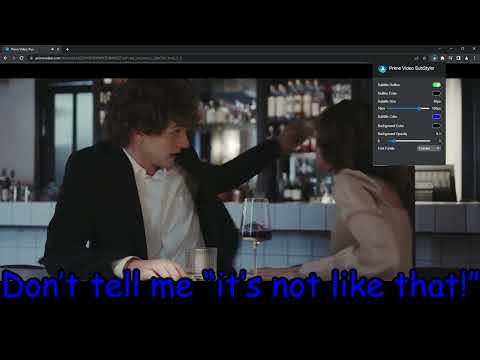
用于在 Prime Video 上自定义字幕和标题的扩展。可更改文本大小、字体、颜色并添加背景。
Wake up your inner artist and express your creativity by customizing PrimeVideo subtitle style. Even though you usually don’t use movie captions, you may consider starting after checking out all the settings this extension has to offer. Now you’re able to: - Choose custom text color, - Adjust text size, - Add text outline and choose its color, - Add text background, choose its color and adjust the opacity - Choose font family Feeling artistic? Here’s another bonus: all the colors can be chosen either from a built-in color picker or by entering RGB value, creating almost endless style possibilities. Take the subtitle customization to the next level with Prime Video SubStyler and let your imagination run wild!! Too many options? Worry not! Check out some basic settings, such as text size and background. All you need to do is add Prime Video SubStyler extension to your browser, manage available options in the control panel and adjust subtitles to your own preferences. It’s as simple as that! Disclaimer : Prime Video is a trademark of Amazon.com, Inc.. This website & extension hold no association or affiliation with Amazon Prime Video or any third-party companies.
4.5 星(5 星制)2 个评分
详情
- 版本1.0.10
- 上次更新日期2026年2月5日
- 提供方BestChromeExtensions
- 大小55.22KiB
- 语言55 种语言
- 开发者HideApp
1021 E Lincolnway Cheyenne, WY 82001-4851 US邮箱
disneypartyapp@gmail.com电话
+1 920-714-7945 - 交易者此开发者已根据欧盟的定义将自己标识为交易者,并承诺仅提供符合欧盟法律要求的产品或服务。
隐私权

“Prime Video 字幕定制器”已就收集和使用用户数据披露了以下信息。 如需了解详情,请查看开发者的privacy policy。
Prime Video 字幕定制器会处理以下数据:
该开发者已声明,您的数据:
- 不会因未获批准的用途出售给第三方
- 不会为实现与产品核心功能无关的目的而使用或转移
- 不会为确定信用度或放贷目的而使用或转移
支持
若有任何疑问、建议或问题,请在桌面浏览器中打开此页面