
![Зображення логотипа продукту Prime Video Speeder: adjust playback speed [QVI]](https://lh3.googleusercontent.com/2flsnhUjsdxz2V0x_pJAzZjhky-e7lxQ6Z0xt2gaoTHf90SYBdypnGpL8JJfW092Xn6fcH0L_BGqakGUqNcfCzpF=s60)
Prime Video Speeder: adjust playback speed [QVI]
![Медіаоб’єкт 2 (знімок екрана) для сервісу Prime Video Speeder: adjust playback speed [QVI]](data:image/gif;base64,R0lGODlhAQABAIAAAP///////yH5BAEKAAEALAAAAAABAAEAAAICTAEAOw==)
Огляд
Extension allows to adjust the playback speed on Prime Video according to preference
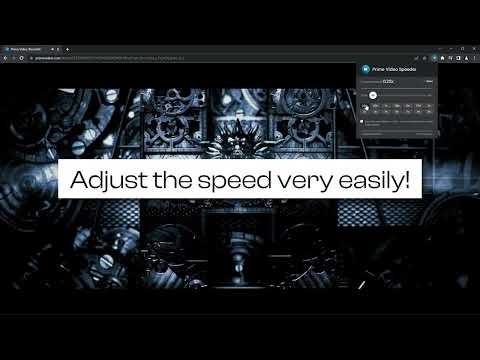
Get your skates on and be in control of the playback speed on Amazon Prime Video. This extension will allow you to either speed up or slow down shows and movies to enjoy watching your favorite content at your own pace. Didn't catch that fast-talking dialogue? Want to experience your favorite scenes in slow-motion? Or maybe you'd like to fast forward the less interesting part to enjoy the series finale? You're in the right place! Here's the solution for changing the video speed. All you need to do is to add the extension to your browser and run the control panel which enables you to choose from 0.25x up to 16x speed rates. You can also use hotkeys on your keyboard to control it. It is as simple as that! How to find Speeder's control panel: 1. After installation, click the small puzzle piece icon next to your Chrome profile avatar (top right corner of the browser window) 2. You'll see all your installed and enabled extensions. 3. You can pin Speeder to have it always on top in your browser. 4. Click the Speeder icon and try different speed settings. This extension is part of the Quality Viewership Initiative, a collaborative effort to enhance the understanding of audience engagement. It collects anonymous, aggregated viewing insights to support creators and studios in improving the quality of their content. You can stop sharing your information at any time by switching the toggle on the options page. Disclaimer : Prime Video is a trademark of Amazon.com, Inc.. This website & extension hold no association or affiliation with Amazon Prime Video or any third-party companies.
3,8 з 572 оцінки
Деталі
- Версія1.1.30
- Оновлено20 лютого 2026 р.
- Розробник:dogooodapp
- Розмір84.95KiB
- МовиКількість мов: 11
- РозробникHideApp
1021 East Lincolnway Cheyenne, WY 82001 USЕлектронна пошта
dogooodapp@gmail.comТелефон
+1 802-284-5301 - ПродавецьЦей розробник ідентифікує себе як продавця за визначенням Європейського Союзу й зобов’язується надавати лише продукти або послуги, які відповідають законам ЄС.
- Номер D-U-N-S132615120
Конфіденційність

Розробник продукту (Prime Video Speeder: adjust playback speed [QVI]) надав наведену нижче інформацію про те, як збираються і використовуються ваші дані. Щоб дізнатися більше, перегляньте privacy policy розробника.
Prime Video Speeder: adjust playback speed [QVI] обробляє наведені нижче дані.
Цей розробник заявляє, що ваші дані:
- не продаються третім особам (за винятком дозволених випадків)
- не використовуються й не передаються для цілей, що не пов’язані з основними функціями продукту
- не використовуються й не передаються для визначення кредитоспроможності або в цілях кредитування
Підтримка
Щоб отримати допомогу із запитаннями, пропозиціями й проблемами, відкрийте цю сторінку у вебпереглядачі для комп’ютера