
![Logobild des Artikels für Prime Video Picture In Picture [QVI]](https://lh3.googleusercontent.com/Ql2C41cPv3Orkda-ivGnKq_bYfcvylo7_wlBmsaqobk8jXKLrA4OC8hivk9U09yAzlgfZBpxomv4T8-tabBpNq_svQ=s60)
![Medienelement 2 (Screenshot) für Prime Video Picture In Picture [QVI]](data:image/gif;base64,R0lGODlhAQABAIAAAP///////yH5BAEKAAEALAAAAAABAAEAAAICTAEAOw==)
Übersicht
Extension to watch Prime Video in Picture in Picture mode. Enables a separate floating window to enjoy your favorite video content.
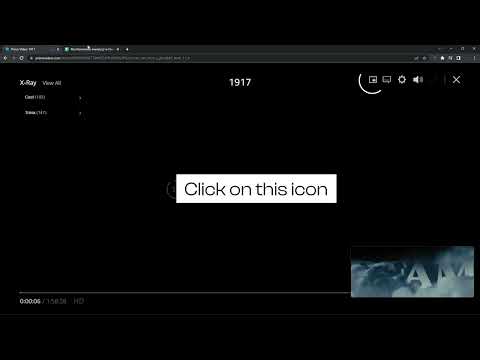
We're thrilled to present the latest update, where we've listened to your feedback and made it happen – introducing the much-anticipated Picture-in-Picture icon with subtitles support! 🌟 What's New: New Picture-in-Picture Icon: Now you can enjoy uninterrupted viewing while diving into other tasks, all with the added bonus of subtitles! Are you looking for a tool to watch PrimeVideo in a convenient always-on-top window? You’re in the right place! Focus on other tasks while watching your favorite series. Prime Video Picture in Picture is perfect for multitasking, having something on in the background, or even working from home (we don’t advise sharing it with your boss though). There’s no need to stack multiple browser tabs anymore or to use other screens, it’s all fixed by this extension. How does it work? Prime Video Picture in Picture allows you to play video content in a floating window pinned always on top, so you can use the rest of your screen for other tasks. This extension adds an extra control button, which can be found among other viewing options (e.g. full-screen). Just click on it to launch a separate window with the show you’d like to watch and place it wherever you want, whether you're browsing your FB feed or preparing a business presentation. All you need to do is add Prime Video Picture in Picture extension to your browser and enjoy your favorite series in the background. It's as simple as that! This extension is part of the Quality Viewership Initiative, a collaborative effort to enhance the understanding of audience engagement. It collects anonymous, aggregated viewing insights to support creators and studios in improving the quality of their content. You can stop sharing your information at any time by switching the toggle on the options page. Disclaimer : Prime Video is a trademark of Amazon.com, Inc.. This website & extension hold no association or affiliation with Amazon Prime Video or any third-party companies.
4,3 von 525 Bewertungen
Details
- Version1.0.36
- Aktualisiert13. April 2026
- Angeboten vonTheBestChromeExtensions
- Größe74.92KiB
- Sprachen4 Sprachen
- EntwicklerHideApp LLC
1021 East Lincolnway Cheyenne, WY 82001 USE-Mail
disneypictureinpicture@gmail.comTelefon
+1 802-284-5301 - HändlerDieser Entwickler hat sich gemäß der Definition der Europäischen Union als Händler deklariert und sich verpflichtet, nur Produkte oder Dienstleistungen anzubieten, die den Gesetzen der EU entsprechen.
- D-U-N-S-Nummer132615120
Datenschutz

Prime Video Picture In Picture [QVI] hat folgende Informationen hinsichtlich der Erhebung und Nutzung deiner Daten offengelegt. Weitere Details findest du im privacy policy des Entwicklers.
Prime Video Picture In Picture [QVI] verarbeitet Folgendes:
Dieser Entwickler erklärt, dass deine Daten
- nicht an Dritte verkauft werden, außer in den genehmigten Anwendungsfällen
- nicht für Zwecke genutzt oder übertragen werden, die nichts mit der Hauptfunktionalität des Artikels zu tun haben
- nicht zur Ermittlung der Kreditwürdigkeit oder für Darlehenszwecke verwendet oder übertragen werden
Support
Wenn du Hilfe bei Fragen, Vorschlägen oder Problemen benötigst, öffne diese Seite in deinem Desktop-Browser