


Overview
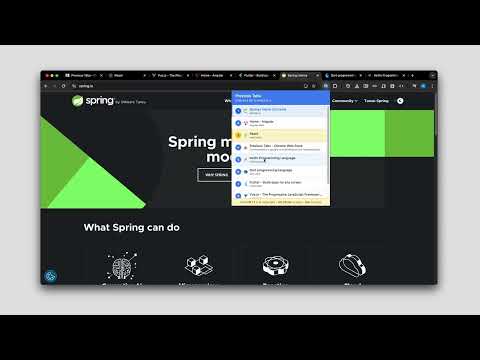
Navigate to previously opened tabs by pressing a button. Press multiple times to go further back in history.
Recent Updates: - Version 1.0.1: Resolved an issue where the extension would occasionally show "No history found" on first open _______________________ Introducing Previous Tabs Stop wasting time hunting for that tab you were previously using. Previous Tabs brings the power of Cmd + Tab style switching directly to your browser. Standard browser shortcuts only let you cycle to the next tab in the strip. Previous Tabs is smarter: it tracks your recently used tabs. Whether you have 5 tabs open or 50, you can instantly snap back to the last tab you were active on or the one before that, and so on. Designed for power users, developers, and researchers who constantly toggle between documentation, code, and previews. _______________________ ⌨️ How It Works Alt + W : Opens the popup list of your currently open tabs, ordered by most recent usage. W or up / down : moves the selection down the list to your previously active tabs. Alt or Enter : Open the highlighted tab and closes the popup. Escape : Close the menu without switching. _______________________ 🌟 Why You Need This - MRU (Most Recently Used) Logic: It doesn't just go to the next tab on the right; it goes to the tab you actually used last. - Visual List: See a vertical list of your open tabs to ensure you are picking the right one. - Lightning Fast: Optimized for speed with shortcuts. Press `Alt + W` and `Alt or Enter` to switch to previously opened tab. - Declutter Your Brain: No need to remember where a tab is located in the top strip. Just press and switch.
4.3 out of 53 ratings
Details
- Version1.0.1
- UpdatedJanuary 18, 2026
- Size441KiB
- LanguagesEnglish
- DeveloperWebsite
Email
developer.homebattles@gmail.com - Non-traderThis developer has not identified itself as a trader. For consumers in the European Union, please note that consumer rights do not apply to contracts between you and this developer.
Privacy

This developer declares that your data is
- Not being sold to third parties, outside of the approved use cases
- Not being used or transferred for purposes that are unrelated to the item's core functionality
- Not being used or transferred to determine creditworthiness or for lending purposes
Support
For help with questions, suggestions, or problems, visit the developer's support site