

Preview any link, anywhere - Link Preview
27 个评分
)
概述
Preview links from across the web!
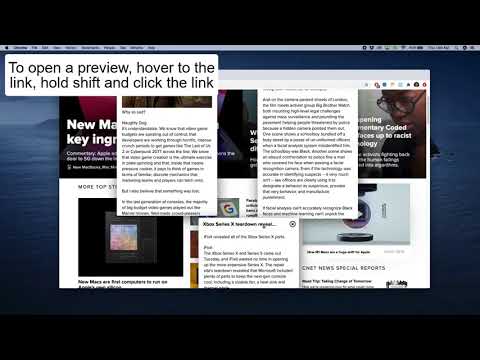
It's very simple to use, according to your settings preference you will be able to preview links from either hovering the link or clicking while holding a predefined key. You can drag the preview around the screen and resize it at the corners. This extension is currently in pre release, there are many functionalities coming. Don't waste time. With LinkPreview you can read your news 10x faster. No ads, no sponsored articles and way less time to load the information that you want to read. Great part of the time for loading content on the internet comes from the browser taking time to paint images and content on the screen, with LinkPreview almost all of that time spent painting is gone, so you can access your content faster. A safer way of browsing. LinkPreview uses DOMPurify, which means every content previewed will be first cleaned to prevent XSS attacks. Cross-Site Scripting (XSS) attacks are a type of injection, in which malicious scripts are injected into otherwise benign and trusted websites. SOON 1- Specific previews for social media links 2- Specific previews for e-commerce links 3- Preview shortened URL's https://linkpreview.co for business inquires: leo_cunha87@hotmail.com
2.7 星(5 星制)27 个评分
详情
- 版本2.0.0
- 上次更新日期2021年3月4日
- 提供方CodingLeo
- 大小217KiB
- 语言English
- 开发者
邮箱
leonardo.cunha@edu.pucrs.br - 非交易者该开发者尚未将自己标识为交易者。欧盟地区消费者须知:消费者权利可能不适用于您与该开发者达成的合约。
隐私权
“Preview any link, anywhere - Link Preview”已就收集和使用用户数据披露了以下信息。
Preview any link, anywhere - Link Preview会处理以下数据:
该开发者已声明,您的数据:
- 不会因未获批准的用途出售给第三方
- 不会为实现与产品核心功能无关的目的而使用或转移
- 不会为确定信用度或放贷目的而使用或转移
支持
若有任何疑问、建议或问题,请在桌面浏览器中打开此页面