

Presentation Console

Overview
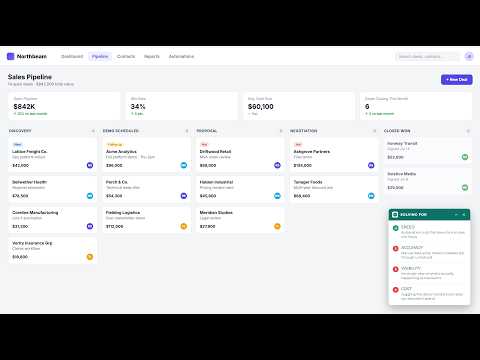
Track discovery pain points during live sales demos, or agenda items during any presentation, right on screen as you go.
Every sales demo and every meeting starts with a reason someone showed up. Somewhere around minute ten, that reason usually disappears, replaced by whatever happens to be on screen. Presentation Console keeps it in front of the whole room the entire time, not just in your own notes. Pain Points mode keeps a sales demo tethered to what discovery actually uncovered. Set up what came up in that conversation, then mark each one solved live as you address it, in front of the person you uncovered it with. The room stays anchored to their problem, not your feature list. Agenda mode does the same for any meeting, training session, or webinar. A live tracker everyone in the room can see, checked off item by item as you go. Runs as a side panel that pushes the page over, or a small draggable modal that floats on top of it. Either way, it never covers what you're actually presenting. Fully customizable branding, your own logo and colors or your client's, set up in seconds. Keyboard shortcuts (Ctrl+Shift+1 through 9) mark items solved without touching your mouse mid-presentation. Get Brand Kit: preparing a presentation somewhere else, like PowerPoint, Google Slides, or Canva? Grab a brand kit in seconds: a client's logo, colors, and fonts, pulled straight from their website and downloaded as a ready-to-use zip, so you're not hunting for hex codes or saving a logo off their homepage by hand. Support Documentation: https://aspenroots.io/presentation-console-support Built by Aspen Roots. aspenroots.io
0 out of 5No ratings
Details
- Version2.7
- UpdatedSeptember 21, 2026
- Offered byAspen Roots
- Size895KiB
- LanguagesEnglish
- DeveloperAspen Roots
Street Address Redacted Broomfield, CO 80020 USEmail
hello@aspenroots.io - Non-traderThis developer has not identified itself as a trader. For consumers in the European Union, please note that consumer rights do not apply to contracts between you and this developer.
Privacy

This developer declares that your data is
- Not being sold to third parties, outside of the approved use cases
- Not being used or transferred for purposes that are unrelated to the item's core functionality
- Not being used or transferred to determine creditworthiness or for lending purposes
Support
For help with questions, suggestions, or problems, visit the developer's support site