


Overview
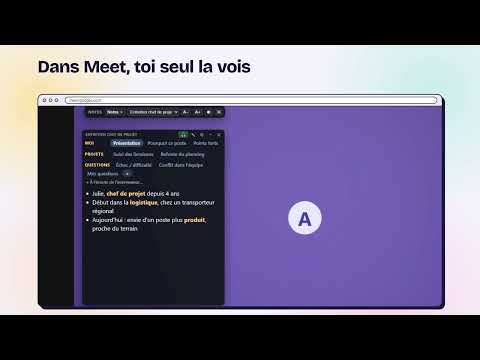
Your call notes on top of Google Meet, in tabs only you can see. The right tab opens when the topic comes up.
PrepNotes puts your prepared notes on top of your Google Meet call, in tabs that only you can see. Prepare before the call • Say why you're preparing: a job interview, a client meeting, or any important call. • Give what you have: your CV and the job offer, or what you offer and who the client is. • The AI sorts the topics to prepare into rows of tabs. Nothing is made up: what's missing is marked "to complete". • Choose how topics are written: keywords, short sentences or full text. Edit anything by hand. During the call • Your card shows over the Google Meet window. Nobody else sees it, unless you share your screen. • Click the PrepNotes icon to start listening: when the other person brings up a topic, the matching tab opens on its own. Privacy • The audio of the call is never recorded. Only the other participants' voices are transcribed, in short chunks, to find the right tab. • Your CV is not kept on our servers. • No ads, no analytics, no selling of data. Free: 30 minutes of listening per month, unlimited cards. No credit card. PrepNotes is an independent extension, not affiliated with Google. Google Meet is a trademark of Google LLC.
0 out of 5No ratings
Details
- Version0.2.1
- UpdatedNovember 3, 2026
- Size60.04KiB
- Languages2 languages
- DeveloperWebsite
Email
adambayar1357@gmail.com - Non-traderThis developer has not identified itself as a trader. For consumers in the European Union, please note that consumer rights do not apply to contracts between you and this developer.
Privacy

PrepNotes — notes for Google Meet™ has disclosed the following information regarding the collection and usage of your data. More detailed information can be found in the developer's privacy policy.
PrepNotes — notes for Google Meet™ handles the following:
This developer declares that your data is
- Not being sold to third parties, outside of the approved use cases
- Not being used or transferred for purposes that are unrelated to the item's core functionality
- Not being used or transferred to determine creditworthiness or for lending purposes
Support
For help with questions, suggestions, or problems, visit the developer's support site