

LocatorLab
1 rating
)
Overview
Complete test automation toolkit - Smart form fill, locator capture with health monitoring, and test recorder with script generation
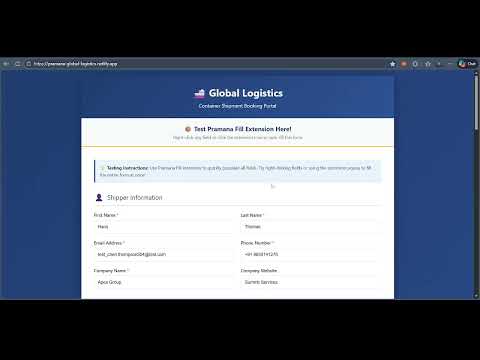
================================================================================ LOCATORLAB - STORE DESCRIPTION ================================================================================ Version: 3.3.0 Last Updated: April 2026 Use this file to copy/paste into Chrome Web Store and Edge Add-ons ================================================================================ SHORT DESCRIPTION (132 characters max) ================================================================================ Complete test automation toolkit — Smart form fill, locator capture with health monitoring, and test recorder with script generation ================================================================================ DETAILED DESCRIPTION ================================================================================ LocatorLab — Complete Test Automation Toolkit for QA Engineers Accelerate your testing workflow with three powerful tools in one extension. Perfect for QA engineers, automation testers, and developers working with Playwright, Cypress, Selenium, or WebdriverIO. --- KEY FEATURES Smart Form Auto-Fill - Detects field types automatically - 20+ data types: names, emails, phone, address, company, URL, date, and more - Global data from India, USA, Europe, Asia, Australia - Respects HTML5 validation (maxlength, minlength, pattern) - Shadow DOM support for modern web components - Custom field mapping profiles with domain activation Locator Capture with Health Monitoring - Capture element locators with one click or keyboard shortcut (Alt+Shift+L) - 10+ locator strategies: CSS, XPath, ID, data-testid, ARIA label, name, class, and more - Smart scoring system (0-10) for locator reliability — best locator highlighted automatically - Context-aware XPath for table row buttons - Health monitoring dashboard with Healthy / Warning / Broken status - Manual locator entry and bulk CSV import - Edit and manage saved locators - Filter by health status or by Locator Set - Page-wise locator organisation - Health Analytics dashboard — average score, distribution breakdown, top broken locators - Export full locator registry as CSV or self-contained HTML report - Locator Sets — organise locators into color-coded groups and re-validate in bulk Test Recorder with Script Generation - Record user interactions as test scripts — zero code required - Generate clean, production-ready code for Playwright, Cypress, Selenium (Java/Python), WebdriverIO - Smart deduplication — no redundant clicks or repeated fill steps - Smart wait detection for animations and network calls - Assertion suggestions based on element context - Minimise recording panel while interacting with the page - Preview generated script with syntax highlighting before export - Download as .spec.js, .cy.js, .java, or .py - Custom Assertion Builder — create reusable assertion templates with placeholder tokens - Append custom assertions directly to your recorded script in the Preview Panel --- v3.3.0 — Latest Release NEW: Health Analytics — summary dashboard with average score, distribution chart, and top broken locators NEW: CSV & HTML Export — export full locator registry as CSV or a self-contained HTML report grouped by page NEW: Locator Sets — organise locators into color-coded sets and filter the Health tab with one click NEW: Set Re-validation — re-scan all locators in a set against the active tab with live progress NEW: Custom Assertion Builder — create reusable assertion templates with {locator}, {value}, {attribute}, {count} tokens NEW: Assertion Quick-Generate — fill placeholders and append assertions directly to a recorded script v3.2.0 NEW: Manual locator entry — add locators one by one via form NEW: CSV bulk import — import multiple locators from CSV file NEW: Edit locators — modify existing locator details NEW: Improved Health tab UI — separate rows for stats and actions v3.1.0 - Locator health monitoring system - Page scanner for bulk element capture - Health score calculation with detailed breakdown - Domain and page-wise locator filtering - Export locators to clipboard --- SUPPORTED FIELD TYPES (Form Fill) Personal Info: First Name, Last Name, Full Name, Username Contact: Email, Phone (Indian / US / Plain formats), Company Address: Street Address, City, State, Country, Pincode / ZIP Security: Password (with complexity options) Forms: Checkboxes, Radio buttons, Dropdowns, Textareas Validation: Pattern matching, min / max length support --- LOCATOR TYPES (Capture) Best Stability: - data-testid (Score 10) — Designed for testing - ID (Score 9) — Unique identifiers - Label / ARIA (Score 9) — Accessible and stable Good Stability: - XPath table-row (Score 7) — Context-aware for tables - CSS selectors (Score 6) — Class-based selection - XPath list-item (Score 6) — List context awareness Fallback Options: - XPath contains (Score 5) — Partial matching - XPath text (Score 4) — Text-based selection - XPath position (Score 3) — Index-based (less stable) --- FRAMEWORK SUPPORT Generate locators and scripts for: - Playwright (JavaScript / TypeScript) - Cypress - Selenium Java - Selenium Python - WebdriverIO - Custom format templates --- KEYBOARD SHORTCUTS Fill Entire Form: Ctrl+Shift+F (Cmd+Shift+F on Mac) Fill Focused Field: Ctrl+Shift+H (Cmd+Shift+H on Mac) Capture Locator: Alt+Shift+L Scan Page Elements: Alt+Shift+S --- CUSTOMIZABLE SETTINGS Form Fill Options: - Text field constraints (min / max characters) - Textarea formatting (lines, chars per line) - Phone number format selection - Email domain customisation - Checkbox selection probability - Toggle notifications Locator Options: - Preferred locator strategy order - Custom output format template - Health score thresholds - Auto-copy to clipboard --- PERFECT FOR - QA engineers testing web applications - Automation testers building and maintaining test suites - Developers creating and debugging forms - Manual testers filling repetitive forms - Teams managing large locator repositories across multiple pages --- PRIVACY AND SECURITY - No data collection — everything runs locally in your browser - No external API calls - No tracking or analytics - All data stored in browser local storage only --- HOW TO USE Form Fill: 1. Click the extension icon and select "Fill Form" 2. Right-click any field to choose a specific data type 3. Use Ctrl+Shift+F to fill the entire form instantly Locator Capture: 1. Hover over any element and press Alt+Shift+L 2. View generated locators ranked by quality score 3. Click to copy or save to the Health Monitor Test Recording: 1. Click "Record Test" to start recording 2. Interact with the page normally — minimise the panel if it covers fields 3. Stop recording, preview the generated script, and export --- Works with registration forms, login pages, checkout flows, profile pages, admin panels, and any web application. Developed by LocatorLab — connect.locatorlab@gmail.com ================================================================================ CATEGORY ================================================================================ Chrome: Developer Tools Edge: Developer Tools ================================================================================ VERSION HISTORY (for reference) ================================================================================ v3.3.0 (April 2026) - Health Analytics dashboard with export (CSV + HTML report) - Locator Sets with color coding and bulk re-validation - Custom Assertion Builder with placeholder tokens - Assertion Quick-Generate panel in Script Preview - Recording improvements: deduplication, minimise panel, dropdown fix v3.2.0 (January 2026) - Manual locator entry feature - CSV bulk import for locators - Edit existing locators - Health tab UI improvements (two-row layout) v3.1.0 (January 2026) - Locator health monitoring system - Page scanner for bulk capture - Health score calculation - Domain / page filtering v3.0.0 (December 2025) - Test recorder with script generation - Multiple framework support - Assertion suggestions v2.0.0 (December 2025) - Locator capture feature - Multiple locator strategies - Side panel mode ================================================================================
4 out of 51 rating
Details
- Version3.3.0
- UpdatedApril 7, 2026
- Offered byrazatechnologyservices
- Size172KiB
- LanguagesEnglish (United States)
- Developer
Email
razatechnologyservices@gmail.com - Non-traderThis developer has not identified itself as a trader. For consumers in the European Union, please note that consumer rights do not apply to contracts between you and this developer.
Privacy

This developer declares that your data is
- Not being sold to third parties, outside of the approved use cases
- Not being used or transferred for purposes that are unrelated to the item's core functionality
- Not being used or transferred to determine creditworthiness or for lending purposes