

PowR-Port Carrier Edition - Smart Load Importer & Margin HUD

Overview
Calculate real-time profit margins, deadhead, and fuel costs, and import freight loads in one click with AI-CASSI rate negotiation.
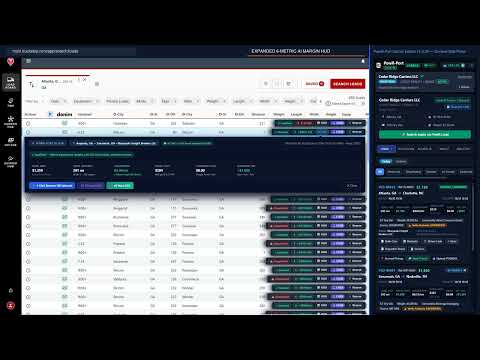
PowR-Port Carrier Edition — Smart Load Importer & Margin HUD PowR-Port Carrier Edition is an intelligent Chrome Side Panel, pop-out multi-monitor window, and in-page Load Board Heads-Up Display (HUD) built for motor carriers and owner-operators. It overlays live net-profit math, regional EIA diesel costs, commercial 5-axle corridor tolls, deadhead distance from your truck's live GPS or Home Base ZIP, and FMCSA broker authority verification directly onto supported freight load boards—while giving you a complete 5-stage load execution pipeline and autonomous AI-CASSI rate negotiation inside Chrome. Why Motor Carriers and Owner-Operators Use It • Stop Guessing True Net Profit: Freight portals show gross rates rather than net take-home pay. PowR-Port calculates your real operating profit inline before you call or email a broker—factoring in Origin Deadhead (DH-O), regional EIA diesel fuel burn, commercial 5-axle highway tolls, and your fleet's baseline operating cost per mile. • Eliminate Manual Calculators & Tab-Switching: Qualify loads, reserve freight, negotiate rates, upload Rate Confirmations, dispatch drivers via a zero-app mobile link, capture Proofs of Delivery (POD), and export invoices without leaving your browser. • Negotiate More Loads Simultaneously with AI-CASSI: Launch multi-turn AI Email threads or live outbound AI Voice phone calls with strict Upper Ask and Lower Floor rate guardrails so you never miss high-margin freight while driving or dispatching. • Protect Your Fleet from Unverified Brokers & Double-Brokering: Verify broker FMCSA operating authority and active $75,000 BMC-84/BMC-85 surety bond status in real time, and validate that every uploaded Rate Confirmation matches your registered USDOT before a truck rolls. Key Features & 5-Tab Operational Cockpit 1. Live In-Page Load Board HUD & 6-Metric Margin Calculator • Inline Qualification Badges: Automatically tags load rows as Qualified or Disqualified with clear diagnostic indicators when rate per mile, deadhead distance, trailer type, or weight falls outside your fleet thresholds. • 6-Metric Expanded Margin HUD: Click HUD on any load row to inspect: 1) Total Gross Freight Rate 2) Total Costing Distance (Loaded Miles + Origin Deadhead DH-O from live truck GPS or Home Base ZIP, plus Destination Deadhead DH-D badge) 3) Loaded RPM and All-In RPM vs. your target minimum 4) Live Regional EIA Diesel Fuel Cost (Costing Distance ÷ Fleet MPG × live regional $/gal) 5) Commercial 5-Axle Corridor Tolls along the highway route 6) True Estimated Net Profit after your configurable Baseline Operating Cost Floor ($/mi) • Real-Time FMCSA Broker Trust Shield: Displays live broker MC/USDOT authority status and $75,000 surety bond verification. 2. Loads Tab — 5-Stage End-to-End Load Pipeline • Complete Lifecycle Tracking: Filter active and historical loads by Today or a Custom Date Range across every dispatch stage from reservation and negotiation through active transit and final delivery. • $0.00 Upfront 1-Click Load Reservations: Lock in target loads from the in-page HUD with live HH:MM:SS reservation countdown timers. • Rate Confirmation Gate & Anti-Double-Brokering Check: Upload the signed broker Rate Confirmation (PDF, PNG, or JPEG up to 25 MB) to convert a load to Booked ($2.00 booking fee). The system verifies that the carrier USDOT on the document matches your profile and generates an encrypted 30-day Broker Load Portal link. • Zero-App Mobile Driver Link: Generate a secure mobile web link for your driver to submit pickup and delivery check-ins, stream live GPS breadcrumbs, and upload signed BOL/POD photos from any smartphone browser. • Reload Finder & 1-Click Accounting Exports: Search outbound reloads directly from your delivery city and export CSV Dispatch Sheets and Carrier Freight Invoices in one click. 3. AI-CASSI Tab — Bilateral Autonomous Email & Voice Rate Negotiation • Dual-Bound Rate Guardrails: Set your Upper Limit (opening Ask) and Lower Limit (strict walk-away Floor—never disclosed to the broker). • Multi-Channel Execution: Dispatch multi-turn AI Email threads ($2.00/thread) or live bidirectional AI Voice phone calls ($5.00/call) in Full Autonomous or Co-Pilot approval mode, with live transcripts and instant manual Take Over controls. 4. Auto-Scan Tab — Continuous Lane Monitoring & Auto-Dispatch • Hands-Free Scanning: Monitor active load board tabs at 1–15 minute intervals across 97 commercial equipment types with Origin, Destination, Min RPM, and Max Deadhead filters. • Instant Alerts & Auto-CASSI: Receive deduplicated audio chimes and desktop notifications when matching loads appear, or enable Auto-Dispatch on Match to initiate rate negotiations automatically. 5. Wallet & Analytics Tabs — Transparent Pay-As-You-Grow & Predictive Intelligence • No Monthly Subscription Required: $0.00 Load Reservations, $2.00 per Booked Load, $2.00 per AI Email Thread, and $5.00 per AI Voice Call. • Dual Onboarding Paths: Registered PowR-Load Carriers connect via 1-Click Session Sync with unlimited Continuous Auto-Scan included ($0.00/day). External Motor Carriers onboard in minutes via 3-step FMCSA USDOT/MC verification with a $25.00 Welcome Trial Wallet ($5.00/day 24-hour rolling Auto-Scan pass) and can upgrade to a Registered PowR-Load Carrier account for free ($0) anytime. • Predictive Spot Rate Engine & Smart Triangulation: Forecast lane Floor, Market Average, and Ceiling $/mi rates and build 3-leg triangulation loops (A -> B -> C -> A) to eliminate empty backhauls.
0 out of 5No ratings
Details
- Version1.0.50
- UpdatedNovember 9, 2026
- Size207KiB
- LanguagesEnglish (United States)
- DeveloperPowRShip Logistic Services LLCWebsite
4465 Commerce Dr SW Atlanta, GA 30336-1911 USEmail
Support@powrship.com - Non-traderThis developer has not identified itself as a trader. For consumers in the European Union, please note that consumer rights do not apply to contracts between you and this developer.
Privacy

PowR-Port Carrier Edition - Smart Load Importer & Margin HUD has disclosed the following information regarding the collection and usage of your data. More detailed information can be found in the developer's privacy policy.
PowR-Port Carrier Edition - Smart Load Importer & Margin HUD handles the following:
This developer declares that your data is
- Not being sold to third parties, outside of the approved use cases
- Not being used or transferred for purposes that are unrelated to the item's core functionality
- Not being used or transferred to determine creditworthiness or for lending purposes
Support
For help with questions, suggestions, or problems, visit the developer's support site