

PowerBar for Xero

Overview
Navigation shortcuts, favorites bar and productivity fixes for the Xero web app. No data collection, xero.com permission only.
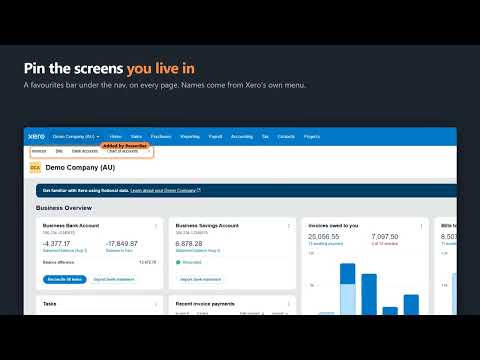
PowerBar adds the menu shortcuts Xero users have been requesting for years. Every feature below comes from a real request on Xero's product ideas forum, where thousands of votes have sat under "Gaining Support" without shipping. PowerBar ships them. WHAT YOU GET (free) • Statements in the Sales menu Xero hides customer statements behind Sales overview. One click instead of three. • Status submenus for invoices and bills Draft, Awaiting approval, Awaiting payment, Paid and Repeating, straight from the Sales and Purchases menus. No more loading the list to filter it. • A favourites bar Pin the screens you live in. They sit under the nav on every page. • Reconcile shortcuts Jump to any bank account's reconcile screen from the Accounting menu. • Financial settings shortcut The settings page you actually open, without the detour through the hub. • Quieter screens Hide the promotional and onboarding banners you have already read. Every feature has its own on/off switch. Turn off anything you don't want. PRO • Custom invoice PDF filenames Xero names every download "Invoice INV-0042.pdf". PowerBar names it "INV-0042 - Acme Ltd.pdf" so a folder of invoices is sortable by client. Your template, your naming. BUILT FOR PEOPLE WHO DON'T TRUST EXTENSIONS Bookkeepers work in client books. An extension in that browser has to earn it. • One permission. PowerBar can read and change pages on xero.com and nowhere else. Check the install prompt yourself — that is the whole list. • No data collection. No analytics, no telemetry, no tracking, no accounts. Nothing about your books, your clients or your browsing is sent anywhere. There is no server to send it to. • Free features are open source. Read the code before you install it: https://github.com/thoopring/powerbar-for-xero • It looks like Xero. Menu items are built from Xero's own components, so they match its type, spacing and behaviour. Nothing is bolted on. NOT AFFILIATED PowerBar for Xero is an independent product. It is not affiliated with, endorsed by, or sponsored by Xero Limited. Xero is a trademark of Xero Limited. Questions, bugs, or a feature you want: https://github.com/thoopring/powerbar-for-xero/issues
0 out of 5No ratings
Details
- Version1.0.0
- UpdatedAugust 6, 2026
- Offered bythoopring
- Size42.65KiB
- LanguagesEnglish
- Developer
Email
thoopring@gmail.com - Non-traderThis developer has not identified itself as a trader. For consumers in the European Union, please note that consumer rights do not apply to contracts between you and this developer.
Privacy

This developer declares that your data is
- Not being sold to third parties, outside of the approved use cases
- Not being used or transferred for purposes that are unrelated to the item's core functionality
- Not being used or transferred to determine creditworthiness or for lending purposes
Support
For help with questions, suggestions, or problems, visit the developer's support site