

PotScout: Whop Content Rewards Clipping Campaign Filter

Overview
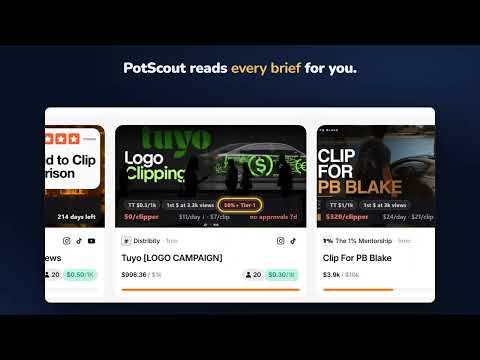
Find the Whop clipping campaign that fits YOUR channel: country rules, platform rates, $/clipper and days left on every card.
Find the Whop clipping campaign that actually pays YOUR channel. You clip for a campaign, the clip gets 30,000 views, and then you find the line in the brief: "40% of your audience must be from the US, UK, Canada or Australia." Or the $1/1k you saw was the Instagram rate and TikTok pays half. Or the minimum payout is $19, so nothing under 19,000 views counts. The rules are real, but they sit in a Google Doc three clicks deep. PotScout reads them for you and puts them on the campaign card. NEW IN 2.0 - CAMPAIGN RULES ON EVERY CARD (free) - Country rule: "40%+ Tier-1". Enter your own Tier-1 share once and it turns red on every campaign you would not get paid for - Rate per platform: "TT $1 · YT $1.50 · IG $2". Whop only shows the highest one - First payout: "1st $ at 10k views". The minimum payout turned into the views you need - "Apply first" on campaigns that must accept you before your clips count - Panel filters for your channel: platforms, Tier-1 share, first payout within N views, hide apply-first campaigns, sort by fastest first payout NEW IN 2.0 - CLIP TRACKER - Paste the link of a clip you posted and pick the campaign - TikTok and YouTube views update by themselves every few hours (Instagram, X and Facebook: type them in) - What each clip should earn, using the campaign's rate, minimum and maximum payout - "2.3k more views to 1st $" for clips below the minimum, growth in the last 24 h, and a warning when a clip stops growing - Free for 5 clips, unlimited with Pro ON EVERY CAMPAIGN CARD - $ left per clipper: the pot divided by the people competing for it - Days left: measured from the real drop in pot size, not guessed from "% paid out" - Burn per day, with an arrow when a pot starts burning faster than yesterday - $ per approved clip: total views divided by approved clips, times the rate - "No approvals 3d": a full pot that stopped approving is a dead pot - NEW: campaigns that appeared since yesterday, before the crowd arrives ONE CLICK ON WHOP ITSELF A "Best value" button right under "All campaigns" puts the campaign with the most money left per clipper at the top. Dying pots and stalled pots go to the bottom. IN THE SIDE PANEL - Filter all 600+ campaigns by pot left, $ per 1k views, $ per clipper, platform, campaign age, verified owners and your channel. No limits, no account - "Tipping since yesterday": pots that started burning at least 1.5x faster than their average - "Approvals stalled": pots with money left that have not approved a clip in 3+ days - Full-text search inside the campaign brief, saved filter presets - Filtered-out campaigns stay visible, greyed out, with the exact reason HOW IT WORKS 1. Open the Whop Content Rewards page. The numbers and rules are already on the cards 2. Open the PotScout panel once, pick your platforms and enter your Tier-1 share 3. No sign-up, no account. Your channel profile and your clips stay in your browser The numbers and campaign rules come from a small public data file on potscout.com that the extension downloads once an hour. Nothing about you is sent. The clip tracker asks for access to tiktok.com / youtube.com only when you add your first clip there, and only reads the view count of your own clips. See the privacy policy. FREE AND PRO Free, with no limits: the card numbers ($ per clipper, days left, NEW), the campaign rules checked against your channel, all filters in the panel, tracking for 5 clips. Pro, one payment, no subscription, no account: burn per day and trend, $ per approved clip, stalled-approval warnings, the "Best value" sort on Whop, the Tipping and Stalled panels, unlimited clip tracking, full-text search and presets. 48h PRO on us: everything unlocked for your first two days, then decide. Works on the new Whop campaigns page (redesign of September 27, 2026). Not affiliated with Whop or contentrewards.com. Questions or problems: https://potscout.com What's new in 2.0: - Campaign rules on every card: country rule, rate per platform, first payout, apply first - "My channel" profile and filters - Clip tracker ("My clips") - Fix: numbers on the campaign cards work again after Whop's page redesign
5 out of 51 rating
Details
- Version2.0.0
- UpdatedSeptember 29, 2026
- FeaturesOffers in-app purchases
- Size54.97KiB
- LanguagesEnglish
- DeveloperWebsite
Email
sportseraswap@protonmail.com - Non-traderThis developer has not identified itself as a trader. For consumers in the European Union, please note that consumer rights do not apply to contracts between you and this developer.
Privacy

PotScout: Whop Content Rewards Clipping Campaign Filter has disclosed the following information regarding the collection and usage of your data. More detailed information can be found in the developer's privacy policy.
PotScout: Whop Content Rewards Clipping Campaign Filter handles the following:
This developer declares that your data is
- Not being sold to third parties, outside of the approved use cases
- Not being used or transferred for purposes that are unrelated to the item's core functionality
- Not being used or transferred to determine creditworthiness or for lending purposes