

Portal Copilot

Overview
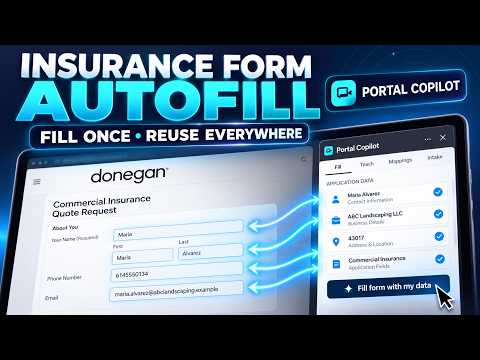
Enter commercial insurance data once, then fill carrier portal forms. Portal Copilot never submits a form.
Portal Copilot is a Chrome side panel for commercial insurance data reuse. Enter business, contact, location, and coverage details once, then review and fill matching fields on supported carrier forms. Key features: • Enter once, fill many: Save insurance intake details locally in your browser. • Form detection: Automatically detects supported forms and proposes a clear field fill plan. • Human in control: Portal Copilot never presses Submit. You review every filled value and submit the application yourself. • Protection & Undo: Preserves fields you edited manually and provides full one-click Undo. • Privacy first: All client intake data is stored strictly in your browser profile (chrome.storage.local). No data selling, no tracking, and no external server storage. • 7-day free trial included, followed by subscription for unlimited autofills.
0 out of 5No ratings
Details
- Version0.2.2
- UpdatedOctober 25, 2026
- Offered byAdamx
- Size206KiB
- LanguagesEnglish (United States)
- Developer
Email
soukpsv5@gmail.com - Non-traderThis developer has not identified itself as a trader. For consumers in the European Union, please note that consumer rights do not apply to contracts between you and this developer.
Privacy

This developer declares that your data is
- Not being sold to third parties, outside of the approved use cases
- Not being used or transferred for purposes that are unrelated to the item's core functionality
- Not being used or transferred to determine creditworthiness or for lending purposes