

Popup - Ask inline follow-ups in ChatGPT
5.0(
4 ratings
)ExtensionTools42 users

Overview
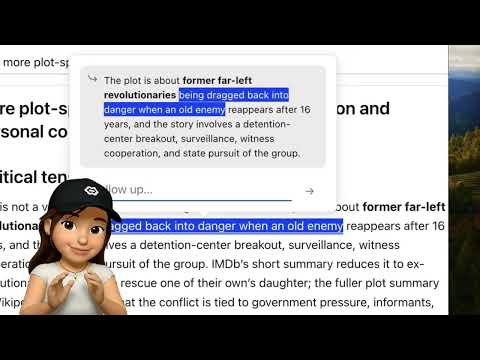
Ask ChatGPT where questions come up. Highlight. Ask. Keep reading. Stay in your flow.
Popup lets you ask inline follow-up questions without leaving the page. Normally, asking follow-up questions in ChatGPT pushes what you were reading off screen, and you have to scroll back to find the original place. Popup opens a mini ChatGPT window on the page so you can ask the question without losing the place. All questions asked through Popup are preserved across page reloads. No API key or login required. Popup works on the existing ChatGPT page as a reformatting layer, sending questions to ChatGPT without being noticeable on the page.
5 out of 54 ratings
Details
- Version1.1.3
- UpdatedMay 6, 2026
- Offered byAtom Wang
- Size96.95KiB
- LanguagesEnglish (United States)
- Developer
Email
maidouatomwang@gmail.com - Non-traderThis developer has not identified itself as a trader. For consumers in the European Union, please note that consumer rights do not apply to contracts between you and this developer.
Privacy

Manage extensions and learn how they're being used in your organization
The developer has disclosed that it will not collect or use your data. To learn more, see the developer’s privacy policy.
This developer declares that your data is
- Not being sold to third parties, outside of the approved use cases
- Not being used or transferred for purposes that are unrelated to the item's core functionality
- Not being used or transferred to determine creditworthiness or for lending purposes