Overview
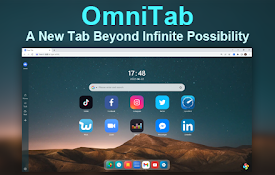
Turn every new tab into a calm workspace for tabs, bookmarks, history, shortcuts, search, and local usage insights.
Pomelo Tab turns Chrome's new-tab page into a focused browser workspace. Keep the things you use every day close at hand: • See open tabs grouped by website, then open, focus, or close them. • Find bookmarks and recent history without leaving the new tab. • Create up to eight Quick Access shortcuts with compact site icons. • Search Google, enter a URL, or search across tabs, bookmarks, history, and shortcuts. • Review locally calculated site-usage insights for 7 days, 30 days, or all time. • Choose a light or dark appearance and add an optional greeting name. Privacy is part of the product. Pomelo Tab asks before reading browser data. Tabs, bookmarks, history, shortcuts, preferences, and usage insights are processed locally and stored in Chrome on your device. They are not transmitted to the publisher, sold, or used for advertising. Access can be paused and locally stored usage insights can be cleared from Settings. Pomelo Tab has no account, cloud sync, analytics SDK, advertising, or remotely hosted code.
Details
- Version1.0.2
- UpdatedSeptember 12, 2026
- Offered byminhangwang1994
- Size57.47KiB
- Languages2 languages
- Developer
Email
minhangwang1994@gmail.com - Non-traderThis developer has not identified itself as a trader. For consumers in the European Union, please note that consumer rights do not apply to contracts between you and this developer.
Privacy

Pomelo Tab has disclosed the following information regarding the collection and usage of your data. More detailed information can be found in the developer's privacy policy.
Pomelo Tab handles the following:
This developer declares that your data is
- Not being sold to third parties, outside of the approved use cases
- Not being used or transferred for purposes that are unrelated to the item's core functionality
- Not being used or transferred to determine creditworthiness or for lending purposes