


Overview
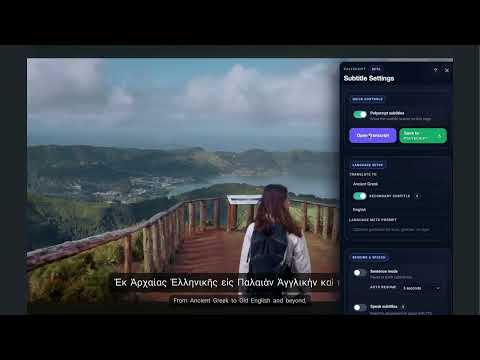
Dual subtitles + natural AI translation on YouTube, Netflix, Disney+ & more. Learn any language — even Ancient Greek — by watching.
Learn a language by watching what you already love. Polyscript — Language Learning with Dual Subtitles Turn the videos you already watch into language practice. Polyscript adds interactive dual subtitles to the streaming sites you use every day: see the original line and your translation together, tap any word for meaning and pronunciation, and save vocabulary to review later on web, mobile, or your watch. • Dual subtitles with word-by-word readings (pinyin, romaji, and other scripts) • Tap-to-translate any word, with dictionary and pronunciation • Save words while you watch; review them anywhere with Polyscript • Automatic translation routing for 100+ languages • Works with the major streaming platforms' built-in subtitles Learn from real shows, at your pace, without leaving the player. ━━━━━━━━━━━━━━ 🎬 DUAL SUBTITLES ON EVERYTHING YOU WATCH See the original line and your translation together, styled your way — font size, position, and languages switchable mid-episode. When a platform already has subtitles in your language, Polyscript uses them automatically for perfect accuracy. 🗣️ HEAR YOURSELF SPEAK FLUENTLY — BEFORE YOU CAN Polyscript clones your voice and speaks any subtitle line with it, in perfect accent and rhythm. Then Shadow Coach hands you the mic: repeat the line and close the gap between you and the fluent you. That's not sci-fi — that's your daily practice loop. 📜 LIVE TRANSCRIPT, ALWAYS IN SYNC A scrolling transcript follows every line of dialogue. Missed something? It's right there. Never lose your place again. 🔤 HARD SCRIPTS, MADE READABLE Pinyin over Chinese. Romaji over Japanese. Romanization for Korean, transliteration for Sanskrit and beyond — with smart word segmentation so you can see where words begin and end. 📖 TAP ANY WORD Click a word in the subtitle for an instant dictionary and grammar breakdown — yes, even Latin and Ancient Greek morphology. 🏛️ LANGUAGES NO ONE ELSE SUPPORTS Hundreds of modern languages — plus the ones mainstream platforms ignore: Ancient Greek, Classical Latin, Sanskrit, Biblical Hebrew, Classical Arabic, Classical Chinese, Old English, Old Norse, Gothic, Aramaic, Sumerian, Akkadian. Watch a thriller in Latin. Seriously. ✂️ CLIP IT, CAST IT Turn any line into a shareable clip, or cast your session straight to the TV. 📌 SAVE THE MOMENT, STUDY ANYWHERE Bookmark a scene on your laptop, pick it up on your phone. Your vocab, settings, and progress follow you on every device with one Polyscript account.
5 out of 51 rating
Details
- Version1.104.1082
- UpdatedJuly 15, 2026
- Size7.41MiB
- LanguagesEnglish (United States)
- Developer
- Non-traderThis developer has not identified itself as a trader. For consumers in the European Union, please note that consumer rights do not apply to contracts between you and this developer.
Privacy

Polyscript has disclosed the following information regarding the collection and usage of your data. More detailed information can be found in the developer's privacy policy.
Polyscript handles the following:
This developer declares that your data is
- Not being sold to third parties, outside of the approved use cases
- Not being used or transferred for purposes that are unrelated to the item's core functionality
- Not being used or transferred to determine creditworthiness or for lending purposes
Support
For help with questions, suggestions, or problems, visit the developer's support site