


Overview
Fast bulk buying on Path of Exile trade: see who sells the most of what you need and buy in one click. Travel to Hideout again.
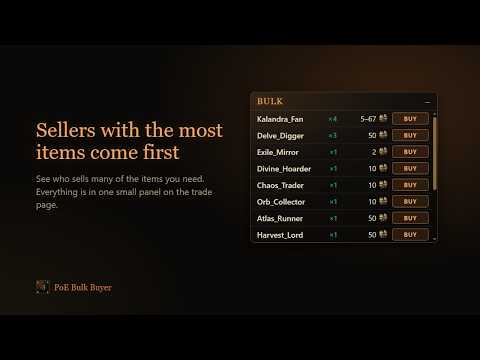
PoE Bulk Buyer is a fast trade tool for the Path of Exile trade site (pathofexile.com/trade). Buy in bulk from the right seller in one click, instead of whispering ten players for ten items. For every unique item it also shows how much Thaumaturgic Dust it gives when you disenchant it, its drop tier, where it drops and which divination cards give it. And with one click you can add any mod to your search or exclude it, and pick the mod tier. Features • Travel to Hideout again: teleport to the same seller as many times as you need, even after the trade site disables its own button. • Bulk buy panel: groups PoE trade results by seller. Sellers with the most items you need are at the top, with item count and price range. • One-click Buy: instantly presses Travel to Hideout (instant buyout) or Direct Whisper on the seller's cheapest item. • Clear Buy result: a green check when the trade request went through, red with the reason when it failed, for example "not in game". • Disenchant dust: under the price of every unique item you see how much Thaumaturgic Dust Rog in Kingsmarch gives for it. The number in brackets is the dust with 20% quality. Hover the line to see how it is counted. • Drop tier and source: in the header of every unique item you see its drop tier, from T0 (the rarest) to T5 (the most common), and where it drops: global drop, a boss or a league mechanic. Foulborn, vestigial and foil versions show their own source. Hover for details. • Divination cards: on the left of the header you see the divination cards you can exchange for this unique, with the number of cards in a set. Stars mark a random reward, a corrupted item or a Foulborn version. Hover a card to see its name and reward. • Add or exclude a mod: hover a mod in the search results and press + to add it to your search filters, or − to hide items with this mod. Press again to remove it. Then press Search. • Tier picker: a T button next to every mod filter shows all tiers of the mod with item level and values. Click a tier to put its value into the filter. • Mods for your base: if you took the mod from an item, you see the tiers for that item's base only, for example armour mods for a Strength base. Mod names are in the site's language. • Contacted sellers are marked, so you always know who you already wrote to. • Seller details: click a name to see all their items and prices, click a price to jump to the listing. • Panel size: make the panel bigger or smaller, from 50% to 200%, and go back to 100% in one click. • Works on every PoE trade language: English, Russian, German, French, Spanish, Portuguese, Thai and Japanese. • Free, no ads, no account.
5 out of 55 ratings
Details
- Version0.6.0
- UpdatedNovember 25, 2026
- Size1.04MiB
- LanguagesEnglish
- DeveloperWebsite
Email
admin@evgen.blog - Non-traderThis developer has not identified itself as a trader. For consumers in the European Union, please note that consumer rights do not apply to contracts between you and this developer.
Privacy

PoE Bulk Buyer has disclosed the following information regarding the collection and usage of your data. More detailed information can be found in the developer's privacy policy.
PoE Bulk Buyer handles the following:
This developer declares that your data is
- Not being sold to third parties, outside of the approved use cases
- Not being used or transferred for purposes that are unrelated to the item's core functionality
- Not being used or transferred to determine creditworthiness or for lending purposes
Support
For help with questions, suggestions, or problems, please open this page on your desktop browser