


Overview
Create interactive step-by-step simulation tutorials for any web application
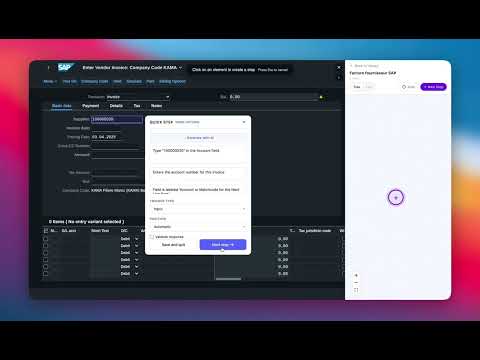
Ederest Creator — Build interactive step-by-step walkthroughs for any web application, no coding required. Ederest Creator lets you create guided practice sessions that walk users through real workflows inside any web app. Simply click on elements, add instructions, and publish — your team can then follow the walkthrough directly on the live application. ━━━━━━━━━━━━━━━━━━━━━━━━━━━━━━ HOW IT WORKS 1. Open Ederest Creator from the Chrome toolbar. 2. Click "New Tutorial" and give it a title and description. 3. Hit "New Step" — hover over any element on the page and click to select it. 4. The extension automatically captures a screenshot, detects the element type (button, input, dropdown, checkbox, etc.), and generates a unique selector. 5. Add an instruction, context ("Why this matters"), and an optional hint. 6. Save and repeat for each step, or let AI generate the instructions for you. 7. Publish your walkthrough and share it with your team via Ederest DAP. ━━━━━━━━━━━━━━━━━━━━━━━━━━━━━━ KEY FEATURES ● Point-and-click element selection No need to write CSS selectors or XPaths — just click on the element you want learners to interact with. ● Auto-pilot mode Turn on auto-pilot and simply use the application naturally. Ederest Creator records every click and input as a step, building your walkthrough as you go. ● AI-powered content generation Automatically generate clear, contextual instructions based on the element, the page screenshot, and your tutorial description. Supports multiple languages. ● Smart element detection Automatically identifies whether an element is a button, input field, dropdown, checkbox, toggle, link, tab, radio button, or select menu — and adjusts the step behavior accordingly. ● Response validation For input fields, dropdowns, checkboxes, and radio buttons, define correct answers. Learners get real-time feedback during practice — including advanced validation with format checks, ranges, and custom rules. ● Branching walkthroughs Create non-linear flows with conditional paths. For example: "If the user selects Option A, go to Step 3a. If Option B, go to Step 3b." Visualize the full flow as an interactive tree diagram. ● Tree and List views Switch between a visual DAG (directed acyclic graph) view and a simple sequential list to organize your steps. ● Multi-language support Create walkthroughs in English, French, Arabic, Spanish, or German. AI-generated content respects your language choice. ● Screenshot capture Every step includes an automatic screenshot of the page at the moment of capture, providing visual context for learners. ● Tooltip positioning Choose where the instruction tooltip appears relative to the selected element — top, bottom, left, right, or automatic. ● Organization management Manage walkthroughs across multiple organizations. Each team member sees only the content relevant to their org. ● Publish and update Publish your walkthrough when it's ready. Update steps and re-publish at any time to keep content current. ━━━━━━━━━━━━━━━━━━━━━━━━━━━━━━ WHO IS THIS FOR? • Training teams building onboarding flows for internal tools • SaaS companies creating interactive product walkthroughs • Customer success teams helping users learn complex workflows • Documentation teams replacing static guides with hands-on practice • Anyone who needs to teach someone how to use a web application ━━━━━━━━━━━━━━━━━━━━━━━━━━━━━━ WORKS WITH EDEREST DAP Once published, your walkthroughs become available in the companion extension, Ederest DAP. Learners follow the steps directly on the live web application, with guided tooltips and real-time validation at every step. ━━━━━━━━━━━━━━━━━━━━━━━━━━━━━━ PRIVACY & PERMISSIONS Ederest Creator requires the following permissions: • Active Tab: To capture screenshots of the current page during walkthrough creation. • Storage: To securely store your authentication session locally. • Tabs: To identify the current page URL for each walkthrough step. • Scripting: To inject the element selection overlay onto web pages during editing. • Host Permissions (all URLs): To work on any web application you want to create walkthroughs for. No data is collected or shared with third parties. Screenshots and element data are sent only to your Ederest account's API for storage. Privacy Policy: https://ederest.com/en/privacy-policy ━━━━━━━━━━━━━━━━━━━━━━━━━━━━━━ GET STARTED 1. Install the extension. 2. Click the Ederest Creator icon in your toolbar. 3. Log in with your Ederest account. 4. Select your organization. 5. Create your first walkthrough. Turn any web application into an interactive training ground — no code, no complexity, just click and teach.
0 out of 5No ratings
Details
- Version1.0.29
- UpdatedOctober 6, 2026
- Size214KiB
- LanguagesEnglish
- DeveloperWebsite
Email
saad.lachhab15@gmail.com - Non-traderThis developer has not identified itself as a trader. For consumers in the European Union, please note that consumer rights do not apply to contracts between you and this developer.
Privacy

Ederest Creator has disclosed the following information regarding the collection and usage of your data. More detailed information can be found in the developer's privacy policy.
Ederest Creator handles the following:
This developer declares that your data is
- Not being sold to third parties, outside of the approved use cases
- Not being used or transferred for purposes that are unrelated to the item's core functionality
- Not being used or transferred to determine creditworthiness or for lending purposes
Support
For help with questions, suggestions, or problems, visit the developer's support site