

Plume - Bandcamp Player Enhancer
5 ratings
)
Overview
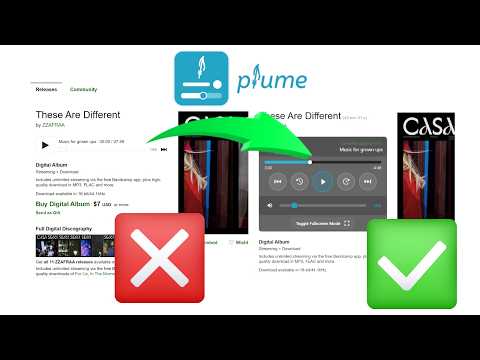
Bandcamp extension: volume slider, hotkeys, loop modes, fullscreen mode, playback speed, waveform progress bar & beat visualizer.
Plume is a free, lightweight browser extension that replaces the default Bandcamp audio player with a modern, feature-rich alternative. Plume makes listening to music on Bandcamp dramatically better. 🎵 CORE IMPROVEMENTS • Volume Slider — Finally, a visible volume control on Bandcamp. A mute button is also present. Your volume preference is saved automatically and restored on every page. • Click-to-Seek Progress Bar — Click or drag anywhere on the progress bar to jump to that point in the track. No more guessing. • Configurable Skip — Rewind or fast-forward by a custom duration (default 10 s). • Playback Speed — Choose from preset speeds (0.5×, 1×, 1.5×, 2×, 3×) or enter a custom value. A live badge shows the active multiplier at a glance. • Looping Modes — Enable smooth track/collection replay. • Tracklist Dropdown — Browse a collection's tracks from the header. A link button next to the title opens the current track's Bandcamp page. • Track Skip & Restart — Navigate between tracks on album pages. The previous track button restarts the current track within a configurable threshold. • Runtime Display — See the total album runtime at a glance. Toggle between elapsed time and remaining time. ✨ QUALITY OF LIFE • Waveform Progress Bar — The progress bar renders the audio waveform for the track, making the song structure visible at a glance (toggleable). • Fullscreen Mode — Press F or click the fullscreen button to enjoy an immersive listening view with album art and track info. • Customizable Hotkeys — Space (play/pause), arrows (seek/volume), 0–9 (seek), L (loop), M (mute), F (fullscreen), PageUp/PageDown (previous/next track). Supports modifier keys (Ctrl, Alt, Shift). • Playback Settings — Fine-tune the seek hotkey step, volume hotkey step, and track restart threshold from the popup panel. • BPM Detection — Detects and displays the live tempo of each track, with per-track badges in the tracklist. • Beat Visualizer — A BPM-driven canvas animation plays in the fullscreen view in sync with the music's tempo (toggleable). • Multi-Language — Available in English, French, Spanish, Italian, Brazilian Portuguese, Romanian, and Russian. • Feature Flags — Toggle individual features on or off from the popup panel. • Accessible Player — Bandcamp is sadly not accessible to impaired users... Plume was designed to pair seamlessly with NVDA. 🔧 HOW IT WORKS Install Plume, then visit any Bandcamp album or track page. The extension automatically replaces the original player with the enhanced Plume player. Your preferences (volume, time display mode) are saved in your browser and persist across sessions. No more worries about scrolling down too, the player sticks to the top of the window. ✅ COMPATIBILITY Works on Chrome, Firefox, Edge, and all Chromium- and Firefox-based browsers. Built with Manifest V3 for modern security and performance standards. 💬 SUPPORT Found a bug or have a feature idea? Open an issue on GitHub: https://github.com/QuentindiMeo/BC-Plume/issues Plume is open-source (MIT license) and has zero external dependencies.
4.8 out of 55 ratings
Details
- Version1.13.0
- UpdatedMay 15, 2026
- Offered byQuentin DI MEO
- Size244KiB
- Languages7 languages
- Developer
Email
q.dimeo@outlook.com - Non-traderThis developer has not identified itself as a trader. For consumers in the European Union, please note that consumer rights do not apply to contracts between you and this developer.
Privacy

Plume - Bandcamp Player Enhancer has disclosed the following information regarding the collection and usage of your data. More detailed information can be found in the developer's privacy policy.
Plume - Bandcamp Player Enhancer handles the following:
This developer declares that your data is
- Not being sold to third parties, outside of the approved use cases
- Not being used or transferred for purposes that are unrelated to the item's core functionality
- Not being used or transferred to determine creditworthiness or for lending purposes
Support
For help with questions, suggestions, or problems, please open this page on your desktop browser