

PlotSet – Turn Images & Text into Interactive Charts with AI
7 valoraciones
)
Descripción general
Use AI to extract structured data from images and text, then instantly recreate interactive charts and maps.
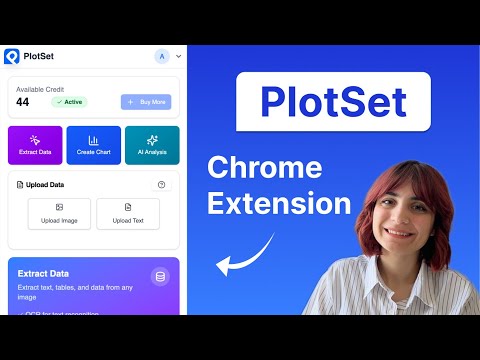
Elevate your data visualization workflow directly in Chrome with PlotSet’s powerful extension. With just a few clicks, extract numerical data from images, charts, maps, graphs, tables, or text selections and instantly convert them into beautiful, interactive charts and maps. Key Features: 🔍 Instant Data Extraction Extract data from images (JPG, JPEG, PNG, WEBP) with PlotSet AI. Pull structured data from text selections on any webpage Upload image or text files directly for processing Right-click context menu integration for seamless workflow 📊 Powerful Data Visualization Generate professional-quality charts and graphs instantly Download extracted data as CSV files for further analysis Customize visualizations within PlotSet workspace to match your needs Share results easily with colleagues. 🚀 Seamless Integration Works on any website with a simple right-click Convenient browser toolbar button for quick access Google account integration for secure login Lightweight design that won't slow down your browsing 💼 Perfect For: Data analysts needing to quickly reverse images of charts and maps. Students extracting data from research papers Business professionals preparing reports Researchers compiling data from multiple sources Anyone who needs to transform visual data into usable formats 🔒 Privacy & Security Your data remains private and secure Processing happens on our secure servers No data is stored without your permission Secure authentication through Google Avoid manual data entry and focus on what matters - analyzing and presenting your data effectively. Whether you're a student, researcher, data analyst, or business professional, PlotSet streamlines your workflow by eliminating tedious data extraction tasks. Try PlotSet today and experience the future of data extraction and visualization! How to Use: Right-click on any image containing data (chart, graph, table) and select "Extract data from image" Select text containing data and right-click to choose "Extract data from text" Or click the PlotSet extension icon to upload files directly View your extracted data and generated visualization instantly Download as CSV or share your results Technical Requirements: Works with Chrome browser version 88 or higher Requires internet connection for AI processing Supports JPG, JPEG, PNG, and WEBP image formats Text extraction works with any selectable text on webpages Transform the way you work with data - Install PlotSet now!
5 de 57 valoraciones
Detalles
- Versión2.1.2
- Actualizado7 de junio de 2025
- Ofrecido porPlotSet
- Tamaño189KiB
- IdiomasEnglish
- DesarrolladorPlotSet
1281 Lawrence Station Rd Sunnyvale, CA 94089-2292 USCorreo electrónico
hello@plotset.com - No operadorEste desarrollador no se ha identificado como operador. Los consumidores residentes en la Unión Europea deben tener en cuenta que los derechos de los consumidores no son aplicables a los contratos que suscriban con este desarrollador.
Privacidad

PlotSet – Turn Images & Text into Interactive Charts with AI ha revelado la siguiente información sobre la recogida y el uso de tus datos. Puedes consultar información más detallada en la privacy policy del desarrollador.
PlotSet – Turn Images & Text into Interactive Charts with AI gestiona lo siguiente:
Este desarrollador declara que tus datos:
- No se venden a terceros, excepto en los casos de uso aprobados
- No se usan ni se transfieren para fines no relacionados con la función principal del elemento.
- No se usan ni se transfieren para determinar la situación crediticia ni para ofrecer préstamos.
Ayuda
Si tienes alguna pregunta, sugerencia o problema, visita el sitio de asistencia del desarrollador.