

Playwright Stud
5 ratings
)
Overview
Record, save and run Playwright tests in Chrome, audit any site for defects
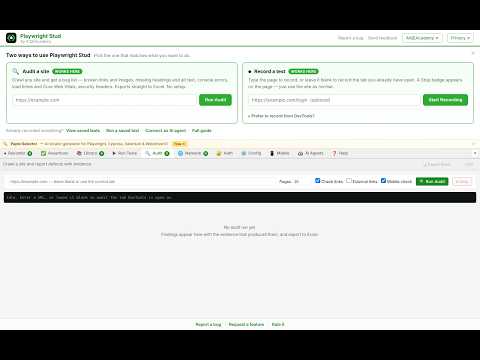
🎭 Playwright Studio by AIQEAcademy The only Chrome extension that lets you record, save, and run Playwright browser tests directly inside Chrome — with zero setup, zero downloads, and zero terminal commands needed. Built by AIQEAcademy (aiqeacademy.onrender.com) — the AI Quality Engineering Academy. ━━━━━━━━━━━━━━━━━━━━━━━━━━━━━━━━━━━━ 🔍 AUDIT — Find bugs on any website ━━━━━━━━━━━━━━━━━━━━━━━━━━━━━━━━━━━━ Paste a URL. Click Run Audit. Get a bug list with evidence. Playwright Stud crawls the site in a real Chrome tab — after JavaScript has rendered — so it reports what it actually observed, not what a static scanner guesses from source code. WHAT IT CHECKS • Functional — broken links, broken images, failed requests (4xx/5xx), JavaScript console errors, and pages showing "no results found" while a counter on the same page claims records exist • Accessibility — missing alt text, missing or duplicate H1, skipped heading levels, unlabelled form fields, buttons with no accessible name, vague "Read more" links, missing lang attribute • Performance — real measurements, not estimates: TTFB, load time, Largest Contentful Paint, Cumulative Layout Shift, request count, page weight, images served larger than they display • Visual — horizontal overflow at mobile width (375px), layout shift • SEO — missing meta descriptions, title length, canonical tags, viewport • Security — missing HSTS / CSP / X-Frame-Options headers, mixed content, target="_blank" without rel="noopener", exposed email addresses EVERY FINDING SHOWS ITS EVIDENCE Not "accessibility issue" — the exact element, the measured number, the page it was found on, what was expected, and how to fix it. Hand a finding straight to a developer without re-investigating it. WATCH IT WORK A live table fills in as it crawls — each page with its findings, TTFB, load time and LCP. Reports are saved, so closing DevTools or restarting Chrome never loses your results. EXPORT TO EXCEL One click produces an .xlsx with three sheets: • Summary — site, pages crawled, counts by severity and type • Findings — ID, severity, type, issue, evidence, expected, how to fix, page, plus Status and Owner columns ready for triage • Pages crawled — per-page TTFB, load, LCP, CLS, requests, images, links CSV export too, for Jira or Google Sheets. Re-run after each release and compare: a finding that disappears is fixed, a new one is a regression. Zero setup. No CLI, no Lighthouse install, no CI pipeline. ━━━━━━━━━━━━━━━━━━━━━━━━━━━━━━━━━━━━ ⏺ RECORD — Automatic Test Capture ━━━━━━━━━━━━━━━━━━━━━━━━━━━━━━━━━━━━ Click "Start Recording" and interact with any website. Every click, keystroke, form fill, dropdown selection, and navigation is captured automatically and converted into production-ready Playwright test code using the exact same locator strategies Playwright recommends: - getByTestId() for data-testid attributes - getByRole() for semantic ARIA roles - getByLabel() for form labels - getByPlaceholder() for input placeholders - getByText() for visible text - Smart CSS fallbacks Non-interactive elements (divs, spans, containers) are automatically skipped. ━━━━━━━━━━━━━━━━━━━━━━━━━━━━━━━━━━━━ ✅ ASSERT — 30+ Playwright Assertions ━━━━━━━━━━━━━━━━━━━━━━━━━━━━━━━━━━━━ Build assertions visually without writing code. The Assertion Builder lets you: - Auto-detect URL, title, H1, form presence from the current page - Choose from 30+ Playwright expect() assertions grouped by category: - Visibility: toBeVisible(), toBeHidden(), toBeAttached(), toBeInViewport() - State: toBeEnabled(), toBeChecked(), toBeEditable(), toBeFocused() - Text: toHaveText(), toContainText(), toHaveInnerText() - Values: toHaveValue(), toHaveValues() for multi-select - Attributes: toHaveAttribute(), toHaveCSS(), toHaveRole(), toHaveAccessibleName() - Count: toHaveCount(), count >= N - Visual: toHaveScreenshot() - Add selected assertions directly to any saved test with one click ━━━━━━━━━━━━━━━━━━━━━━━━━━━━━━━━━━━━ ▶ RUN — Tests Execute Right in Chrome ━━━━━━━━━━━━━━━━━━━━━━━━━━━━━━━━━━━━ No Node.js. No terminal. No Playwright installation required. Click ▶ Run Test and watch: - A new Chrome tab opens and navigates to your app - Each element is highlighted with a green glow before being acted on - Text is typed character-by-character so you can see it happen - A live terminal panel shows every step as it executes - Pass ✅ or Fail ❌ reported in real time Speed controls: Slow / Normal / Fast Self-healing: When locators break after UI changes, the runner automatically tries 8 fallback strategies (role+name, placeholder, aria-label, data attributes, text, etc.) ━━━━━━━━━━━━━━━━━━━━━━━━━━━━━━━━━━━━ 📚 TEST LIBRARY — Manage Your Suite ━━━━━━━━━━━━━━━━━━━━━━━━━━━━━━━━━━━━ Every saved test appears as a card with: - ▶ Run — execute immediately - ✏️ Edit — full inline editor: rename, add/delete/reorder actions, live code preview - ↩ Load — reload into Recorder for re-recording - 💾 Download — get a .spec.ts file to use with Playwright CLI - Pass/Fail badge from the last run ━━━━━━━━━━━━━━━━━━━━━━━━━━━━━━━━━━━━ 🌐 NETWORK MOCK STUDIO ━━━━━━━━━━━━━━━━━━━━━━━━━━━━━━━━━━━━ Record XHR and Fetch requests while you browse, then generate instant page.route() mock code. Switch scenarios: Success, Error 500, Timeout, or Abort. Export all mocks as a .spec.ts in one click. ━━━━━━━━━━━━━━━━━━━━━━━━━━━━━━━━━━━━ 🔐 AUTH STATE EXPORTER ━━━━━━━━━━━━━━━━━━━━━━━━━━━━━━━━━━━━ Log into your app, click Capture, download a Playwright storageState.json. Reuse it in all your tests to skip login every time. ━━━━━━━━━━━━━━━━━━━━━━━━━━━━━━━━━━━━ ⚙️ CONFIG GENERATOR ━━━━━━━━━━━━━━━━━━━━━━━━━━━━━━━━━━━━ Auto-detects base URL, viewport, locale and timezone from the current page. Configure browsers, timeouts, reporters, and trace settings. Generates a complete playwright.config.ts. ━━━━━━━━━━━━━━━━━━━━━━━━━━━━━━━━━━━━ 🔒 PRIVACY — 100% LOCAL ━━━━━━━━━━━━━━━━━━━━━━━━━━━━━━━━━━━━ - Zero data collection — nothing leaves your browser - No analytics, no tracking, no third-party services - All tests stored locally in chrome.storage.local - Uninstall removes everything ━━━━━━━━━━━━━━━━━━━━━━━━━━━━━━━━━━━━ 👨💻 PERFECT FOR ━━━━━━━━━━━━━━━━━━━━━━━━━━━━━━━━━━━━ - QA Engineers learning Playwright - SDETs who want faster test authoring - Developers writing smoke tests without a test framework setup - Teams adopting test automation for the first time From AIQEAcademy — training the next generation of AI Quality Engineers. 🔗 aiqeacademy.onrender.com
5 out of 55 ratings
Details
- Version2.5.7
- UpdatedNovember 18, 2026
- Offered bySrkanpu
- Size264KiB
- LanguagesEnglish
- Developer
Email
srkanpu@gmail.com - Non-traderThis developer has not identified itself as a trader. For consumers in the European Union, please note that consumer rights do not apply to contracts between you and this developer.
Privacy

This developer declares that your data is
- Not being sold to third parties, outside of the approved use cases
- Not being used or transferred for purposes that are unrelated to the item's core functionality
- Not being used or transferred to determine creditworthiness or for lending purposes
Support
For help with questions, suggestions, or problems, please open this page on your desktop browser