

Playwright Recorder
1 rating
)
Overview
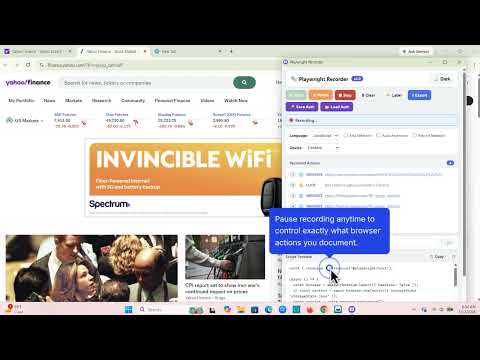
Record browser actions and generate Playwright test scripts in JavaScript, TypeScript, Python, Java, and C# (.NET).
Playwright Recorder - Test Automation Made Simple Playwright Recorder is a powerful Chrome extension that allows you to record browser interactions and automatically generate Playwright test scripts in JavaScript, TypeScript, Python, Java, and C# (.NET). It is perfect for QA engineers, developers, and automation testers who want to create reliable automated tests without writing code manually. 𝗞𝗲𝘆 𝗙𝗲𝗮𝘁𝘂𝗿𝗲𝘀 🆕 NEW in v4.0: Hover, Key Press & Scroll Recording, Double-Click & Right-Click, File Upload, Smart Navigation Wrapping, Click-to-Assert Builder, Inline Step Editor & Tailwind Selector Fix 🖱️ Hover Recording — Captures mouseover interactions on interactive elements with smart 400ms debounce to avoid noise. 🔑 Key Press Recording — Records meaningful keyboard events: Enter, Tab, Escape, arrow keys, and all F1–F12 function keys. 📜 Scroll Recording — Tracks scroll wheel actions with delta accumulation, generating page.mouse.wheel() calls for precise scroll tests. 👆👆 Double-Click & Right-Click — Records dblclick and right-click (context menu) interactions across all 5 languages. 📎 File Upload Recording — Captures <input type="file"> interactions and generates page.setInputFiles() with the selected filenames. 🔀 Smart Navigation Wrapping — Automatically detects when a click triggers a page navigation and wraps it in Promise.all([page.waitForURL(), page.click()]) so tests don't race. Works in all 5 languages. ✅ Click-to-Assert Builder — Hit the Assert button, click any element, and get an instant expect() assertion — toHaveText, toHaveValue, or toBeVisible chosen automatically. ✏️ Inline Step Editor — Double-click any recorded step's details to edit it in-place. Press Enter to save, Escape to cancel. 🆕 NEW in v3.0: Dark Mode, Pause/Resume Recording, Step Labels, Auto-Assertions, Per-Action Delete, Copy to Clipboard & Toast Notifications • 🌙 Dark Mode - Toggle between light and dark themes with your preference saved between sessions. • ⏸ Pause & Resume - Pause recording mid-session to handle popups or manual steps, then resume without losing any recorded actions. • 🏷️ Step Labels - Insert named markers between actions (e.g. "Login flow", "Fill form"). Labels appear as readable comments in the generated script. • ✅ Auto-Assertions - Automatically inserts URL assertions after every navigation step so your tests validate page state with zero extra work. • 🗑 Per-Action Delete - Hover over any recorded action and click × to remove it individually. No need to clear everything and re-record. • 📋 Copy to Clipboard - Copy the generated script instantly without exporting to a file first. • 🔔 Toast Notifications - Real-time feedback for every action — recording started, action removed, script copied, export complete. • Multi-Language Support - Generate test scripts in JavaScript, TypeScript, Python, Java, or C# (.NET) with a simple dropdown selection. • Session Persistence - Save authentication state (cookies + localStorage) to skip login flows. Load saved states to instantly authenticate in tests without repeating login steps. • Network Recording - Capture HTTP requests and automatically generate page.route() mocks. Perfect for testing without hitting real APIs or creating deterministic tests. • ARIA Selectors - Generate accessibility-first selectors using getByRole() and ARIA attributes. These selectors are more resilient to UI changes and improve test stability. • Mobile Emulation - Select from popular devices (iPhone, iPad, Pixel) to generate tests with proper viewport and user agent configuration for mobile testing. • One-Click Recording - Start recording your browser actions with a single click. • Accurate Selectors - Automatically generates robust CSS selectors that work even when the page structure changes. • Multi-Tab Support - Records actions across different tabs and windows. • Navigation Tracking - Captures all page navigations and URL changes automatically. • Real-Time Preview - See your Playwright script generated in real-time as you interact with web pages. • Custom Filename - Name your test scripts with the correct file extension automatically applied. • Resizable Interface - Adjust the panels to focus on either recorded actions or generated code. • Export Ready Scripts - Download complete, ready-to-run Playwright scripts with proper syntax. 𝗛𝗼𝘄 𝘁𝗼 𝗨𝘀𝗲 • Install the extension and click on its icon in your Chrome toolbar. • Open the recorder window by clicking "Open Recorder." • Select your preferred programming language (JavaScript, TypeScript, Python, Java, or C# (.NET)). • (Optional) Toggle Dark Mode from the top-right for a comfortable recording environment. • (Optional) Save authentication state by clicking "Save Auth State" if your site requires login. • (Optional) Enable "Record Network" to capture API calls for mocking. • (Optional) Enable "Aria Selectors" for more resilient accessibility-based selectors. • (Optional) Enable "Auto Assertions" to auto-insert URL checks after every navigation. • (Optional) Select a mobile device from the "Device" dropdown for mobile testing. • Click the green "Start" button to begin recording. • Interact with your website normally by clicking links, filling forms, and navigating between pages. • Use Pause to temporarily stop capturing without losing recorded actions. • Add Labels to annotate sections of your test flow. • Delete any unwanted action with the × button on hover. • Stop recording when finished. • Copy the script directly or customize the filename and click Export. • Run the exported script using Playwright in your automation project. 𝗧𝗲𝗰𝗵𝗻𝗶𝗰𝗮𝗹 𝗗𝗲𝘁𝗮𝗶𝗹𝘀 Playwright Recorder generates scripts using the official Playwright API, making them compatible with any Playwright project. The scripts are ready to use without modifications and follow best practices for reliable automation. The extension works on any website without requiring any special configuration. It is designed to be lightweight and non-intrusive, ensuring your browsing experience is not affected. 𝗣𝗲𝗿𝗳𝗲𝗰𝘁 𝗙𝗼𝗿 • QA Engineers automating regression tests • Developers creating end-to-end tests • Product teams validating user journeys • Anyone looking to save time on test automation • Teams working with multiple programming languages • .NET developers building automated testing workflows 𝗘𝘅𝗮𝗺𝗽𝗹𝗲 𝗼𝗳 𝗚𝗲𝗻𝗲𝗿𝗮𝘁𝗲𝗱 𝗣𝗹𝗮𝘆𝘄𝗿𝗶𝗴𝗵𝘁 𝗧𝗲𝘀𝘁𝘀 The extension generates complete, runnable test scripts in your chosen language: JavaScript: Uses native Playwright JS API with async/await patterns TypeScript: Includes proper type annotations and error handling Python: Follows Python conventions with async Playwright API Java: Implements Java-specific Playwright patterns C# (.NET): Uses modern C# async/await with proper resource disposal These scripts include all recorded steps such as navigations, clicks, form inputs, and can be directly executed within any Playwright automation framework. 🚀 More Developer Tools by Ashish Sharda Building better software? Check out our other productivity tools: SecuriScan - Web Security Analyzer Find security vulnerabilities, check headers, analyze your web apps → https://chromewebstore.google.com/detail/securiscan-web-security-a/ngiloibpcojbjpkpkkohmliamfhmanm Vajra AI - AI Coding Assistant AI-powered code generation and testing for VS Code → https://marketplace.visualstudio.com/items?itemName=AshishSharda.vajra
5 out of 51 rating
Details
- Version4.0.0
- UpdatedJune 21, 2026
- Size60.45KiB
- LanguagesEnglish
- Developer
Email
ashishjsharda@gmail.com - Non-traderThis developer has not identified itself as a trader. For consumers in the European Union, please note that consumer rights do not apply to contracts between you and this developer.
Privacy

Playwright Recorder has disclosed the following information regarding the collection and usage of your data. More detailed information can be found in the developer's privacy policy.
Playwright Recorder handles the following:
This developer declares that your data is
- Not being sold to third parties, outside of the approved use cases
- Not being used or transferred for purposes that are unrelated to the item's core functionality
- Not being used or transferred to determine creditworthiness or for lending purposes
Support
For help with questions, suggestions, or problems, visit the developer's support site