


Overview
Organize any YouTube playlist. Search it, filter it, and split a huge Watch Later into clean playlists. All local, no sign-in.
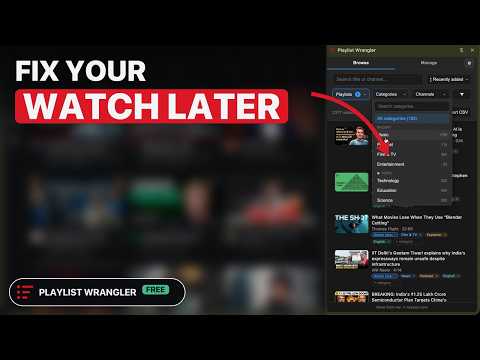
Playlist Wrangler organizes the YouTube playlists you already have. Scan a playlist once and every video in it is searchable, filterable, sorted into categories automatically, and ready to be moved, removed or played in bulk. Free, no sign-in, and the index stays in your browser. WHAT IT DOES Find • Search every video by title, across all the playlists you have scanned at once • Filter by category, channel, captions and language, and by length, age, views, likes and like rate on bars you tap or drag across • Tell Shorts from videos, and the songs YouTube Music will play from everything else • Sort by newest, oldest, longest, shortest, most liked, likes per view, or shuffle Sort automatically • Every video is filed by topic, music genre, film and TV genre, format, mood and language: 252 categories and 40 languages, worked out on your device • Nothing to label by hand, and not a paid upgrade • Add or remove categories of your own, on one video or a hundred at once Clean up • Filter by how much of each video you have watched, from never started to done • Mark videos unwatched in bulk, which clears the red progress bar • Find videos saved in more than one playlist • Select many, then add, move or remove them across playlists, with undo • Split one giant Watch Later into clean playlists Play • Play a filtered set from any row, or pick videos and play them in the order you picked • Play next and Add to queue, onto YouTube's real queue • Play your songs on YouTube Music • Send what you picked to your phone with a QR code, nothing to sign into there Save and keep • A + button on any thumbnail saves to any playlist, with a search across your whole library • Paste a list of links to import them into a playlist • Export any view to CSV • While the panel is open it keeps in step with YouTube: changes you make there show within a couple of minutes • Keep the title of a video YouTube deletes or makes private, and get a warning before a playlist hits the 5,000-video cap Private • No API key, no OAuth, no account: it reads YouTube through the session you are already signed into • Everything stays in your browser. It changes YouTube only when you ask: playlist edits with undo, likes, and Mark unwatched Works on Chrome, Edge and Brave as a side panel, Firefox as a sidebar, and Opera and Arc as a window of its own (experimental). Chrome is retiring its Featured badge in 2026: Google's own words are that it had become "a less meaningful signal" of quality, and developers are asked to rely on recent ratings instead. So a rating is what gets a small extension in front of the next person. If this one helps you, that is the most useful thing you can do for it. THE DETAILS, FOR ANYONE STILL READING WHY IT EXISTS You have fifty stand-up specials saved somewhere in your Watch Later. On a Friday night you cannot find one of them, so you scroll the home feed instead and end up watching something you did not choose. Playlist Wrangler sorts every video you have already saved into categories, automatically. When you want to laugh, you click Comedy, and there are your fifty specials. You do not have to change how you save. Keep dumping things into Watch Later and Liked the way you already do. The organizing is the part this does for you. HOW IT WORKS 1. Open the panel and Watch Later is scanned for you. Scan any other playlist, Liked videos included, from the panel's Manage tab or with "Scan this playlist" on its YouTube page. 2. Every video is read from the page you are already on, using the YouTube session you are already signed into. No sign-in of its own, no OAuth, no API key, no quota. 3. The side panel fills with your videos, already sorted, ready to search and filter. The first ones show in seconds and the rest arrive as they are read, and closing the panel does not stop the scan. The categories are worked out on your device from what each video says about itself. That means some will be off, which is a limit of guessing locally rather than a fault, and every one of them can be edited or removed by hand, in bulk if you like. Anything you set yourself is never overwritten. EACH FEATURE, IN DETAIL • Search across every video by title, instantly, spanning every playlist you have scanned. Accents and case do not matter, so cafe finds Café, and a category, channel or playlist your words name is offered as a filter. The video you saved eight months ago and cannot name is findable again. • Stack filters: topic, genre, mood, language, channel and captions. Length, age, views, likes and like rate are bars showing how your videos spread: tap one, or drag across several, gaps allowed. A set of filters can be saved as a view and opened again in one click. Each filter leads with the values still present in what you are looking at, so narrowing a big library never means scrolling past a hundred categories that cannot match. A video made by several channels is filed under all of them, so a collab is reachable from either artist. • Build a queue by hand and play it. Cmd-click (Ctrl on Windows) the videos you want, in the order you want them, and press Play. Each one shows its place in the running order as you pick it, and they play in exactly that order as a temporary playlist with autoplay. Nothing is saved and no playlist is edited, so an evening's watching costs you no cleanup. YouTube's temporary queue holds fifty videos, and anything past that is marked before you press Play rather than dropped quietly. • Split one giant list into clean, separate playlists in a couple of clicks. Filter to what belongs together, select the lot, and move them in a single step. A move is out of one named playlist into another, and its undo puts back only what the move changed. Categories go on a hundred videos at once and come off the same way. Every bulk add, remove, move, and category edit has a one-tap undo. • Save to any playlist without leaving the page. A small + button on any thumbnail, and under the video, reaches your whole library through a search box, with your recent destinations at the top. A tick marks what you have already saved, and clicking it takes the video back out. • See what you have actually watched, and undo it. Filter by how much of each video you have already got through, from never started up to watched, read from the red progress bar YouTube itself draws rather than guessed from the length of the video. And when that bar sits on something you meant to start again, select those videos and Mark unwatched clears it, the only way YouTube allows: by taking them out of your watch history, which is the same thing YouTube's own History page does one video at a time. It counts what it will touch before it asks, and it cannot be undone. • Play your songs on YouTube Music. The panel asks YouTube Music which of your videos it will play, rather than guessing from a title, marks each with a music note, and plays one or the whole list there. • Quick Ask. Summarize a video from its thumbnail or its row in the panel, without playing it, using YouTube's own built-in Ask AI, so there is nothing extra to sign into. Chapters come back with clickable timestamps that jump the player, and editable modes cover ELI5, key quotes, and "does it deliver?". It only works on accounts YouTube has given its Ask feature. • See how a video landed before you open it. The like-to-view percentage sits inline in YouTube's own byline, right after the view count, and every row in the panel carries likes, views, that ratio, length, and age. WHAT PEOPLE USE IT FOR • A thousand videos deep in Watch Later. Filter to your workout music, select it, and move it into its own playlist in one step. • Twenty minutes before bed. Filter Watch Later to short videos and actually clear a few. • A long drive tomorrow. Pull up every talk and podcast over an hour and queue them back to back. • Friends are over. Search your liked music for one mood and let it play straight through, like a station you built. • A commute that mixes languages. Music in one language on the way in, podcasts in another on the way back, each one filter away, including titles written in Latin letters rather than their own script. • Four thousand Liked videos from ten years of reflex clicking. It is the biggest archive you own and the least usable one. Scan it once and it has genres. THE CATEGORIES IT DETECTS Every video is filed automatically along six axes: topic, music genre, film and TV genre, format, mood, and language. That is 252 categories in all, and the music side is by far the deepest of them, because a liked-videos list is mostly music and "Music" on its own tells you nothing. The music side is also built for the whole of YouTube rather than one country's charts. Brazilian, African, Southeast Asian, Arab and South Asian music each have their own family of genres, weighted by where YouTube's audience actually is, so a Sertanejo track or a Tamil film song lands as precisely as a house track does. You type none of it in, and nothing leaves your machine to work it out. The detection reads the video's own title and channel, on your computer. Language is worked out alongside the rest, including titles written in Latin letters rather than their own script, so a Punjabi or Hindi track spelled out in English is still filed under its own language rather than under English. QUESTIONS PEOPLE ASK Can you search inside a YouTube playlist? Yes. YouTube gives you no search box inside a playlist. Playlist Wrangler scans the playlist once and then searches every title in it, across every playlist you have scanned at the same time. How do I find a video I saved in Watch Later? Search it by any word in the title, or filter by category, channel, length, or language until it is the only thing left. Both work across your whole scanned library at once, not one playlist at a time. How do I sort my Watch Later by category? Scan it, then open the Categories filter. Every video is already sorted into topics, genres, formats, moods, and languages, so filtering to one is a click. You do not label anything yourself. How do I see the genres of my liked videos on YouTube? Scan your Liked videos and every track lands in a music genre, with the language detected as well. It is the closest thing YouTube has to a genre view of what you have liked. How do I mark a YouTube video as unwatched, or get rid of the red progress bar? Select the videos in the panel and choose Mark unwatched. The red bar is drawn from your watch history, so the only way to clear it is to remove those videos from that history, and that is what this does — in bulk, rather than one video at a time on YouTube's History page. It only touches videos YouTube has recorded progress on, it tells you how many that is before you agree, and it cannot be undone, which it says before you click. How do I see what I have not watched yet in my Watch Later? Filter by progress. Its bars run from never started to done, and you can pick any stretch of them. It is read from YouTube's own progress marker, so it matches the red bars you already see, and it is how you pull the twenty things you genuinely have not started out of a pile of a thousand. How do I find videos I saved in two different playlists? Filter by how many playlists a video is saved in. Narrow to one playlist, ask for the videos that are in two or more, and what comes back is everything in that list that already lives somewhere else. It counts only playlists you have scanned, so it can miss an overlap but never invent one. Can I export my Watch Later to CSV? Yes. Any view, filtered or whole, exports to CSV, including titles, channels, categories, lengths, and stats. How do I clear out my Watch Later in bulk? Scan it, filter to what you are done with, or to everything, select all, and press Remove. Hundreds go at once, each batch is confirmed with YouTube, and there is an undo if you took out too much. Can I move or copy videos between playlists, or add a whole playlist to Watch Later? Yes. Scan a playlist, select the videos or the whole list, and choose Add or Move to any playlist you own, Watch Later included. It works past YouTube's roughly 100-video page, so long playlists move in full. Does it need my Google account or an API key? Neither. It reads the playlist from the page you are already on, using the session you are already signed into. There is no account to create, no OAuth screen, and no API quota to run out of. Does it organize my channel subscriptions? No. This is about the videos inside your playlists. If your problem is a crowded subscription feed rather than a pile of saved videos, this is not the tool for that job, and there are good extensions that are. Is it free? Yes. As of October 2026 it is free and ad-free, with no paid tier. The automatic categorization is part of the free extension. Managing a second YouTube account is a one-time unlock that asks for an email address and costs nothing. Will it change my playlists? Only when you ask it to. Adds, removes and moves are confirmed with YouTube, and each has an undo. Adding to or removing from Liked videos likes or un-likes the video, and Mark unwatched deletes its watch-history entry, with no undo. It never subscribes or comments. WHY IT IS DIFFERENT • Your library outlives YouTube's limits. A playlist stops at about 5,000 videos and refuses the next one, and Liked videos keeps only your most recent 5,000 in the list. A scanned playlist is kept locally and exports to CSV, so a list you spent years building is yours whatever YouTube does to it next. • One home for every playlist. A side panel spans all the playlists you have scanned, with the same video across lists merged into one row so duplicates are obvious. It handles multiple signed-in Google accounts too, following whichever one your YouTube tab is on. RECENTLY ADDED • Number filters you tap: length, age, views, likes, like rate and watch progress are bars, and any stretch of them is a filter. • Search ignores accents and offers your categories, channels and playlists as filters while you type. • A first scan shows videos in seconds and carries on when the panel closes. • Play on your phone: pick videos on your computer, scan the QR code, and they open on the phone. PRIVATE BY DESIGN Everything it scans lives in your browser's local storage, on your machine. There is no account to create, and your playlists, categories, and metadata never leave your device. Two things can leave, both on your terms: anonymous, content-free usage counts, which you can switch off in settings, and, only if you choose to give them, an email address for release notes, or a message you send through the feedback form. It changes YouTube only when you ask: playlist edits, likes through Liked videos, and Mark unwatched. It never subscribes or comments. WHAT IT DOES NOT DO It does not organize your channel subscriptions or your home feed. It does not download videos, block ads, or replace YouTube Premium. It cannot bring back a video that has been deleted or made private, though it will still show you the row so you know what you lost. It is an unofficial extension built on top of a site that changes without warning, so a YouTube redesign can break a feature until it is fixed. When something cannot be read, it is built to do nothing rather than break the page you are on. WORKS ON Google Chrome, Microsoft Edge and Brave, as a side panel, plus Firefox as a sidebar. It is a Manifest V3 extension. Opera and Arc have no side panel for extensions, so there it opens as a window of its own instead, which is experimental. Free and ad-free. Learn more at naxatar.com/products/playlist-wrangler. Note: "YouTube" is used only to indicate compatibility. Playlist Wrangler is not affiliated with, endorsed by, or sponsored by YouTube or Google.
4.5 out of 515 ratings
Details
- Version1.40.0
- UpdatedOctober 16, 2026
- Size358KiB
- LanguagesEnglish
- DeveloperWebsite
Email
hello@naxatar.com - Non-traderThis developer has not identified itself as a trader. For consumers in the European Union, please note that consumer rights do not apply to contracts between you and this developer.
Privacy

Playlist Wrangler: Manager for YouTube has disclosed the following information regarding the collection and usage of your data. More detailed information can be found in the developer's privacy policy.
Playlist Wrangler: Manager for YouTube handles the following:
This developer declares that your data is
- Not being sold to third parties, outside of the approved use cases
- Not being used or transferred for purposes that are unrelated to the item's core functionality
- Not being used or transferred to determine creditworthiness or for lending purposes
Support
For help with questions, suggestions, or problems, visit the developer's support site