


Overview
Chat in real-time with others watching the same YouTube or Rumble playlists.
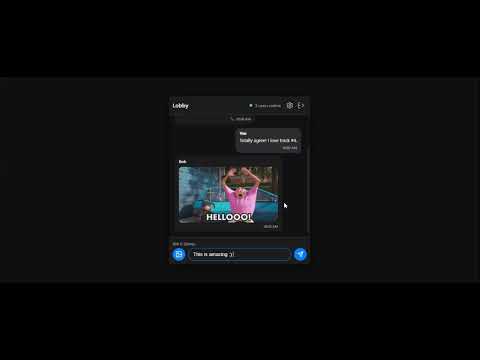
Playlist Chat adds a real-time chat room to every YouTube and Rumble playlist you watch. Open the side panel while browsing a playlist and you're instantly connected with everyone else watching the same content. Key Features: • Real-Time Chat: A live chat room appears in the side panel for every playlist. Talk with other viewers as you watch together. • Discovery Feed: Browse a personalized feed of playlist chatrooms, channels, and creators. Filter by language, category, or search to find communities you care about. • Multi-Platform Support: Works on both YouTube and Rumble playlists. • GIF & Emoji Support: Send GIFs via Giphy and use custom emojis to express yourself in chat. • Notifications: Get notified when someone messages you or mentions you in a chat room. • Buddy List & Private Messages: Add friends, send private messages, and manage group conversations. • Credits & Tips: Earn credits through the affiliate program and tip room owners to support their communities. • Premium Membership: Unlock additional features including AI message translation, voice-to-text, custom chat wallpapers, username glow effects, and video calls. • Affiliate Program: Share your referral link and earn recurring commissions when your invitees upgrade to Premium. • Bookmarks & Subscriptions: Save your favorite rooms and subscribe to channels for quick access. • Light & Dark Mode: Choose your preferred theme for comfortable viewing. • Multi-Language Support: Interface available in 16 languages. Filter the discovery feed by content language. How It Works: 1. Install the extension and sign in with your Google account. 2. Browse to any YouTube or Rumble playlist. 3. Click the big blue button and it will open the side panel to join the chat room for that playlist. 4. Or open the Discovery page to find and join chatrooms by interest. Playlist Chat turns passive playlist watching into a shared, social experience.
3.7 out of 53 ratings
Details
- Version0.45
- UpdatedOctober 22, 2026
- FeaturesOffers in-app purchases
- Size2.28MiB
- LanguagesEnglish
- DeveloperWebsite
Email
beukzgroup@outlook.com - Non-traderThis developer has not identified itself as a trader. For consumers in the European Union, please note that consumer rights do not apply to contracts between you and this developer.
Privacy

This developer declares that your data is
- Not being sold to third parties, outside of the approved use cases
- Not being used or transferred for purposes that are unrelated to the item's core functionality
- Not being used or transferred to determine creditworthiness or for lending purposes
Support
For help with questions, suggestions, or problems, please open this page on your desktop browser