

PlanYT - Youtube Playlist Planner & Progress Tracker

Overview
Transform any YouTube playlist into a structured learning plan with time estimates, progress tracking, and playback speed control.
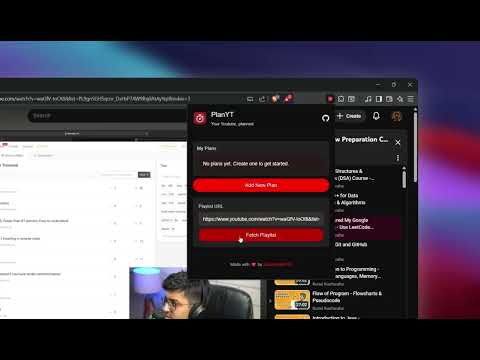
PlanYT: YouTube Playlist Planner & Progress Tracker Stop hoarding videos. Start finishing courses. PlanYT is a lightweight YouTube productivity tool that lives directly inside your browser. It transforms YouTube from a distraction-filled platform into a structured Learning Management System - without you ever leaving the site. Most "Watch Later" lists are where tutorials go to die. PlanYT changes that by injecting a native progress tracker and planner icon right into the YouTube interface. ───────────────────────────────── NEW IN v1.3 ───────────────────────────────── ▸ Per-Video Checkboxes Check off individual video segments inside each day. Finish all segments and the day auto-completes. Mark a whole day done and all segments check themselves. Full two-way sync. ▸ Playback Speed Support Watching at 1.5× or 2×? PlanYT now adjusts your plan to your actual watch speed. Set it once at plan creation with a snap-point slider matching YouTube's native options (0.25× to 2×). ▸ Two Planning Modes Video-by-Video: one video per day, zero time math. Custom Schedule: set a daily time budget, pick your speed, and PlanYT splits the playlist intelligently. ▸ Duplicate Widget Bug Fixed Navigation from the popup's playlist link no longer causes a duplicate progress widget on the YouTube sidebar. ───────────────────────────────── THE IN-YOUTUBE EXPERIENCE ───────────────────────────────── Unlike other productivity apps, PlanYT doesn't require a separate dashboard. - Injected Icon: A dedicated icon lives inside the YouTube playlist sidebar. - Native Feel: Open your plan, check off videos, and track completion while you watch. - Seamless Workflow: Feels like a Pro feature built by YouTube itself. ───────────────────────────────── WHY PLANYT IS DIFFERENT ───────────────────────────────── - Smart Study Planner: Turn 50-hour coding bootcamps or massive lecture series into realistic daily goals. - Granular Progress Tracking: Check individual video segments, not just whole days. PlanYT remembers exactly where you left off. - Speed-Aware Scheduling: Your plan reflects how you actually watch — not just raw video duration. - Daily Target Logic: Input your timeline and let PlanYT calculate exactly what you need to watch today. - Open Source & Privacy-First: No ads, no data tracking, no unnecessary permissions. Everything stored locally in your browser. - One-Click and Jump back into your last active playlist with a single click from the injected PlanYT menu. ───────────────────────────────── PERFECT FOR ───────────────────────────────── - Developers tackling a new framework or a 100 Days of Code series - Students organizing university lectures, exam prep, or SAT/GRE playlists - ADHD productivity — breaking overwhelming playlists into small daily wins - Self-taught learners turning YouTube into their personal university ───────────────────────────────── No Ads. No Bloat. Just your YouTube — Planned. PlanYT is open source and built for serious learners. Check out our GitHub to contribute or audit the code. Stop "Watching Later." Start finishing now.
5 out of 57 ratings
Details
- Version1.3.3
- UpdatedSeptember 4, 2026
- Size112KiB
- Languages47 languages
- DeveloperWebsite
Email
saaarthak.codes@gmail.com - Non-traderThis developer has not identified itself as a trader. For consumers in the European Union, please note that consumer rights do not apply to contracts between you and this developer.
Privacy

PlanYT - Youtube Playlist Planner & Progress Tracker has disclosed the following information regarding the collection and usage of your data. More detailed information can be found in the developer's privacy policy.
PlanYT - Youtube Playlist Planner & Progress Tracker handles the following:
This developer declares that your data is
- Not being sold to third parties, outside of the approved use cases
- Not being used or transferred for purposes that are unrelated to the item's core functionality
- Not being used or transferred to determine creditworthiness or for lending purposes
Support
For help with questions, suggestions, or problems, visit the developer's support site