

PlanWell Schedule
1 rating
)
Overview
Your PlanWell schedule, right in your browser.
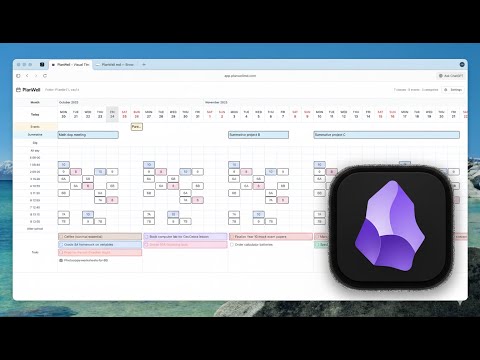
PlanWell Schedule brings your teacher planning workflow to Chrome and Edge browsers. This is a **companion extension** to the PlanWell planning application at planwellmd.com. ## WHAT IS PLANWELL? PlanWell is a markdown-native teacher planning application that helps educators organize their teaching schedule, lesson plans, and weekly goals. Unlike traditional calendar apps, PlanWell separates your recurring classes (timetable events) from multi-day events (exams, projects, holidays), giving you a clear visual overview of your entire teaching week. All your data is stored as markdown files in a local folder (your "vault"), which means you own your data completely - no cloud storage, no vendor lock-in, just plain text files you can edit in any text editor. **The PlanWell Ecosystem:** - **Desktop App** (Windows/Mac/Linux) - Full planning capabilities with native file access - **Web App** (planwellmd.com) - Feature-identical browser-based planning This Chrome extension is the **quick-glance companion** - perfect for keeping track of your schedule while browsing, without opening the full planning application. --- ## KEY FEATURES **Badge Countdown** - Extension icon shows minutes until your next class in large, readable numbers - Red badge when <10 minutes until class starts - Blue badge when ≥10 minutes away - Green checkmark when all classes are done for the day - Updates automatically every 1-5 minutes **Today's Schedule** - Click to see your full daily timetable - All classes listed with period labels and times - Color-coded status indicators (upcoming, current, completed) - Shows class names exactly as they appear in your vault - Clean, minimal interface optimized for quick reading **Quick Access to Web App** - Click any class to open it in planwellmd.com - Opens the full planning interface in a new tab - Jump directly to lesson plans and notes - Seamless integration with your PlanWell workflow **Local & Private** - All data stored locally, zero cloud dependency - No data collection, no tracking, no analytics - Extension reads directly from your vault folder - Works entirely offline after initial setup - File System Access API requires your explicit permission **Smart Updates** - Automatic refresh based on proximity to class - Every 5 minutes normally - Every 1 minute when class is approaching - Uses Chrome's alarm API for efficient background updates --- ## HOW IT WORKS This extension is designed for existing PlanWell users. If you don't have a PlanWell vault yet, visit **planwellmd.com** to create one. **Setup (One-Time):** 1. Install this extension from the Chrome Web Store 2. Click the extension icon 3. Grant permission to access your PlanWell vault folder 4. Extension reads your schedule from the markdown files **Daily Use:** 1. Extension badge shows countdown to next class 2. Click icon to see today's full schedule 3. Click any class to open it in the PlanWell web app for editing 4. Schedule updates automatically in the background --- ## WHO IS THIS FOR? **Perfect for:** - Windows/Linux users who can't use the macOS menu bar app - Teachers who want quick schedule access while browsing - Anyone who prefers browser-based tools over desktop apps - Educators who already use PlanWell for planning **Requirements:** - Chrome 86+ or Edge 86+ (File System Access API support) - A PlanWell vault (create one at planwellmd.com) - Local folder access permission (granted via browser dialog) --- ## PRIVACY FIRST **Zero Data Collection:** - No analytics, no tracking, no telemetry - No data sent to external servers - No account required, no sign-in needed **Local Storage Only:** - Vault folder reference (for accessing your files) - Cached schedule data (expires after 5 minutes) - Extension preferences **Explicit Permissions:** - File System Access API requires your consent via browser dialog - Permission limited to the specific folder you select - Can be revoked anytime via browser settings - Extension has read-only access to your vault **See our full privacy policy:** https://planwellmd.com/privacy --- ## WHY PLANWELL? **Data Ownership:** Your lesson plans are yours. Plain markdown files stored locally on your device, not locked in a proprietary cloud service. **Flexibility:** Edit your schedule in the PlanWell app, in Obsidian, in VS Code, in Vim - anywhere you edit markdown files. The extension just displays what's already there. **Global-Friendly:** Configurable periods, no US-centric defaults. Set up your school's exact schedule with custom period labels and times. **Teacher-Designed:** Built by educators who understand the difference between recurring classes and one-time events. No more cluttered calendar apps that treat everything the same.
5 out of 51 rating
Details
- Version1.0.1
- UpdatedNovember 29, 2025
- Offered byPlanWell
- Size102KiB
- LanguagesEnglish
- DeveloperPeter Bazylak
Jl. Antasura/Sutra II/12B Peguyangan Denapasar, Bali 80239 IDEmail
contact@planwellmd.comPhone
+62 821-4483-7813 - TraderThis developer has identified itself as a trader per the definition from the European Union and committed to only offer products or services that comply with EU laws.
Privacy

This developer declares that your data is
- Not being sold to third parties, outside of the approved use cases
- Not being used or transferred for purposes that are unrelated to the item's core functionality
- Not being used or transferred to determine creditworthiness or for lending purposes