

PlainCapture – Screen Recorder, Screenshot & Video Editor

Overview
Screen recorder & screenshots with auto-zoom, cuts and vertical video – no app to install, no account, nothing uploaded.
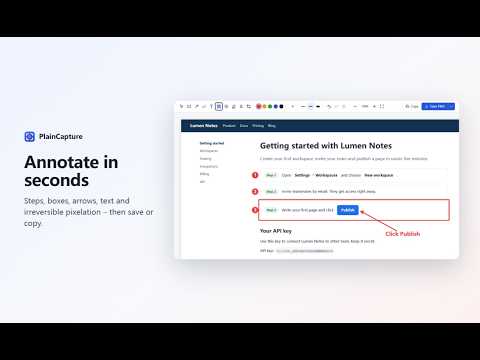
Skip the desktop app: record your tab, a window or your whole screen, polish it with auto-zoom and cuts, and export MP4, vertical video or GIF – all in your browser. Screenshots and screen recordings that stay on your computer. PlainCapture captures exactly what you see – a selected area, the visible part of the page, or the whole page – and records your tab, a window or your entire screen. No account, no uploads, no watermark. ★ SCREENSHOTS THAT JUST WORK • Full page: scrolls and stitches long pages reliably – sticky headers and chat widgets appear once, lazy-loaded images are waited for, and app-style pages that scroll inside a panel are supported. • Selected area: freezes the screen first, so hover menus and dropdowns stay in the shot. • Visible area: one click or one shortcut. • Never switches your tabs. If you switch away during a full-page capture, it pauses and continues when you come back. ★ ANNOTATE IN SECONDS Rectangles, arrows, freehand pen, text, pixelate (irreversible), crop, undo/redo. Save as PNG or JPG, or copy to the clipboard. ★ BEAUTIFY AND AUTO-REDACT • Beautify: one click puts your screenshot on a gradient background with rounded corners and a shadow – ready for a tweet, a slide or your docs. • Auto-redact: emails, phone numbers, card numbers and API keys on the page are found when you capture, and pixelated in one click before you share. ★ SCREEN RECORDING WITHOUT A WATERMARK • Record this tab (with its sound), a window or your whole screen. • Add your microphone and a round camera bubble. • Choose which microphone and camera to use – handy with USB mics and phone-as-webcam apps. • Edit like a pro demo: auto-zoom on your clicks with a camera that follows your cursor, a smooth cursor with click ripples (hidden while it rests), shortcut keys on screen, and a gradient background. • A real timeline: adjust zooms, cut mistakes, speed up the waiting (2×/4×/8×) and add text notes. • Export vertical (9:16, the crop follows your cursor) or square for TikTok, Reels and Shorts, in 1080p or 720p, or as a GIF. Preview free; save the edited video with Pro – exported in seconds, not in real time. • Save as MP4 or WebM – both seekable. Recordings are saved to your computer as soon as they finish. • Pause and resume from the toolbar icon, which turns into a red dot while recording; no time limit. • Your recording is written every second, so a browser crash doesn't lose it. ★ FIND THINGS AGAIN • "My screenshots and recordings": your recent captures in one place, grouped by day, with search. • Named after the page you captured, and you can rename them. • Nothing unsaved is ever deleted automatically. ★ PRIVATE BY DESIGN • Runs entirely in your browser. Nothing is uploaded, ever. • No account, no analytics, no tracking. • Installs with no "read your data on all websites" warning. Tab recording asks for permission only the first time you use it. ★ KEYBOARD SHORTCUTS Alt+Shift+S selected area · Alt+Shift+V visible area · Alt+Shift+F full page · Alt+Shift+E start/stop recording. Change them any time at chrome://extensions/shortcuts. ★ PLAINCAPTURE PRO (optional) Everything above is free, permanently. Pro adds time-savers for people who capture every day: • Save edited recordings: auto-zoom, smooth cursor, cuts, speed-ups, text, vertical video and GIF • More beautify backgrounds and a browser window frame • Numbered steps, highlighter, blur and custom colors • Export full-page screenshots as PDF (one long page or A4 pages) • Save straight to a folder you choose, with your own file names • Record in 1440p or 4K, and at 60 fps • Countdown before recording starts $19 a year, or $29 once for lifetime access (launch price). Activating Pro sends only your license key to our license service, which checks it with our payment provider. Questions or problems: support@plaincapture.com
0 out of 5No ratings
Details
- Version1.3.1
- UpdatedNovember 5, 2026
- FeaturesOffers in-app purchases
- Offered byPlainCapture
- Size418KiB
- Languages8 languages
- Developer
Email
support@plaincapture.com - Non-traderThis developer has not identified itself as a trader. For consumers in the European Union, please note that consumer rights do not apply to contracts between you and this developer.
Privacy

This developer declares that your data is
- Not being sold to third parties, outside of the approved use cases
- Not being used or transferred for purposes that are unrelated to the item's core functionality
- Not being used or transferred to determine creditworthiness or for lending purposes
Support
For help with questions, suggestions, or problems, visit the developer's support site