

Trade Translate - WhatsApp Two-Way Translator
14 ratings
)
Overview
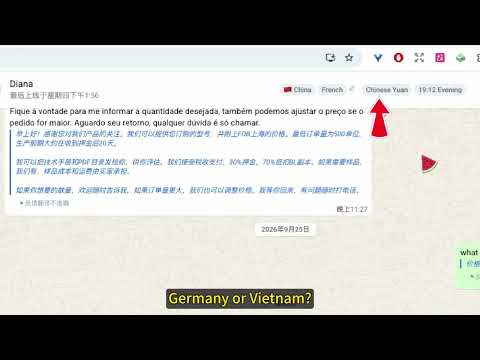
Two-way auto translation for WhatsApp Web: translate incoming chats and reply in your customer's language with one keystroke.
What it is Trade Translate is a foreign-trade translation assistant for WhatsApp Web. Chat with customers in English, Spanish, Portuguese, Arabic and more — without leaving the chat window to open a translator and copy-paste. It does three things: · Incoming — foreign messages are translated into your language, shown right below the original · Outgoing — type in your own language, press Enter, and it sends in your customer's language with your original text kept below for verification · AI polish — when machine translation isn't natural enough, tap "AI Optimize" and a large model rewrites it with recent chat context Why install Zero clicks — translations appear automatically, no buttons, no long-press copy. No mistakes — your original text stays under every translated message. Know who you're talking to — detects 214 countries/regions by phone code and shows country, language, currency and local time. Reply faster — type ; in the input box to open quick replies, matched by title/content, fill and send in one step. More accurate — "AI Optimize" uses the last 5 messages of context and keeps trade terms (FOB/MOQ/T/T) intact. Zero setup — no API key, no subscription, no payment; just refresh WhatsApp Web. Edge + Google engines switch automatically and fall back on failure. Languages: 75 languages, auto-detected, bidirectional real-time translation. Free quota · No sign-up needed: 50 incoming + 50 outgoing translations per day; 100 country/time lookups per day · AI translate & AI compose available without login (20 each per day) · Sign in with Google: unlimited machine translation, full AI quota (50 translate / 50 compose per day), boost packs stackable · Based on free Edge / Google translation interfaces — no subscription fee Privacy — our promise We say what is sent, then what is not: Sent: · When auto-translating, the sentence being translated is sent to Microsoft Edge or Google Translate · When you tap "AI Optimize", that message + the last 5 context messages are sent to our server and forwarded to a third-party LLM — this path never triggers unless you tap the button · After sign-in: account info (email, name, avatar) and translation count/character statistics Never: · We do not sell or rent data, and do not use it for advertising · We do not secretly read your chat history — AI collection happens only at the moment you tap · Analytics events contain functional metadata only (language, counts, characters), never message content · Translation cache, AI results and templates are stored locally in your browser See the full privacy policy (link). How to use Search "Trade Translate" in the Chrome Web Store and click "Add to Chrome" Pin it to the toolbar, open web.whatsapp.com and refresh Turn on "Auto Translate" and you're ready
4.9 out of 514 ratings
Details
- Version1.7.10
- UpdatedNovember 16, 2026
- Offered bythomas.wang
- Size3.15MiB
- Languages9 languages
- Developer
Email
wangweiwen200@gmail.com - Non-traderThis developer has not identified itself as a trader. For consumers in the European Union, please note that consumer rights do not apply to contracts between you and this developer.
Privacy

Trade Translate - WhatsApp Two-Way Translator has disclosed the following information regarding the collection and usage of your data. More detailed information can be found in the developer's privacy policy.
Trade Translate - WhatsApp Two-Way Translator handles the following:
This developer declares that your data is
- Not being sold to third parties, outside of the approved use cases
- Not being used or transferred for purposes that are unrelated to the item's core functionality
- Not being used or transferred to determine creditworthiness or for lending purposes