


Overview
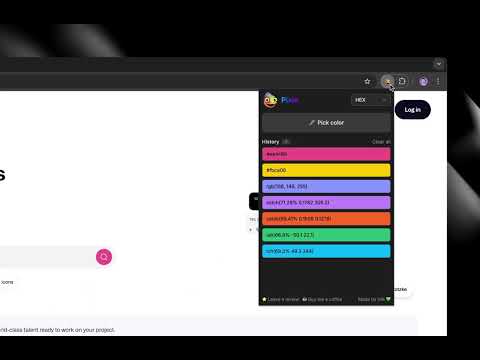
Pick any color from a webpage, copy it in modern CSS formats, and save it to your history.
Pixie is a free, lightweight color picker that lets you grab any color from a webpage and instantly copy it to your clipboard. Choose your preferred output format — from classic HEX and RGB to modern perceptual color spaces like OKLCH and OKLab — and Pixie copies it the moment you pick a color. Every color is saved with all format variants, so you can switch between them anytime. Key features: 🎨 Pick any color from any webpage with one click 📋 Copy colors instantly in your preferred CSS format 💾 Save up to 1,000 colors with automatic history 🎛️ Expand any saved color to access all format variants 🌗 Light and dark mode support 🔒 Fully private — no tracking, no data collection ✨ Completely free with no ads Pixie supports modern CSS color spaces alongside traditional formats, making it ideal for designers and developers working with wide-gamut displays and perceptual color models. All data is stored locally on your device. Pixie never sends your data anywhere.
5 out of 51 rating
Details
- Version2.0.0
- UpdatedFebruary 25, 2026
- Offered bylirik
- Size202KiB
- LanguagesEnglish (United States)
- Developer
Email
kirill.isachenko@gmail.com - Non-traderThis developer has not identified itself as a trader. For consumers in the European Union, please note that consumer rights do not apply to contracts between you and this developer.
Privacy

Pixie - Color Picker has disclosed the following information regarding the collection and usage of your data. More detailed information can be found in the developer's privacy policy.
Pixie - Color Picker handles the following:
This developer declares that your data is
- Not being sold to third parties, outside of the approved use cases
- Not being used or transferred for purposes that are unrelated to the item's core functionality
- Not being used or transferred to determine creditworthiness or for lending purposes
Support
For help with questions, suggestions, or problems, please open this page on your desktop browser