Item logo image for PixGrab - Image Downloader, Screenshot & PDF Tool

PixGrab - Image Downloader, Screenshot & PDF Tool

toolscase.com
5.0(

2 ratings

)
ExtensionTools22 users
Item media 6 (screenshot) for PixGrab - Image Downloader, Screenshot & PDF Tool
Item video thumbnail
Item media 2 (screenshot) for PixGrab - Image Downloader, Screenshot & PDF Tool
Item media 3 (screenshot) for PixGrab - Image Downloader, Screenshot & PDF Tool
Item media 4 (screenshot) for PixGrab - Image Downloader, Screenshot & PDF Tool
Item media 5 (screenshot) for PixGrab - Image Downloader, Screenshot & PDF Tool
Item media 6 (screenshot) for PixGrab - Image Downloader, Screenshot & PDF Tool
Item video thumbnail
Item media 2 (screenshot) for PixGrab - Image Downloader, Screenshot & PDF Tool
Item media 3 (screenshot) for PixGrab - Image Downloader, Screenshot & PDF Tool
Item media 4 (screenshot) for PixGrab - Image Downloader, Screenshot & PDF Tool
Item media 5 (screenshot) for PixGrab - Image Downloader, Screenshot & PDF Tool
Item media 6 (screenshot) for PixGrab - Image Downloader, Screenshot & PDF Tool

Overview

Download images from websites, capture screenshots, save pages as PDF, convert WebP images, and export files as ZIP.

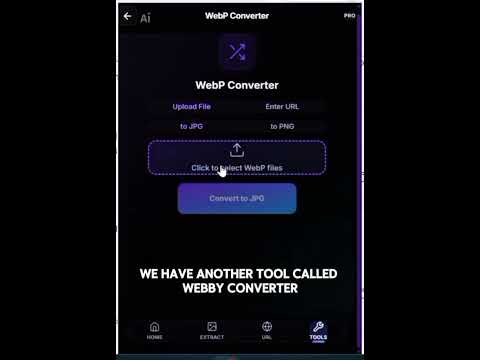
PixGrab is your all-in-one image downloader, high-resolution web page scraper, screenshot capture utility, and WebP image converter built directly into Google Chrome. Whether you need to extract HD images from active browser tabs, scrape images across multiple website URLs, capture full-page scroll-and-stitch screenshots, convert WebP images into PNG or JPG formats, or convert web pages into print-ready HD PDFs — PixGrab handles it all instantly with just one click. ⚡ WHAT IS PIXGRAB? PixGrab transforms how designers, content creators, marketers, researchers, and everyday web users grab visual media from the web. Instead of right-clicking and saving images one by one or taking manual fragmented screenshots, PixGrab automatically detects, extracts, enhances, and packages all images and pages into organized ZIP archives or crisp PDF files. 🚀 KEY FEATURES & CAPABILITIES: 📷 1. Active Tab & Batch Image Extractor: - Extract all images from your current tab or input multiple web URLs at once. - Automatically filters out unwanted icons, pixel trackers, and emojis so you only get real content images. - Smart Srcset Resolution Upgrade: Automatically fetches original, high-resolution source images instead of low-quality thumbnails. - Interactive Preview & Selection Grid: Filter, preview, select/deselect images, and download as a ZIP file. 🖼️ 2. WebP to PNG & JPG Converter: - Convert single or multiple WebP files to JPG or PNG format instantly. - Drag-and-drop file upload with visual preview cards. - High-performance, server-assisted conversion with zero loss in visual clarity. - Download single converted images directly or export multiple files as a compressed ZIP package. 📄 3. Webpage to HD PDF Converter: - Convert any single webpage or batch list of URLs into clean, professional PDF documents. - High-definition rendering with full desktop viewport layout and print background graphics enabled. - Built-in Bicubic Resampling & Unsharp Masking algorithm ensures all text and graphics remain sharp and readable. 📸 4. Screenshot Hero (Full Page & Visible Screen Capture): - Capture full-page scrolling screenshots or visible viewport snapshots. - Smooth scroll-and-stitch technology automatically hides fixed sticky headers and footers to produce seamless full-page captures. - Preview, crop, and download screenshots as high-quality PNG or PDF. 🖼️ 5. Images to PDF Converter: - Combine multiple local images into a single, beautifully structured A4 PDF document. - Automatic landscape/portrait page orientation matching with clean margin borders. - Built-in HD upscaling and text sharpening for clear presentation documents. 🎯 PERFECT FOR PROFESSIONALS & CREATORS: - Web Designers & Developers: Inspect, grab asset inspirations, and extract layout images from client websites. - Content Creators & Marketers: Collect high-res visual assets, promo banners, and blog header images in bulk. - E-commerce Sellers & Store Owners: Download product catalog images from Shopify, WooCommerce, or Amazon listings. - Researchers & Students: Save entire articles, documentation pages, and visual references as organized PDFs. - Social Media Managers: Convert WebP images from social platforms into standard PNG/JPG graphics for editing tools. 💡 HOW TO USE PIXGRAB: 1. Click the PixGrab icon in your Chrome toolbar. 2. Select your desired tool from the main navigation: - "Tab Images" — Extract all images from the current active tab. - "URL Scraper" — Paste one or more webpage URLs to extract images in batch. - "WebP Converter" — Drag and drop WebP images to convert to PNG or JPG. - "Webpage to PDF" — Convert any website URL into an HD PDF document. - "Screenshot" — Capture full-page or visible area screenshots. 3. Preview your extracted images or converted files. 4. Click "Download" or "Export ZIP" to save your files instantly. 🔒 PRIVACY & SECURITY FIRST: Your privacy and security are our top priorities: - No account or login required. - Secure, encrypted HTTPS communication for all server operations. - Images and conversion processing are temporary and automatically deleted immediately after download. - We do NOT track browsing history, sell data, or inject ads into web pages. 🌐 TOOLSCASE PRODUCTIVITY ECOSYSTEM: PixGrab is part of the Toolscase productivity suite designed to simplify web media and document workflows: - Toolscase PDF Tools — Edit, merge, split, compress, and convert PDFs directly in your browser. - AskFiles AI — Chat with PDFs, CSVs, and Excel spreadsheets using conversational AI. - CV Builder — Build ATS-friendly professional resumes in minutes. Discover more at toolscase.com

Details

  • Version
    1.1.0
  • Updated
    August 5, 2026
  • Features
    Offers in-app purchases
  • Size
    395KiB
  • Languages
    English (United States)
  • Developer
    Hassan Saeed Chohan
    House No 359, Mohallah Sheikhan , Zafarwal Tehsil Zafarwal District Narowal Zafarwal, Narowal 54000 PK
    Website
    Email
    hassanchohan10@gmail.com
    Phone
    +92 301 1226722
  • Trader
    This developer has identified itself as a trader per the definition from the European Union and committed to only offer products or services that comply with EU laws.

Privacy

Manage extensions and learn how they're being used in your organization

PixGrab - Image Downloader, Screenshot & PDF Tool has disclosed the following information regarding the collection and usage of your data. More detailed information can be found in the developer's privacy policy.

PixGrab - Image Downloader, Screenshot & PDF Tool handles the following:

Website content

This developer declares that your data is

  • Not being sold to third parties, outside of the approved use cases
  • Not being used or transferred for purposes that are unrelated to the item's core functionality
  • Not being used or transferred to determine creditworthiness or for lending purposes

Support

For help with questions, suggestions, or problems, visit the developer's support site

Google apps