Item logo image for PixGrab - Image Downloader, Screenshot & PDF Tool

PixGrab - Image Downloader, Screenshot & PDF Tool

5.0(

2 ratings

)
ExtensionTools15 users
Item media 6 (screenshot) for PixGrab - Image Downloader, Screenshot & PDF Tool
Item video thumbnail
Item media 2 (screenshot) for PixGrab - Image Downloader, Screenshot & PDF Tool
Item media 3 (screenshot) for PixGrab - Image Downloader, Screenshot & PDF Tool
Item media 4 (screenshot) for PixGrab - Image Downloader, Screenshot & PDF Tool
Item media 5 (screenshot) for PixGrab - Image Downloader, Screenshot & PDF Tool
Item media 6 (screenshot) for PixGrab - Image Downloader, Screenshot & PDF Tool
Item video thumbnail
Item media 2 (screenshot) for PixGrab - Image Downloader, Screenshot & PDF Tool
Item media 3 (screenshot) for PixGrab - Image Downloader, Screenshot & PDF Tool
Item media 4 (screenshot) for PixGrab - Image Downloader, Screenshot & PDF Tool
Item media 5 (screenshot) for PixGrab - Image Downloader, Screenshot & PDF Tool
Item media 6 (screenshot) for PixGrab - Image Downloader, Screenshot & PDF Tool

Overview

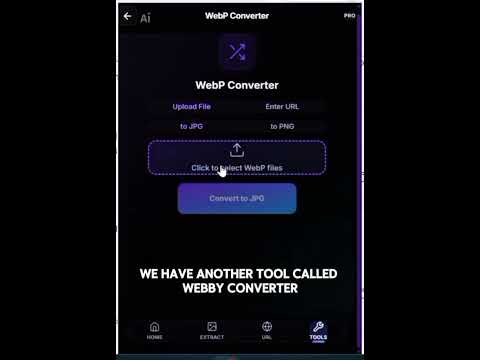
Download images from websites, capture screenshots, save pages as PDF, convert WebP images, and export files as ZIP.

PixGrab — Download, Convert & Export Images From Any Website PixGrab is a powerful browser extension that helps you instantly extract, download, and convert images from any webpage. Whether you're a designer, developer, marketer, student, researcher, or content creator, PixGrab saves hours of manual work by collecting images in seconds. Stop saving images one by one. PixGrab automatically scans webpages, detects images, and lets you download or export them with just a few clicks. Why Choose PixGrab? Modern websites contain dozens—or even hundreds—of images hidden across HTML, CSS backgrounds, lazy-loaded galleries, and scripts. Collecting them manually is slow and frustrating. PixGrab automates the entire process: • Scan any webpage instantly • Detect images automatically • Download images individually or in bulk • Convert images into different formats • Export image collections as ZIP or PDF It's the fastest and easiest way to collect images from the web. Key Features 1. Extract Images from Any Webpage PixGrab automatically detects: • Standard `<img>` elements • Lazy-loaded images • Gallery and slider images • Images loaded through scripts • High-resolution versions (when available) View every detected image in one organized gallery. 2. Capture Hidden CSS Background Images Many websites use CSS background images that can't easily be downloaded. PixGrab detects and extracts: • Hero banners • Section backgrounds • Background textures • Decorative CSS images Access images that are normally difficult to save manually. ### 3. Bulk Download Images Download multiple images with a single click. No more: ✖ Opening images in separate tabs ✖ Saving files individually ✖ Repeating the same process over and over Simply select your images and download them together. 4. Convert Image Formats Convert images into formats that suit your workflow. Supported conversions include: • JPG • PNG • WEBP • Additional supported formats Perfect for websites, presentations, reports, and social media. 5. Export Images as ZIP or PDF Export selected images as: **ZIP** • Store complete image collections • Share assets easily • Ideal for designers and developers **PDF** • Create mood boards • Build research documents • Prepare presentations and client reports Turn any webpage into a shareable PDF within seconds. 6. Smart Preview & Filtering Quickly find exactly what you need. • Preview images before downloading • Filter by size and image type • Select only the files you want Clean, simple, and efficient. Who Is PixGrab For? Designers • Collect inspiration and mood boards • Download UI assets and graphics Developers • Extract website assets for testing • Download images from templates and themes Marketers • Save campaign creatives • Collect competitor visuals Students & Researchers • Gather images for reports, assignments, and presentations Content Creators • Build reference collections quickly • Organize visual assets efficiently Simple to Use 1. Open any webpage. 2. Click the PixGrab extension. 3. Scan the page. 4. Select your images. 5. Download or export them. No technical knowledge required. Privacy Friendly PixGrab works directly in your browser. Your browsing data and extracted images are not uploaded to our servers. Processing takes place locally on your device whenever possible, helping keep your data private. Discover More Productivity Tools PixGrab also provides convenient access to additional Toolscase productivity tools through contextual recommendations inside the extension. Depending on your workflow, you can quickly explore: • **PDF Tools** – Convert, merge, compress, split, and manage PDF files. • **CV Builder** – Create professional resumes with customizable templates. • **Toolscase** – Discover additional productivity tools and utilities. These recommendations are optional, non-intrusive, and designed to help you continue your workflow. They do not change PixGrab's primary purpose of extracting, downloading, converting, and exporting images. Save Time Every Week Instead of manually saving images one by one, PixGrab does the heavy lifting for you. Install PixGrab today and make image downloading effortless.

Details

  • Version
    1.0.7
  • Updated
    June 27, 2026
  • Features
    Offers in-app purchases
  • Size
    5.94MiB
  • Languages
    English (United States)
  • Developer
    Hassan Saeed Chohan
    House No 359, Mohallah Sheikhan , Zafarwal Tehsil Zafarwal District Narowal Zafarwal, Narowal 54000 PK
    Website
    Email
    hassanchohan10@gmail.com
    Phone
    +92 301 1226722
  • Trader
    This developer has identified itself as a trader per the definition from the European Union and committed to only offer products or services that comply with EU laws.

Privacy

Manage extensions and learn how they're being used in your organization

PixGrab - Image Downloader, Screenshot & PDF Tool has disclosed the following information regarding the collection and usage of your data. More detailed information can be found in the developer's privacy policy.

PixGrab - Image Downloader, Screenshot & PDF Tool handles the following:

Website content

This developer declares that your data is

  • Not being sold to third parties, outside of the approved use cases
  • Not being used or transferred for purposes that are unrelated to the item's core functionality
  • Not being used or transferred to determine creditworthiness or for lending purposes

Support

For help with questions, suggestions, or problems, visit the developer's support site

Google apps