

PixelPeek

Overview
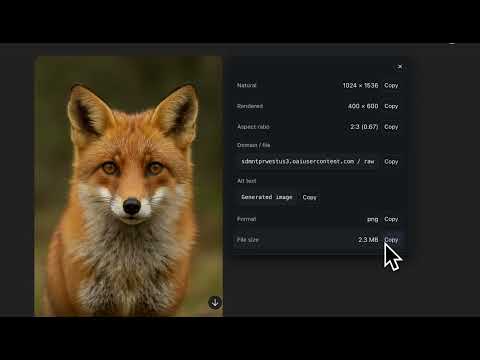
Image details for designers: popup via context menu, overlay.
Pixel Peek — a handy tool for working with images right in your browser. Pixel Peek helps designers, frontend developers, and content editors quickly get all the details about any image without opening DevTools. One click — and you see: natural and rendered dimensions, format, file size, alt text, plus domain, file name, and the full URL. How it works: • Right-click on an image → "Show image info" • A popup with full details appears • Hover over an image → see a compact badge with key parameters Main features Popup: • Natural (original) and rendered dimensions • Aspect ratio • Format (jpg, png, webp, avif, etc.) • File size* • Domain, file name, URL, and alt text • Copy-to-clipboard buttons • Smart positioning and draggable window Badge (overlay): • Displays: natural size, rendered size, format, file size • Choose corner position, badge size, and transparency • Smooth fade-in/out animation Settings: • Light, dark, or system theme • Language selection (English / Українська) • Choose what to show in the popup and context menu Who will benefit: • Designers — check image dimensions and formats without DevTools • Frontend devs — verify rendered sizes and aspect ratios • Content teams — review alt texts and image weight before publishing • SEO & performance specialists — detect oversized images Privacy: • No data is collected, sent, or sold • All settings are stored locally (chrome.storage.sync) • File size is determined via a direct request to the image only; no external services involved Permissions explained: • contextMenus — add the right‑click menu item • storage — save settings • host_permissions — let the extension work on any website Limitations: • Some servers may block file size detection if they don’t return Content-Length • CSS background-images are not yet supported • Certain sites with custom context menus may require reloading the page --- Pixel Peek saves you time, removes the need to dig into DevTools, and makes working with images much simpler.
0 out of 5No ratings
Details
- Version1.2.2
- UpdatedAugust 28, 2025
- Offered byAnton Zhezherun
- Size39.35KiB
- Languages2 languages
- Developer
Email
stragewhite@gmail.com - Non-traderThis developer has not identified itself as a trader. For consumers in the European Union, please note that consumer rights do not apply to contracts between you and this developer.
Privacy

This developer declares that your data is
- Not being sold to third parties, outside of the approved use cases
- Not being used or transferred for purposes that are unrelated to the item's core functionality
- Not being used or transferred to determine creditworthiness or for lending purposes
Support
For help with questions, suggestions, or problems, please open this page on your desktop browser