

PixelMatch — Pixel Perfect Design Overlay

Overview
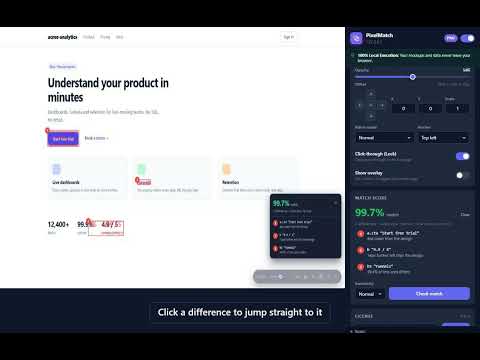
Compare your Figma mockup with the live page, score the match, and show layout grids. Pixel perfect design QA, 100% local.
PixelMatch puts your design on top of the live web page, so you can see exactly where the build doesn't match the mockup: down to the pixel. Built for front-end developers, QA engineers and designers who review implementations. OVERLAY YOUR DESIGN • Drop, paste or browse for a PNG, JPG, WebP or SVG mockup • Adjust opacity, nudge by 1px (Shift for 10px) and scale for @2x exports • Difference mode turns every matching pixel black, so only the mistakes light up • Click-through lock: interact with the real page underneath the mockup • Settings are remembered per website LAYOUT GRIDS (no mockup needed) • Column grids: Bootstrap 5, Tailwind, Material, or your own • Built-in grids switch automatically at their breakpoints • Baseline grid for vertical rhythm, square grid for 4pt/8pt spacing • Press Alt+G on any page to toggle WORKS WHERE YOU WORK • Dock PixelMatch in Chrome's side panel so the controls stay open while you click around the page • The side panel follows you from tab to tab, and every site keeps its own settings PIXELMATCH PRO • Match score: one click compares the page with your mockup and lists every difference in plain English, e.g. "button 'Sign up': 4px lower than the design", with numbered highlights on the page • Figma frame import with your own personal access token • Multiply and Screen blend modes • Up to 24 saved mockups • Custom responsive grids, saved grid presets, and "Detect grid from page" Pro is available monthly ($9) or as a one-time lifetime license ($59) from our website. Payments are handled by Lemon Squeezy. PRIVATE BY DESIGN • No account, no sign-in, no analytics, no tracking • Your mockups, settings and match results never leave your browser • The only outside services the extension contacts are Lemon Squeezy (to check a license key you enter) and Figma (only when you import a frame) Privacy policy: https://pixelmatch-beta.vercel.app/privacy.html Refund policy (14-day money-back guarantee): https://pixelmatch-beta.vercel.app/refund.html Support: hammadghafoor8@gmail.com
0 out of 5No ratings
Details
- Version1.2.2
- UpdatedOctober 9, 2026
- FeaturesOffers in-app purchases
- Offered byhammadghafoor8
- Size76.97KiB
- LanguagesEnglish
- DeveloperHammad Ghafoor
street no 4 near by water supply tank muhallah jahjranwala pakpattan pakpattan 57400 PKEmail
hammadghafoor8@gmail.comPhone
+92 301 0700053 - TraderThis developer has identified itself as a trader per the definition from the European Union and committed to only offer products or services that comply with EU laws.
Privacy

PixelMatch — Pixel Perfect Design Overlay has disclosed the following information regarding the collection and usage of your data. More detailed information can be found in the developer's privacy policy.
PixelMatch — Pixel Perfect Design Overlay handles the following:
This developer declares that your data is
- Not being sold to third parties, outside of the approved use cases
- Not being used or transferred for purposes that are unrelated to the item's core functionality
- Not being used or transferred to determine creditworthiness or for lending purposes
Support
For help with questions, suggestions, or problems, visit the developer's support site