Item logo image for PixelCloak

PixelCloak

Item media 6 (screenshot) for PixelCloak
Item video thumbnail
Item media 2 (screenshot) for PixelCloak
Item media 3 (screenshot) for PixelCloak
Item media 4 (screenshot) for PixelCloak
Item media 5 (screenshot) for PixelCloak
Item media 6 (screenshot) for PixelCloak
Item video thumbnail
Item media 2 (screenshot) for PixelCloak
Item media 3 (screenshot) for PixelCloak
Item media 4 (screenshot) for PixelCloak
Item media 5 (screenshot) for PixelCloak
Item media 6 (screenshot) for PixelCloak

Overview

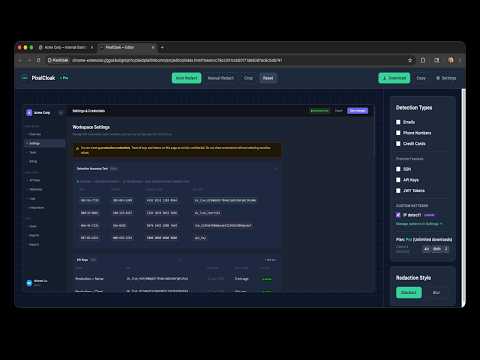
Redact sensitive data from screenshots locally — no uploads, no cloud processing, nothing leaves your browser.

Capture, detect, and redact sensitive information from screenshots — locally. No uploads, no cloud processing.

Details

  • Version
    1.0.0
  • Updated
    March 24, 2026
  • Features
    Offers in-app purchases
  • Size
    113KiB
  • Languages
    English (United States)
  • Developer
    Website
    Email
    support@pixelcloak.app
  • Non-trader
    This developer has not identified itself as a trader. For consumers in the European Union, please note that consumer rights do not apply to contracts between you and this developer.

Privacy

Manage extensions and learn how they're being used in your organization

PixelCloak has disclosed the following information regarding the collection and usage of your data. More detailed information can be found in the developer's privacy policy.

PixelCloak handles the following:

Personal communications

This developer declares that your data is

  • Not being sold to third parties, outside of the approved use cases
  • Not being used or transferred for purposes that are unrelated to the item's core functionality
  • Not being used or transferred to determine creditworthiness or for lending purposes

Support

For help with questions, suggestions, or problems, visit the developer's support site

Related

Redact It™

5.0

Redact sensitive information from PDFs and images locally. No uploads. 100% private.

NativeMind: Your fully private, open-source, on-device AI assistant

4.2

NativeMind connects to local LLMs via Ollama to bring powerful AI into your browser — with zero data sent to the cloud.

Native Translate — Private, Built-in AI Translation

5.0

Private, offline translation with Chrome's built-in AI. No cloud or telemetry: your text stays in the browser; models run locally.

GrabFrame - Screenshot, Record & OCR

0.0

Full page, visible, or region screenshots. Tab recording. Annotate, blur, crop, and extract text with OCR. All local, no cloud.

Offline OCR

4.5

A safe, fully offline region-select OCR — no data ever leaves your browser.

Text Extractor OCR

5.0

Screen OCR: Extract text from images, screenshots, PDFs & videos. Instant offline capture. 100% private, no cloud, no data upload.

MultCloud Save - Save Webpage as PDF

2.9

Save webpages in Chrome as PDF or images and save to the cloud or local.

Ditto

5.0

Privacy-first transcript extraction. 100% local, no data leaves your browser.

PageRedact - Screenshot Redaction, Blur & PDF Export

5.0

Free unlimited screenshot redaction. Blur, sign, annotate, export PDF/PNG/JPG. Captured content never leaves your browser.

Pic to PC

0.0

Transfer photos from your phone into any file upload, paste anywhere, or save to PC — no app, no account, no cloud.

Meine Cookies & LocalStorage Manager

5.0

No bulls**t, no ads, nada - just import and export encrypted cookies and local storage data

Screen Snap

5.0

Screen shot webpage with its URL and annotations, all stored and organized in the Cloud.

Redact It™

5.0

Redact sensitive information from PDFs and images locally. No uploads. 100% private.

NativeMind: Your fully private, open-source, on-device AI assistant

4.2

NativeMind connects to local LLMs via Ollama to bring powerful AI into your browser — with zero data sent to the cloud.

Native Translate — Private, Built-in AI Translation

5.0

Private, offline translation with Chrome's built-in AI. No cloud or telemetry: your text stays in the browser; models run locally.

GrabFrame - Screenshot, Record & OCR

0.0

Full page, visible, or region screenshots. Tab recording. Annotate, blur, crop, and extract text with OCR. All local, no cloud.

Offline OCR

4.5

A safe, fully offline region-select OCR — no data ever leaves your browser.

Text Extractor OCR

5.0

Screen OCR: Extract text from images, screenshots, PDFs & videos. Instant offline capture. 100% private, no cloud, no data upload.

MultCloud Save - Save Webpage as PDF

2.9

Save webpages in Chrome as PDF or images and save to the cloud or local.

Ditto

5.0

Privacy-first transcript extraction. 100% local, no data leaves your browser.

Google apps