

Pixel Perfect Pro

Обзор
Helps developers to make pixel perfect site layout
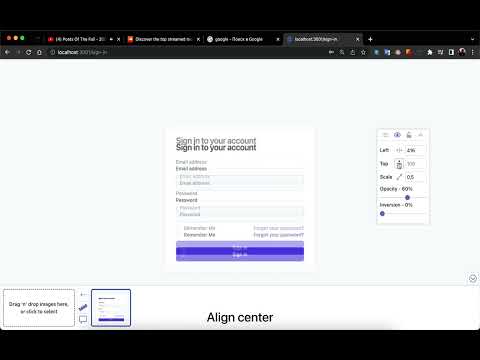
Pixel Perfect Pro The Pixel Perfect Pro Extension for Browsers is an invaluable tool for web designers and developers. With this extension, users can easily and accurately overlay their web designs on the existing web page, making sure that all the planned design elements and styling match up perfectly. The extension is compatible with all major browsers, so no matter what browser a user is using, they can be sure that their designs will look perfect. Using this extension is easy and straightforward. First, open the page you want to work with and then open the Pixel Perfect Pro Extension. You can then choose the design you want to overlay and the extension will automatically display it over the web page. You can position the design elements, adjust the size and check that all the planned elements are in place. It offers a wide range of features: 1. unlimited layers, 2. inversion and scaling, 3. horizontal and vertical alignments, 4. splitting images for each website, 5. support for large images up to 50 MB, 6. drag and drop file uploads, 7. keyboard arrow and mouse wheel support when focused on an input, 8. minimal space needed for development panels, 9. a ruler for accurate measurements. With Pixel Perfect Pro, you can save time and energy creating flawless websites with perfect pixel-level accuracy. Overall, the Pixel Perfect Extension for Browsers is an incredibly useful tool for web designers and developers who want to quickly and accurately check that their designs match up with the existing web page.
4,5 из 522 оценки
Подробности
- Версия1.9.2
- Обновлено13 ноября 2025 г.
- Размер233KiB
- ЯзыкиEnglish
- РазработчикСайт
Электронная почта
maxym2010i@gmail.com - Не продавецРазработчик не указал для себя статус продавца. Просим клиентов из Европейского союза обратить внимание, что на сделки между вами и этим разработчиком не распространяются законы о защите прав потребителей.
Конфиденциальность

Этот разработчик утверждает, что ваши данные:
- Не продаются третьим лицам, за исключением разрешенных вариантов использования
- Не используются и не передаются в целях, не связанных с работой основных функций продукта
- Не используются и не передаются для определения платежеспособности или в целях кредитования
Поддержка
Чтобы сообщить об ошибках в работе продукта, задать вопрос или поделиться идеями, откройте эту страницу в браузере для компьютера.