


Overview
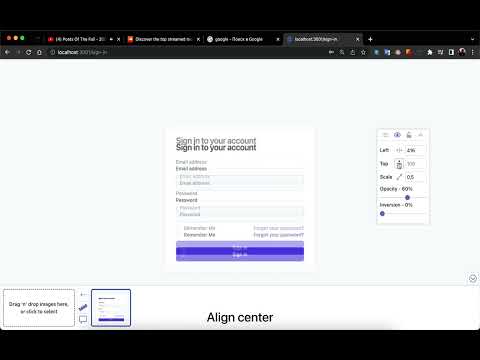
Overlay your design over any page and match it pixel by pixel. Blend modes, column grids, rulers, hotkeys. No ads, free forever.
Pixel Perfect Pro puts your design mockup on top of the live page so you can match the implementation pixel by pixel — the fastest way to catch a 2px offset, a wrong font size, or a misaligned grid before review does. Free, with no catch - No ads. No account. No tracking — your images never leave the browser. - Everything you can use today stays free, forever. New advanced features may arrive as paid extras someday, but nothing you rely on will move behind a paywall. Match designs against the real page - Unlimited overlays, stored separately per website. - Opacity, inversion (for dark pages), scale, rotation, and exact width. - Blend modes — set Difference and every mismatching pixel lights up (also Multiply, Overlay, Screen, Exclusion). - Compare mode: a draggable slider that wipes between design and page. - Drag the overlay with the mouse or nudge it 1px at a time from the keyboard. - Lock the overlay in place and click straight through it to use the page. Layout tools - Column grid with Bootstrap, Tailwind, and Material presets — or your own columns, gutters, max-width, and offsets. - On-page rulers and guide lines for measuring distances. Made for daily QA work - Fully customizable hotkeys for every action. - Add designs by drag & drop, paste from clipboard, or download by URL. - Handles large images (50 MB+ exports are fine). - Works inside iframes — pick the exact frame from the toolbar popup. - Light and dark themes with customizable colors. - A quick interactive tour walks you through every control on first run. - The overlay comes back after a page reload, exactly where you left it. Privacy Everything is stored locally in your browser. The extension collects nothing, sends nothing, and shows no ads. Found a bug or missing a feature? Tell us: https://www.pixperfectpro.com/contact/
4.4 out of 526 ratings
Details
- Version2.0.0
- UpdatedSeptember 1, 2026
- Size241KiB
- LanguagesEnglish
- DeveloperWebsite
Email
max7up.support@gmail.com - Non-traderThis developer has not identified itself as a trader. For consumers in the European Union, please note that consumer rights do not apply to contracts between you and this developer.
Privacy

This developer declares that your data is
- Not being sold to third parties, outside of the approved use cases
- Not being used or transferred for purposes that are unrelated to the item's core functionality
- Not being used or transferred to determine creditworthiness or for lending purposes
Support
For help with questions, suggestions, or problems, please open this page on your desktop browser