


Overview
Check the Meta Pixel, TikTok Pixel, GA4, GTM and Google Ads tags on any website. See IDs, events and setup issues in one click.
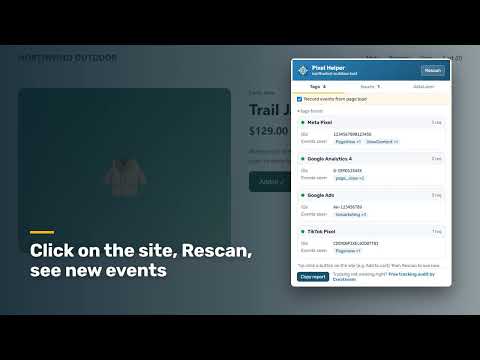
See the tracking pixels on any website in one click. Pixel Helper shows which tags are installed, which events they fire and what is set up wrong, so you can fix tracking before it wastes your ad budget. What it checks: ✔ Meta Pixel: pixel IDs and events such as PageView, ViewContent and AddToCart ✔ TikTok Pixel: pixel IDs and events ✔ Google Analytics 4: measurement IDs and events ✔ Google Tag Manager: container IDs ✔ Google Ads: conversion and remarketing tags It also recognizes other common marketing tags, and shows the dataLayer and the Google Consent Mode status. How it helps • Spot duplicate tags and double-counted page views • Find pixels that are installed but blocked or not firing • Test events: click a button on the site, press Rescan, and see the new events • Copy a clean report to share with your developer or agency Record from page load (optional) Turn on "Record events from page load" to also see events that fire before you open the popup. Access to all sites is requested only when you switch this on, and you can switch it off at any time. Privacy first • Everything runs locally in your browser • No account, no tracking, and no data sent to our servers Built by Creativism, a digital marketing agency in Yogyakarta, Indonesia. Need help fixing your tracking? Get a free tracking audit at https://creativism.id
0 out of 5No ratings
Details
- Version1.0.0
- UpdatedNovember 3, 2026
- Size41.63KiB
- Languages9 languages
- DeveloperCreativism Digital MarketingWebsite
Jl. Perumahan Kenari Asri No.C7b Losari, Sukoharjo, Ngaglik Sleman, Daerah Istimewa Yogyakarta 55581 IDEmail
creativismid@gmail.comPhone
+62 812-2222-7920 - TraderThis developer has identified itself as a trader per the definition from the European Union and committed to only offer products or services that comply with EU laws.
Privacy

This developer declares that your data is
- Not being sold to third parties, outside of the approved use cases
- Not being used or transferred for purposes that are unrelated to the item's core functionality
- Not being used or transferred to determine creditworthiness or for lending purposes
Support
For help with questions, suggestions, or problems, visit the developer's support site