

Pirate
3 个评分
)
概述
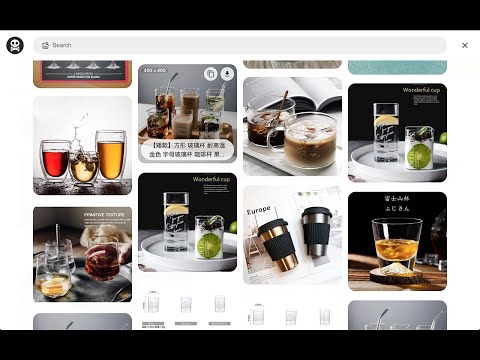
Pirate - Provide users grab current web page's all images into files or clipboard.
- Here comes several ways to turn on 「Pirate」. 1. Turn on contextMenu & choose 「Pirate」. 2. Press shortcut 「 Pirate 」 which right next to url bar. - How to use 「Pirate」? 1. Press contextMenu & choose 「Pirate」to turn it on. 2. Pick image you like to 「 COPY 」or 「 DOWNLOAD 」it. 3. You could also use search function to find images you like quickly. - Keyboard shortcut 1.「 Cmd + Shift + O」︰Turn on or off 「Pirate」. 2.「 Esc 」︰Turn off 「Pirate」 or 「Shortcuts」 guide. 3.「 / 」︰Search images. 4.「 Tab 」︰Switch content. 5.「 Shift + ? 」Turn on 「Shortcuts」 guide. Enjoy it. - Change Log: 1.0.7: a. Fixed keyboard shortcut issue. 1.0.6: a. Migrate to MV3. b. Performance enhancement. 1.0.5: a. Dark mode support. 1.0.4: a. Refactor card structure. 1.0.3: a. Accessibility & performance enhancement. 1.0.2: a. Masonry layout display bug fixed. 1.0.1: a. Add keyboard shortcuts guide. b. Ally enhancement. c. Add scroll to top function. d. Fetch more images from meta / video / touch-icon / startup-image. e. Add multi keyword search. (use space as separate sign)
5 星(5 星制)3 个评分
详情
- 版本1.0.7
- 上次更新日期2021年12月4日
- 提供方Paul Li
- 大小75.8KiB
- 语言中文(台灣)
- 开发者mei's studio
14f. no. 66 San Chung Rd, Nangang dist. Tapipei, Taipei City 115 Taiwan邮箱
meistudioli@gmail.com - 非交易者该开发者尚未将自己标识为交易者。欧盟地区消费者须知:消费者权利可能不适用于您与该开发者达成的合约。
隐私权

该开发者已声明,您的数据:
- 不会因未获批准的用途出售给第三方
- 不会为实现与产品核心功能无关的目的而使用或转移
- 不会为确定信用度或放贷目的而使用或转移
支持
若有任何疑问、建议或问题,请在桌面浏览器中打开此页面