

PiP Any Tab/Window
2 ratings
)
Overview
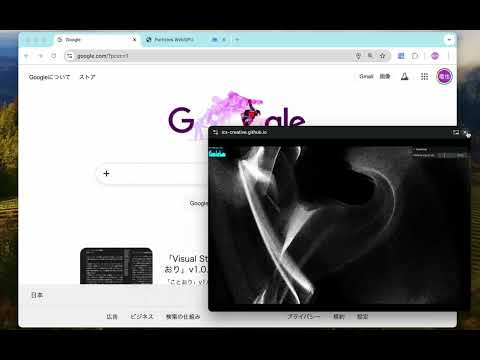
Display any browser tab, window, or screen in a Picture-in-Picture window. Supports zoom, pan, and keeps content always on top.
PiP Any Tab / Window lets you pop out any browser tab — or any window on your computer — into a floating Picture-in-Picture panel that stays on top of everything else. ── WHAT IT DOES ── - Capture This Tab — instantly floats your current tab as a PiP window - Select Window or Screen — opens your OS window picker so you can float any native app (terminal, editor, Finder, etc.) ── WHO IT'S FOR ── - Watching a recipe video while you cook — keep it visible as you type notes - Staying in a video call while switching to another tab or app - Monitoring a live stream, sports score, or news feed in the background - Keeping a reference document, map, or spreadsheet always in view - Students following along with a lecture while taking notes elsewhere - Anyone who wants one thing always visible while working on another ── WHAT IT DOES NOT DO ── The PiP window is view-only. You cannot interact with or control the captured content through the PiP window. This is a browser platform limitation, not a feature we plan to add. ── PERMISSIONS ── tabCapture — Used solely to capture the video stream of the active tab and display it in a Picture-in-Picture window. No tab content is stored, transmitted, or processed beyond rendering to the PiP overlay. tabs — Used to display the list of open tabs in the popup so you can select which tab to float. Only tab titles and URLs are read locally; nothing is sent externally. activeTab — Used to identify the currently active tab when you click "Capture This Tab." Access is granted only at the moment you click the button. scripting — Required to execute a content script in the target tab to initiate the tabCapture stream from within the tab's context. The script is injected only at the moment the user clicks "Capture This Tab" and performs no other action than triggering the capture handshake between the popup and the background service worker. No page content is read, modified, or exfiltrated. ── PRIVACY ── This extension collects no personal data, sends nothing to external servers, and has no analytics. All processing happens locally in your browser. ── OPEN SOURCE ── Source code is available at: https://github.com/iwamatsu0430/pip-any-tab-window
4 out of 52 ratings
Details
- Version0.1.0
- UpdatedFebruary 20, 2026
- Offered byiwamatsu0430
- Size33.83KiB
- LanguagesEnglish
- Developer
Email
iwamatsu0430@gmail.com - Non-traderThis developer has not identified itself as a trader. For consumers in the European Union, please note that consumer rights do not apply to contracts between you and this developer.
Privacy

This developer declares that your data is
- Not being sold to third parties, outside of the approved use cases
- Not being used or transferred for purposes that are unrelated to the item's core functionality
- Not being used or transferred to determine creditworthiness or for lending purposes