

Pinyin & more - Live Captions & Translation for any website

Overview
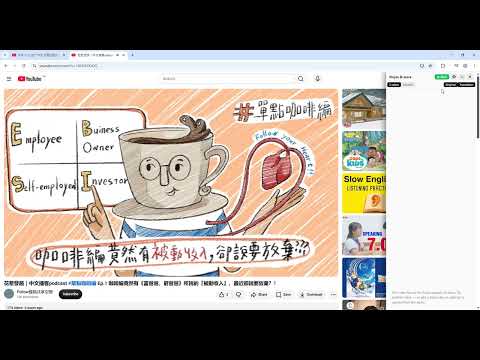
Free Pinyin, captions & translation on captioned YouTube videos. Tap a word for its meaning. No captions? Use your own key.
Pinyin & more turns what you're watching into something you can actually study — captions, a translation, and a Pinyin line under every Chinese character. Free on YouTube videos that have captions: no account, no login, no API key. ▶ See it in action: https://youtu.be/ZXnkHwgFBk4 TWO WAYS TO CAPTION 1) FREE — YouTube videos that already have captions (no key, no cost) Reads the video's own caption track (creator-made or auto-generated) and rebuilds it as a learning view: the original line, Pinyin stacked under each Chinese character, and a translation into the language you pick. Tap any word to see its pinyin and meaning. Turn on Karaoke and the word being spoken is highlighted as you hear it. Works on normal videos and on Shorts. Nothing is sent to us or to any third party — the captions come from YouTube, and the Pinyin and dictionary run on your own device. Note that not every video has a caption track. Many Chinese videos don't — which is exactly what the second mode is for. 2) ANYTHING WITH SOUND — built from the audio (optional, your own Soniox key) Including YouTube videos that have NO captions, and any other website. The extension listens to the tab's audio and creates the captions itself, auto-detecting the spoken language (60+) and translating live — so it works even where no subtitles exist at all. This part runs on your own Soniox API key: pay-as-you-go, currently about $0.12/hour. You pay Soniox directly; there's no middleman and no account with us. WHAT YOU GET • Free on captioned YouTube videos — no account, no key, no cost • Pinyin under every Chinese character, generated on your device • Tap-a-word dictionary for Chinese — pinyin + meaning, offline (CC-CEDICT), no network and no key • Karaoke mode — the word being spoken is highlighted as it's spoken • Translate into 60+ languages • Works on YouTube videos and Shorts • Optional: caption anything with sound from its audio using your own Soniox key — including YouTube videos with NO captions, and any other website • Two display modes: a side panel docked beside the page, or an overlay on the video that also works in fullscreen • Show any combination of lines: original, Pinyin, translation • Light / Dark / System themes, custom sentence colours • English and Tiếng Việt interface HOW TO USE (free, on a captioned YouTube video) 1. Open a YouTube video that has captions (or a Short). 2. Click the toolbar icon, or press Alt+Shift+S. The captions, Pinyin and translation appear right away. 3. Everything else is on the caption window itself: pause and resume, choose which lines to show, switch Karaoke on, minimise it to the edge strip, or × to close. 4. Tap any word in a Chinese line to see its pinyin and meaning. Only the tab you're watching captions at a time. Switch tabs and that tab pauses and keeps its place, so nothing keeps running behind your back — come back and press Start to pick it up again. WHEN THERE'S NO CAPTION TRACK (optional) For a YouTube video without captions, or any other website: open Settings (⚙ on the caption window), switch the caption source to Soniox and paste a Soniox key — the built-in Guide has a link and the steps. After that, anything with sound can be captioned. Check your usage and balance in the Soniox console anytime. To save credits, the connection pauses itself during silence and reconnects when sound returns. PRIVACY We run no server, there are no analytics, and nothing is collected. In free mode the captions come from YouTube itself, and the Pinyin and dictionary run entirely on your device — nothing is sent to Soniox at all. Only if you choose Soniox mode does the tab's audio go to Soniox, using your own key, which is stored only in your browser. Full policy: https://pinyin-and-more.netlify.app/privacy.html An independent project — not affiliated with Soniox or YouTube. Feedback: hexaoutsourcing@gmail.com
0 out of 5No ratings
Details
- Version2.2.3
- UpdatedJuly 21, 2026
- Size5.43MiB
- LanguagesEnglish (United States)
- Developer
Email
hexaoutsourcing@gmail.com - Non-traderThis developer has not identified itself as a trader. For consumers in the European Union, please note that consumer rights do not apply to contracts between you and this developer.
Privacy

Pinyin & more - Live Captions & Translation for any website has disclosed the following information regarding the collection and usage of your data. More detailed information can be found in the developer's privacy policy.
Pinyin & more - Live Captions & Translation for any website handles the following:
This developer declares that your data is
- Not being sold to third parties, outside of the approved use cases
- Not being used or transferred for purposes that are unrelated to the item's core functionality
- Not being used or transferred to determine creditworthiness or for lending purposes
Support
For help with questions, suggestions, or problems, visit the developer's support site