


概要
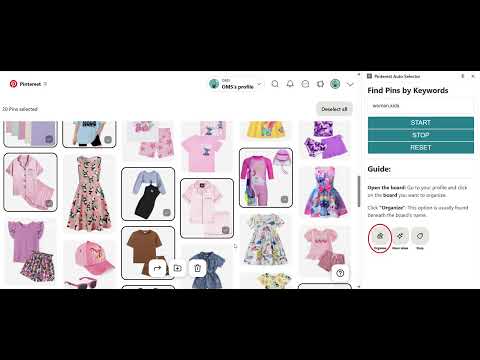
Find and Select Pinterest Pins based on keyword.
Managing your saved Pins on Pinterest can be overwhelming — especially if you have hundreds or thousands spread across different boards. That’s where the Pinterest Organizer Chrome Extension comes in. This powerful tool lets you easily select, sort, and manage Pins directly within Pinterest’s Organize tool. Whether you're creating new sections, moving Pins to different boards, or deleting outdated content, this extension helps you get the job done faster. What Does the Extension Do? This Chrome extension enhances Pinterest’s organizing features by allowing you to: ✅ Search and Select Pins by Keywords ✅ Bulk-Select Pins for easier management ✅ Move Selected Pins to other boards or sections ✅ Delete Multiple Pins in one go ✅ Reset Selection and Refresh the Page for a fresh start 📌 Where It Works The extension is specifically designed to work only on the Pinterest website and only when you’re on the Organize page (URL path: /tools/organize/). This ensures it integrates seamlessly with Pinterest's built-in pin management tools. 1. Open Pinterest Organize Page - Log in to your Pinterest account - Go to the board you want to manage - Click on the “Organize” option at the top - The URL should contain something like /tools/organize/. 2. Open the Chrome Extension - Click the Pinterest Organizer icon from your Chrome Extensions toolbar - The extension opens a side panel on the page 3. Search for Keywords - In the side panel, enter one or more keywords separated by commas (e.g. travel, recipe, DIY) - Click “Search” - The extension will scan all visible pins and automatically select those that contain your keywords (in title, description, or hidden metadata) 4. Scroll and Auto-Select - The extension automatically scrolls the page down and selects matching Pins - It ensures no pins are missed, even if they load lazily as you scroll 5. Take Action on Selected Pins - Once Pins are selected, use Pinterest’s native controls to: - Move them to a different board or section - Delete them in bulk - Reorganize your board efficiently 🚀 Why You’ll Love It Managing boards and Pins can be time-consuming. This extension removes the tedium of manually clicking pins one by one. Whether you're curating a new section, cleaning up your boards, or prepping content to delete, the Pinterest Organizer Chrome Extension saves you time and clicks.
5 点満点で 21 件の評価
詳細
プライバシー

Pinterest Pins Organizer から、お客様のデータの収集と使用に関する以下の情報が開示されています。 詳しくは、デベロッパーの privacy policy をご確認ください。
Pinterest Pins Organizer は次を扱います。
このデベロッパーは、お客様のデータについて以下を宣言しています
- 承認されている以外の用途で第三者に販売しないこと
- アイテムの中心機能と関係のない目的で使用または転送しないこと
- 信用力を判断する目的または融資目的で使用または転送しないこと
サポート
質問や提案、問題がある場合は、デベロッパーのサポートサイトにアクセスしてください。