

PinRadar — Pinterest Stats, Pin Analytics & CSV Export

Overview
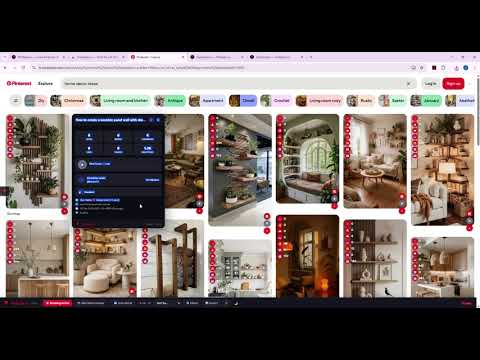
Pinterest stats extension — see saves repins & viral score on every pin. Sort, export CSV, download HD Free Pinterest analytics tool
PinRadar is the most powerful Pinterest analytics extension for Chrome — used by 1,500+ creators, marketers, and SEO experts worldwide. See hidden engagement data on every pin instantly, directly in your feed. Create a free account to unlock all features in seconds. ━━━━━━━━━━━━━━━━━━━━━━ 🆓 FREE FEATURES — Free account required ━━━━━━━━━━━━━━━━━━━━━━ 📊 Real-time Stats Overlay See saves, repins, likes, comments, reactions, and shares directly on every pin in your feed. No more guessing which content performs. The data appears instantly as you scroll — no extra steps, no switching tabs. 🔥 Viral Score & Trending Badges A viral score (0-100) is calculated for every pin based on engagement ratios relative to pin age and reach. Instantly spot trending content before it peaks and identify which pins are worth saving or recreating. 📅 Pin Age & Creation Date See exactly when any pin was created. Identify evergreen content vs. fresh trends and understand how long high-performing content has been accumulating engagement. 🔍 Keyword Volume Overlay See the monthly search volume directly on pins — powered by real keyword data from the platform. Know immediately whether a topic has audience demand before investing time creating content around it. 🚫 Hide Sponsored & AI Pins Clean up your feed by hiding promoted pins and AI-generated content with one click. Browse organic, human-created content without distraction and get a cleaner view of what actually performs. 🌙 Dark Mode Force dark mode for a more comfortable browsing experience. Toggle it on or off anytime from the extension settings. 💾 Pin Vault — Save Your Favorites Save up to 10 pins locally to your personal vault. Organized, searchable, and always available. No cloud storage, no account data sharing — your saved pins stay on your device. ━━━━━━━━━━━━━━━━━━━━ ⚡ PRO FEATURES — Upgrade to unlock ━━━━━━━━━━━━━━━━━━━━ 🔃 Sort Feed by Performance Sort your entire feed by saves, repins, viral score, comments, reactions, or date. Find the best performing content in seconds. No other analytics extension lets you sort your feed this way — most tools only show stats, PinRadar lets you act on them immediately. 📊 Export Data to CSV Export complete pin data to CSV with 29 columns per pin: saves, repins, viral score, pin URL, image URL, description, pinner name, board name, creation date, annotated interests, related keywords, dominant color, media type, and more. The most complete pin data export available in any Chrome extension. 📥 HD Image & Video Download Download any image or video in full HD quality directly from any pin. Supports individual downloads and bulk batch downloads across an entire session. Original resolution preserved, no compression applied. 📦 Bulk Board Download — ZIP Export Download ALL pins from any board as a ZIP file containing full HD images and videos. Export entire boards in one click. Unique to PinRadar — no other extension offers full board ZIP download. Ideal for archiving competitor boards, building mood boards, or backing up your own content. 📋 Export Any Board to CSV Export every pin from any board to a complete CSV file with all engagement data. 29 columns per pin including saves, repins, viral score, pinner stats, board stats, and keyword annotations. Perfect for competitor research, content audits, and SEO analysis. No other extension offers this level of detail. 🕵️ Board Spy — Competitor Analysis Analyze any board in depth directly while browsing. See top performing pins, average engagement metrics, dominant content niches, traffic source domains, and posting frequency patterns — all without leaving the platform. The most advanced competitor analysis tool available as a Chrome extension. 🎯 Content Gap Detector Automatically detect content formats and topics that are missing or underrepresented in any niche. PinRadar analyzes visible pins and identifies angles your competitors have not covered yet. Find untapped content opportunities backed by real engagement data. Unique worldwide. 🔑 Annotated Interests & Keyword Annotations See the exact interest categories and keywords tagged internally on every pin — the same signals the platform uses to decide who sees your content. This is the only Chrome extension that reveals these hidden annotations directly in your feed. Use this data for SEO, keyword research, content strategy, and understanding what drives distribution for top-performing pins. 🔗 Board Hover Stats Hover over any board to instantly see its stats — pin count, follower count, engagement rate — without opening it. Quickly evaluate boards during competitor research without losing your place in the feed. 🧩 Pin Actions Bar Quick action buttons appear on every pin: download image, download video, save to vault, view viral score details, and more. Everything accessible in one click without opening the pin page. 📌 Pin Manager — Unlimited Vault Save unlimited pins to your personal local vault. Organize by collection, search by keyword, filter by niche, and export your saved pins collection to CSV. Everything stored locally on your device. ━━━━━━━━━━━━━━━━━━━━━━━ 🌟 WHAT MAKES PINRADAR UNIQUE ━━━━━━━━━━━━━━━━━━━━━━━ Most analytics tools require you to leave your feed, paste URLs into a separate app, and wait for results. PinRadar works differently — every insight appears inline, directly on the pin, as you scroll. No copy-pasting. No tab switching. No extra steps. ★ Annotated interest annotations revealed on every pin — unique worldwide. No other extension exposes the internal interest tags the platform uses to distribute content. This is the most valuable SEO signal available outside of a professional ads account. ★ Content Gap Detector — unique worldwide. Automatically surface topics and formats that are underrepresented in any niche or search result. Find content opportunities your competitors have missed, backed by real engagement data from the pins already performing in your niche. ★ Full board CSV export with 29 engagement columns — unique worldwide. Every other tool exports a basic list. PinRadar exports saves, repins, viral score, pinner stats, board stats, keyword annotations, creation date, source domain, dominant color, and more — in one click. ★ Full board ZIP download with HD media — unique worldwide. Download every image and video from any board as a single ZIP file. Ideal for competitor research, mood board creation, content audits, or backing up your own boards. ★ Viral score calculated in real-time for every pin — no other extension computes this on the fly. The score factors in saves, repins, engagement ratio, and pin age to give you an instant quality signal without manual calculation. ━━━━━━━━━━━━━━━━━━━━━━━ 🎯 WHO IS PINRADAR FOR? ━━━━━━━━━━━━━━━━━━━━━━━ PinRadar is built for anyone who creates or researches content professionally. Content creators and bloggers use it to identify viral formats before investing time creating. SEO specialists and social media marketers use it for keyword research and competitor board analysis. E-commerce brands and agencies use it to export complete pin data for client reporting, competitor audits, and trend tracking. If your work depends on understanding what performs on this platform, PinRadar gives you the data layer you were missing. ━━━━━━━━━━━━━━━━━━━━━━━━ ❓ FREQUENTLY ASKED QUESTIONS ━━━━━━━━━━━━━━━━━━━━━━━━ Q: Is PinRadar free? A: Yes. Create a free account at pinradar.io/register to get your licence key and unlock all free features instantly. Free includes: real-time stats overlay, viral scores, pin age, keyword volume, hide ads/AI pins, and save up to 10 pins locally. Pro features — CSV export, board spy, bulk downloads, sort feed, keyword annotations, content gap detector — require a subscription starting at $8/month. Q: Do I need an account to use it? A: A free account is required to activate the extension and access its features. Creating one is free and takes less than 30 seconds at pinradar.io/register. You do not need to be logged into the platform to use the extension — it works on any page without requiring your credentials. Q: Is my data safe? Does PinRadar collect my browsing data? A: All analytics are processed locally in your browser using JavaScript. No pin data, browsing history, or feed content is ever sent to our servers. The only data we collect is your email address (when you create a free account) and a device identifier (for licence key management). See the full privacy policy at pinradar.io/privacy. Q: Does it work on all pages? A: Yes. PinRadar activates on all pages — home feed, search results, board pages, pin detail pages, and profile pages. Stats appear automatically as you scroll, with no manual action required. The extension detects the page context and adapts its display accordingly. Q: What does Viral Score mean? A: A Viral Score (0-100) is calculated for every pin based on the ratio of saves, repins, and engagement relative to pin age and reach. A score above 70 indicates high viral potential. This helps you instantly identify content worth saving, recreating, or drawing inspiration from — without manually calculating engagement rates. Q: What are Annotated Interests? A: The platform internally tags every pin with interest categories and keywords that determine how it is distributed to users. PinRadar is the only extension that reveals these hidden tags directly in your feed. This data is invaluable for SEO — use it to understand exactly which keywords and interests drive distribution for top-performing pins in your niche. Q: How does Board Spy work? A: When viewing any board, PinRadar analyzes all visible pins and surfaces insights: top performing content, dominant topics, traffic source domains, posting frequency, and engagement benchmarks. Use it to reverse-engineer any competitor content strategy without leaving the page. Works on any public board without requiring login. Q: How does Content Gap Detector work? A: PinRadar analyzes the pins in any search result or board and identifies content formats, topics, and styles that are underrepresented or missing compared to what is already performing well. This helps you find content angles your competitors have not covered yet, backed by real engagement data from the live feed. Q: What data is included in the CSV export? A: The export includes 29 columns per pin: pin URL, image URL, video URL, title, description, saves count, repins count, reactions count, comments count, shares count, viral score, pin age, creation date, pinner name, pinner followers, pinner following, board name, board URL, board pin count, board followers, category, annotated interests, related keywords, dominant color, media type, aspect ratio, source domain, and more. Q: Can I export an entire board? A: Yes. With Pro, you can export any board to CSV with complete engagement data, or download all board media as a ZIP file containing HD images and videos. No other Chrome extension offers full board export in either format. The ZIP download preserves original resolution with no compression. Q: How many devices can I use my Pro licence on? A: Pro allows up to 3 devices simultaneously. Manage your registered devices anytime from your dashboard at pinradar.io. Switching devices is instant — deactivate one and activate another in seconds. Q: Can I cancel my subscription anytime? A: Yes. Monthly and annual plans can be cancelled at any time from your dashboard. You keep Pro access until the end of your billing period. The Lifetime plan never expires — pay once and use it forever with all future updates included. Q: Is there a refund policy? A: Yes. A 7-day money-back guarantee applies to all plans. Contact contact@pinradar.io within 7 days of purchase for a full refund, no questions asked. Q: Does it work on mobile? A: PinRadar is a Chrome extension and works on the desktop browser version of the platform. It does not work on the mobile app. For best results, use it on Chrome on Mac or Windows. Q: What is the difference between Free and Pro? A: Free gives you stats overlay, viral scores, pin age, keyword volume, hide ads/AI pins, and vault for up to 10 pins — all requiring a free account. Pro unlocks everything: sort feed, CSV export, bulk downloads, board ZIP export, board spy, content gap detector, keyword annotations, board hover stats, pin actions bar, and unlimited vault. Q: How do I activate my licence key? A: After purchasing, go to pinradar.io/login, sign in with Google, and copy your Licence Key from your dashboard. Then open the extension popup and paste your key in the activation field. Pro features unlock instantly — no restart required. Q: Does PinRadar work without being logged into the platform? A: Yes. PinRadar works on any page regardless of whether you are logged in or not. The stats overlay, viral scores, and all free features activate automatically as soon as the extension is running. A PinRadar account is required, but not a platform account. ━━━━━━━━━━━━━━━━━━━ 🔒 PRIVACY FIRST ━━━━━━━━━━━━━━━━━━━ All analytics are processed locally in your browser. No browsing data is ever sent to any external server. No tracking beyond what is strictly necessary for account management. Only your email address and device identifier are collected when you create a free account — solely for licence key management. See the full privacy policy at pinradar.io/privacy. ━━━━━━━━━━━━━━━━━━━ 💰 PRICING ━━━━━━━━━━━━━━━━━━━ 🆓 Free — Stats overlay, viral badges, pin age, keyword volume. Free account required. ⚡ Pro Monthly — $8/month. Cancel anytime. ⚡ Pro Annual — $29/year. Save 70% vs monthly. ⚡ Pro Lifetime — $49 one-time. Pay once, use forever. Best value. Visit pinradar.io/extension-pro to see all plans and upgrade to Pro. ━━━━━━━━━━━━━━━━━━━━━━━━━ 📈 BUILT FOR PINTEREST SEO ━━━━━━━━━━━━━━━━━━━━━━━━━ Pinterest is a visual search engine — not a social network. Content that ranks well gets shown to new audiences for months or years after it is published. PinRadar gives you the data layer that was missing: see which keywords drive distribution, which interest tags get attached to top-performing pins, and which content formats consistently outperform others in your niche. Use this intelligence to create content that ranks from day one instead of guessing what the algorithm rewards. Every feature in PinRadar is designed around one goal — helping you understand what already works on Pinterest so you can replicate it faster and more precisely than anyone else in your space. ━━━━━━━━━━━━━━━━━━━━ ⭐ TRUSTED BY CREATORS ━━━━━━━━━━━━━━━━━━━━ Rated 4.7 stars · 1,500+ active users · Updated regularly · Responsive support at support@pinradar.io · New features added based on user feedback every release.
4.9 out of 522 ratings
Details
- Version1.0.25
- UpdatedSeptember 7, 2026
- Size73.95KiB
- LanguagesEnglish
- Developer
- Non-traderThis developer has not identified itself as a trader. For consumers in the European Union, please note that consumer rights do not apply to contracts between you and this developer.
Privacy

PinRadar — Pinterest Stats, Pin Analytics & CSV Export has disclosed the following information regarding the collection and usage of your data. More detailed information can be found in the developer's privacy policy.
PinRadar — Pinterest Stats, Pin Analytics & CSV Export handles the following:
This developer declares that your data is
- Not being sold to third parties, outside of the approved use cases
- Not being used or transferred for purposes that are unrelated to the item's core functionality
- Not being used or transferred to determine creditworthiness or for lending purposes
Support
For help with questions, suggestions, or problems, visit the developer's support site