Item logo image for Pine Optimizer

Pine Optimizer

pineoptimizer.com
2.8(

4 ratings

)
Item media 2 (screenshot) for Pine Optimizer
Item video thumbnail
Item media 2 (screenshot) for Pine Optimizer
Item video thumbnail
Item media 2 (screenshot) for Pine Optimizer

Overview

Connects Pine Optimizer to TradingView, enabling users to automate TradingView backtest operations

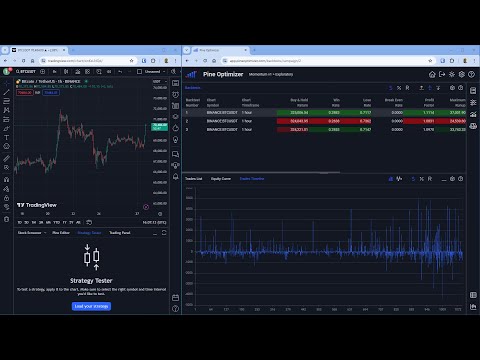
Pine Optimizer is the ultimate accessory for serious TradingView users who want to tune their trading strategies for maximum profit and minimum risk. Pine Optimizer is a web-based app that you open in your browser, just like any regular website. At the same time, you open TradingView in another browser tab. You'll also need to install the Pine Optimizer Chrome extension, which lets the two browser tabs communicate with each other. When you use Pine Optimizer, it silently sends instructions to the TradingView tab, to execute the kind of charting operations that you usually do manually. For example, when you optimize a strategy, you'll typically want to execute a separate backtest for each permutation of its strategy parameter values. Optimizing any trading strategy could entail many backtests, and doing it manually might take forever. But, with Pine Optimizer, it's completely automated. Just launch your optimization and then sit back and relax, while Pine Optimizer and TradingView do the heavy lifting. When all the backtesting is complete, Pine Optimizer harvests the results from TradingView and presents them to you in a single-screen format that highlights the highest performing strategy settings. It also provides many secondary insights that will help you to identify further optimization opportunities. The Pine Optimizer website includes comprehensive user documentation and a full video tutorial series, to help you get started. In less than an hour, you'll progress from complete beginner to expert strategy optimizer.

Details

  • Version
    1.3
  • Updated
    November 4, 2024
  • Size
    23.66KiB
  • Languages
    English (United Kingdom)
  • Developer
    Timothy Neil Coulter
    3 Faesten Way Bexley DA5 2JB GB
    Website
    Email
    support@pineoptimizer.com
  • Non-trader
    This developer has not identified itself as a trader. For consumers in the European Union, please note that consumer rights do not apply to contracts between you and this developer.

Privacy

Pine Optimizer has disclosed the following information regarding the collection and usage of your data. More detailed information can be found in the developer's privacy policy.

Pine Optimizer handles the following:

Personally identifiable information
Website content

This developer declares that your data is

  • Not being sold to third parties, outside of the approved use cases
  • Not being used or transferred for purposes that are unrelated to the item's core functionality
  • Not being used or transferred to determine creditworthiness or for lending purposes

Support

Related

TradingView Supercharged - TradingView Strategy Optimizer

1.0

The ultimate TradingView Strategy Optimizer - Supercharge your trading with parameter optimization!

TradeSage - TradingView Enhancement Suite

4.2

Your trading copilot with ChatGPT Pine Script generator

TradingView Strategy Finder

2.9

Automated Backtesting Tool

OptiPie TradingView Optimizer

3.8

TradingView Parameter Optimizer as an extension

TradingView Strategy Optimizer (AI Assisted) by Quant Trading Pro

4.8

Optimize, backtest, and automate TradingView strategies with precision.

TradingView Settings Exporter

1.0

Export, import, and save TradingView indicator settings

Trading and Backtesting Assistant

5.0

Log and track your TradingView backtests with automatic CSV export and candle timer

TradingView Strategy Optimiser (TradeOptimiser)

4.0

Optimise TradingView trading strategies parameters to achive higest profitability

TVExtBot 옵티마이저

5.0

트레이딩뷰 전략 백테스트 자동화 프로그램

Tradingview Alerts Manager

4.0

TradingView Alerts Manager - Backup, Restore, Migrate, Delete Easily manage your TradingView alerts with this extension. Backup…

NewHorizon Optimizer

4.4

TradingView Parameter Optimizer as an extension

TradingView AutoBacktester - Tradingade

5.0

Automatically collects backtesting data from your strategies by scrolling through your watchlist and timeframes.

TradingView Supercharged - TradingView Strategy Optimizer

1.0

The ultimate TradingView Strategy Optimizer - Supercharge your trading with parameter optimization!

TradeSage - TradingView Enhancement Suite

4.2

Your trading copilot with ChatGPT Pine Script generator

TradingView Strategy Finder

2.9

Automated Backtesting Tool

OptiPie TradingView Optimizer

3.8

TradingView Parameter Optimizer as an extension

TradingView Strategy Optimizer (AI Assisted) by Quant Trading Pro

4.8

Optimize, backtest, and automate TradingView strategies with precision.

TradingView Settings Exporter

1.0

Export, import, and save TradingView indicator settings

Trading and Backtesting Assistant

5.0

Log and track your TradingView backtests with automatic CSV export and candle timer

TradingView Strategy Optimiser (TradeOptimiser)

4.0

Optimise TradingView trading strategies parameters to achive higest profitability

Google apps