


Overview
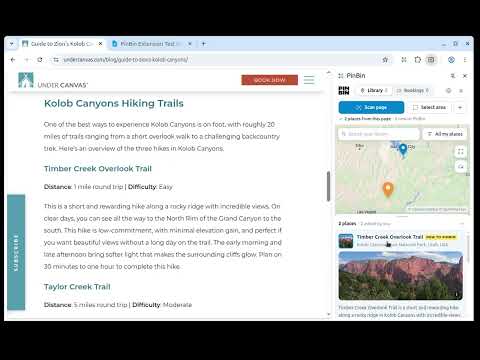
Uses AI to catalog activities of interest, and your reservations, for use at https://pinbin.app when scheduling your trips.
The side panel is PinBin's entire user interface. Clicking the PinBin toolbar icon opens it next to the page the user is reading, so they can scan that page and review the places and bookings PinBin found, on a list and a map, without leaving the page. It also holds sign-in, the user's saved places and bookings, and settings. Unlike a popup, a side panel stays open while the user moves between tabs and travel sites, which is how people research a trip.
0 out of 5No ratings
Details
- Version1.0.48
- UpdatedNovember 20, 2026
- Size2.71MiB
- LanguagesEnglish (United States)
- DeveloperWebsite
Email
support@pinbin.app - Non-traderThis developer has not identified itself as a trader. For consumers in the European Union, please note that consumer rights do not apply to contracts between you and this developer.
Privacy

pinbin.app has disclosed the following information regarding the collection and usage of your data. More detailed information can be found in the developer's privacy policy.
pinbin.app handles the following:
This developer declares that your data is
- Not being sold to third parties, outside of the approved use cases
- Not being used or transferred for purposes that are unrelated to the item's core functionality
- Not being used or transferred to determine creditworthiness or for lending purposes
Support
For help with questions, suggestions, or problems, visit the developer's support site