


Overview
Automate LinkedIn outreach, follow-ups, and campaign workflows from your browser.
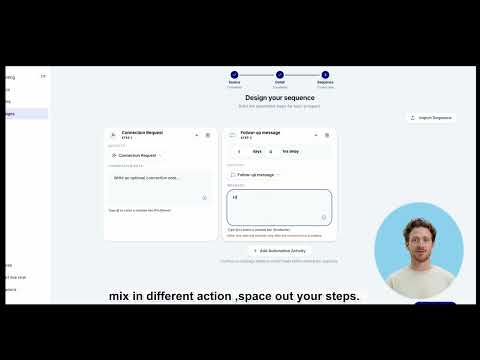
Pikeah runs your LinkedIn outreach for you — right from your browser, using your own logged-in session. Build a campaign once, and Pikeah handles the repetitive work: sending connection requests, following up after they're accepted, and keeping your inbox in sync — at a safe, human-like pace. ⏱️ ✨ What you can do 🎯 Build campaigns from a LinkedIn people search, a saved list, or your own imported prospects. 🔗 Multi-step sequences — connection requests (with optional personalized notes) ➡️ timed follow-up messages once the invite is accepted. 📥 Inbox & reply sync — Pikeah tracks who accepted and who replied, so accepted leads move forward and replies surface automatically. 👥 Multi-account — run campaigns across multiple connected LinkedIn accounts from one workspace. 🛡️ Built-in safety — daily limits, paced timing, and quiet hours help keep your account healthy. Pause anytime. 📊 Dashboard — review leads, campaign progress, and account status in your Pikeah account. ⚙️ How it works Pikeah works on top of your existing, logged-in LinkedIn session — 🔒 no password sharing. It opens and manages its own LinkedIn tabs (tidied under a labeled "Pikeah" tab group 🗂️), runs the steps you configured, and syncs status back to your account. Automation runs in the background on a safe schedule, so you don't need to keep a tab focused. 💤 🔐 Privacy Pikeah only interacts with LinkedIn and your own Pikeah account endpoints. Your LinkedIn session stays in your browser and is never shared with third parties. You decide which campaigns run — and can pause or stop them anytime. 📝 A Pikeah account is required to use this extension.
5 out of 51 rating
Details
- Version0.7.3
- UpdatedJune 26, 2026
- Size494KiB
- LanguagesEnglish
- DeveloperCOHEN STEEVEWebsite
20 Allée Darius Milhaud Paris 75019 FREmail
contact@pikeah.comPhone
+33 7 77 75 26 26 - TraderThis developer has identified itself as a trader per the definition from the European Union and committed to only offer products or services that comply with EU laws.
Privacy

Pikeah - LinkedIn outreach automation has disclosed the following information regarding the collection and usage of your data. More detailed information can be found in the developer's privacy policy.
Pikeah - LinkedIn outreach automation handles the following:
This developer declares that your data is
- Not being sold to third parties, outside of the approved use cases
- Not being used or transferred for purposes that are unrelated to the item's core functionality
- Not being used or transferred to determine creditworthiness or for lending purposes
Support
For help with questions, suggestions, or problems, please open this page on your desktop browser