

Pikamark: Visual Bookmark Manager & New Tab

Overview
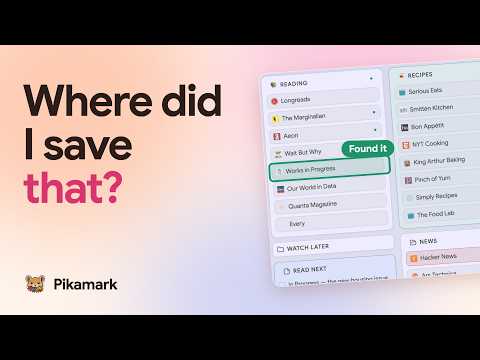
Your real bookmarks on every new tab, as a drag-and-drop board or a gallery. Notes, instant search, no account, no bookmark limit.
Got hundreds of bookmarks buried in folders you never open? Pikamark is a visual bookmark manager that puts your real bookmarks on every new tab, as a drag-and-drop board or a gallery. No account, no bookmark limit. Your new tab page becomes a cozy home for what you already saved. As a bookmark organizer, it shows the whole collection at a glance, lets you search instantly and keeps notes right next to your links. THE FREE CORE • Board: your folders as draggable columns • Gallery: any folder as a tile grid or a list, compact or extended • Instant search, and a command palette on F to jump to any bookmark or folder • Toolbar popup: search your bookmarks and save the current page • Favorites and color labels • Note cards with checklists, right on the board • A date and time widget • Light and dark themes, five accent colors and a choice of typefaces • Save all open tabs as a folder in one click • Undo after a delete, and a Trash that keeps items for up to 7 days • Backup & restore to a file SAFE BY DESIGN Pikamark works on your real bookmarks and edits them only when you ask. Delete something by mistake and Undo is right there, with the Trash holding it for up to 7 days. Remove Pikamark and every bookmark stays where it is. Pikamark reads bookmarks straight from the browser, so there is nothing to move. PRIVATE BY DEFAULT Pikamark has no accounts, analytics or tracking. Your bookmarks, notes, favorites, backups and themes are stored on your device, and none of it leaves your browser. The only server Pikamark contacts is the license provider (Freemius), and only when you activate, check or deactivate a Pro license key. Everything else works offline. Permissions cover bookmarks, local settings, site icons and web search. Saving open tabs, tab groups and system notifications each need an optional permission, which your browser asks for only when you use them. GOOD TO KNOW • Desktop only • Bookmarks follow your browser account as usual. Your notes, tags and layout stay on this device, and Backup & restore moves them to another computer • Want to keep your browser's own new tab? Decline the replacement or revert it later, then open Pikamark from the toolbar icon • Opera and Vivaldi: install this version, then open Pikamark from the toolbar icon, since they keep their own new tab • Available in English, Ukrainian, Spanish, French and German • Every release is listed in a public changelog PRO: OPTIONAL PAID PLAN Pro is optional, and the free core keeps working without it. Try Pro for 14 days, no card needed, then pick monthly, yearly or lifetime. One license key, not an account, covers up to 3 devices. Pro adds: • Workspaces: separate boards for work, home and more • Tags, comments and reminders, to note why you saved a link and when to come back to it • Automatic backups, with an optional backup folder • Backgrounds, a custom accent color, pitch black and custom icons • More widgets: countdown, Pomodoro timer, counter, snippets and photo, plus other time zones on the clock • Pinned links, one click away • Tab sessions: save named sets of tabs and reopen them later • Bulk tools: copy links as Markdown, HTML or CSV, rename a selection, clean up duplicates • Names and colors for board columns • Optional system notifications for due reminders and finished timers If you stop, the free core keeps working. Pro-only features lock, switch off or turn read-only, and your boards, notes, tags and settings stay saved on this device. Reactivate Pro and everything comes back exactly as it was.
4.8 out of 517 ratings
Details
- Version1.33.0
- UpdatedOctober 30, 2026
- Size723KiB
- Languages5 languages
- DeveloperRoman KolisnykWebsite
Samorianka 20 Korsun'-Shevchenkivs'kyi, Черкаська область 19402 UAEmail
ramapitex@gmail.comPhone
+380 75 545 9850 - TraderThis developer has identified itself as a trader per the definition from the European Union and committed to only offer products or services that comply with EU laws.
Privacy

This developer declares that your data is
- Not being sold to third parties, outside of the approved use cases
- Not being used or transferred for purposes that are unrelated to the item's core functionality
- Not being used or transferred to determine creditworthiness or for lending purposes
Support
For help with questions, suggestions, or problems, visit the developer's support site