

PigQuery

Overview
Enhance BigQuery: insert snippets, share URLs, link to sites
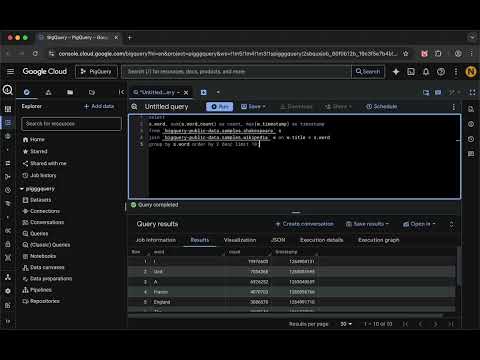
PigQuery is a productivity extension for Google BigQuery that helps you write, reuse, share, and explore SQL queries more efficiently. With PigQuery you can: • Insert saved queries and reusable SQL snippets into the BigQuery editor using keyboard shortcuts, making long table names, common joins, and complex query fragments easy to reuse • Interact with query results by opening cell values in external sites and formatting cell data (for example JSON payloads or timestamps) • Share in-progress queries via URL by generating a link that contains the full contents of the current editor, without saving or manually copying SQL • Configure snippets and sites using YAML, either locally or from remote URLs with automatic updates for team-wide sharing PigQuery integrates directly into the BigQuery UI, supports English and German, and is intended for users who work with BigQuery regularly and want faster, lower-friction workflows.
0 out of 5No ratings
Details
- Version2.0
- UpdatedFebruary 10, 2026
- Offered bynicholasdower
- Size114KiB
- Languages2 languages
- Developer
Email
nicholasdower@gmail.com - Non-traderThis developer has not identified itself as a trader. For consumers in the European Union, please note that consumer rights do not apply to contracts between you and this developer.
Privacy

This developer declares that your data is
- Not being sold to third parties, outside of the approved use cases
- Not being used or transferred for purposes that are unrelated to the item's core functionality
- Not being used or transferred to determine creditworthiness or for lending purposes
Support
For help with questions, suggestions, or problems, please open this page on your desktop browser