「Picture-in-Picture Extension (by Google)」的項目標誌圖片

Picture-in-Picture Extension (by Google)

Google
精選商品
3.9(

2684 個評分

)
商品影片縮圖

總覽

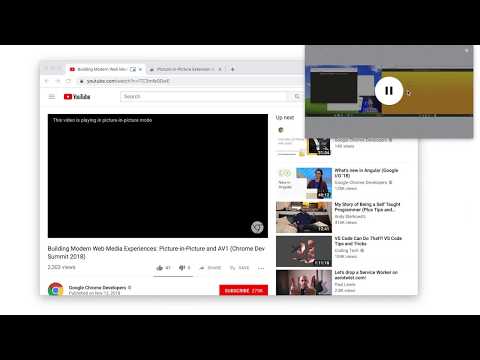
Watch video using Picture-in-Picture

Picture-in-Picture (PiP) allows you to watch videos in a floating window (always on top of other windows) so you can keep an eye on what you’re watching while interacting with other sites, or applications. Keyboard shortcut: Alt + P (⌥ + P on macOS) Source code: https://github.com/GoogleChromeLabs/picture-in-picture-chrome-extension By installing this item, you agree to the Google Terms of Service and Privacy Policy at https://www.google.com/intl/en/policies/.

3.9 分 (滿分 5 分)2684 個評分

進一步瞭解結果與評論。

詳細資料

  • 版本
    1.14
  • 已更新
    2025年2月13日
  • 大小
    9.91KiB
  • 語言
    English
  • 開發人員
    Google Ireland, Ltd.
    Gordon House Barrow Street Dublin 4 D04 E5W5 IE
    網站
    電子郵件
    pip-extension@google.com
    電話
    +1 650-253-0000
  • 交易商
    這位開發人員表明自己是交易商 (依歐盟的定義),並承諾只提供符合歐盟法律的產品或服務。
  • 鄧白氏環球編碼
    985840714

隱私權

管理擴充功能,並瞭解貴機構的擴充功能使用情形

「Picture-in-Picture Extension (by Google)」已揭露下列關於收集及使用資料的資訊。 如需更多詳細資訊,請參閱開發人員的《privacy policy》。

Picture-in-Picture Extension (by Google) 會處理下列資料:

使用者活動

這位開發者就你的資料做出下列聲明:

  • 經核准的用途外,不會將你的資料販售給第三方
  • 不會基於與商品核心功能無關的目的,使用或轉移資料
  • 不會為了確認信用度或基於貸款目的,使用或轉移資料

支援

相關項目

Picture in Picture with subtitles — Piphover

2.6

Picture in Picture with subtitles. Increase your productivity while continuing watching what you love.

SuperPiP - 帶播放控制和字幕的子母畫面

3.8

在子母畫面視窗觀看YouTube、Netflix、Disney+和Prime Video — 完整播放控制、字幕和鍵盤快捷鍵。

PiP - Picture in Picture Plus

3.6

Pop out video into a PIP Chrome Window. Works on all videos and websites. Watch video using Picture-in-Picture.

Picture-in-Picture any site

4.8

Picture-in-Picture any site even non video

Netflix PiP 現在適用於 Prime 和 D+ [QVI]

4.1

以畫中畫模式播放您喜愛的視頻內容。

Picture in Picture - PiP 子母畫面懸浮影片

4.2

在懸浮的子母畫面 (PiP) 視窗中觀看 YouTube、Netflix 及任何影片,置頂於其他分頁與應用程式之上。一鍵彈出影片。

Picture in Picture Player - Floating Video

4.3

Keep your videos visible at all times while doing something else! PiP mode on all videos.

Force Picture-in-Picture Extension

4.5

Watch video using Picture-in-Picture

Picture in Picture - floating video player

4.5

Watch videos while surfing the web with Picture in Picture (PiP) mode. Floating video player for Web!

Disney+ PIP

3.0

Adds Picture-in-Picture (PIP) support for Disney+

子母畫面適用於Disney Plus [QVI]

4.1

獨立軟體 - 與Disney無關。在始終置頂的浮動子母畫面視窗中觀看Disney+。

Hulu Picture In Picture [QVI]

4.0

Extension to watch Hulu in Picture in Picture mode. Enables a separate floating window to enjoy your favorite video content.

Picture in Picture with subtitles — Piphover

2.6

Picture in Picture with subtitles. Increase your productivity while continuing watching what you love.

SuperPiP - 帶播放控制和字幕的子母畫面

3.8

在子母畫面視窗觀看YouTube、Netflix、Disney+和Prime Video — 完整播放控制、字幕和鍵盤快捷鍵。

PiP - Picture in Picture Plus

3.6

Pop out video into a PIP Chrome Window. Works on all videos and websites. Watch video using Picture-in-Picture.

Picture-in-Picture any site

4.8

Picture-in-Picture any site even non video

Netflix PiP 現在適用於 Prime 和 D+ [QVI]

4.1

以畫中畫模式播放您喜愛的視頻內容。

Picture in Picture - PiP 子母畫面懸浮影片

4.2

在懸浮的子母畫面 (PiP) 視窗中觀看 YouTube、Netflix 及任何影片,置頂於其他分頁與應用程式之上。一鍵彈出影片。

Picture in Picture Player - Floating Video

4.3

Keep your videos visible at all times while doing something else! PiP mode on all videos.

Force Picture-in-Picture Extension

4.5

Watch video using Picture-in-Picture

Google 應用程式
