

Picrota - Screenshot & Image Editor: Crop, Annotate, Mask

Overview
Crop, annotate, highlight and mask images and screenshots in Chrome.
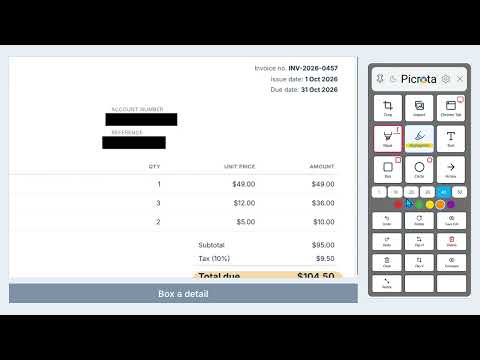
Picrota is a focused image editor and screenshot tool for Chrome, designed to make everyday image editing faster and easier. Open an image or capture a screenshot, make your edits in one workspace, then save the result as a PNG. No switching between multiple editing applications. ⚡ HOW IT WORKS Open or drag an image into a Chrome tab to start editing. Click the Picrota extension icon to capture a screenshot of your Chrome tab or your desktop. Crop, mask, highlight, annotate and resize with clear on-screen tools. Save your edited image as a PNG, automatically named with the date and time. ✂️ WHAT YOU CAN DO Crop images and preview the result before saving. Capture screenshots of the current Chrome tab or your desktop. Mask sensitive details and highlight important information. Add boxes, circles, arrows and text. Resize images with Small, Medium and Large presets, keeping proportions intact. Rotate and flip images. Compare your edits with the original. Zoom and pan around large images. Delete annotations, or simply drag them off the image to remove them. Clear all edits, or undo and redo step by step. Save the full image or just the visible area. 🎯 CLEANER ANNOTATIONS, FEWER STEPS Straight-stroke masking locks to horizontal lines, and the highlighter locks to horizontal or vertical, so your marks stay neat and consistent. Prefer to draw freely? Toggle the mask pen to freehand. All the essential annotation tools sit together in one practical workspace, with no hunting through complicated menus. 🚀 MADE FOR SMOOTH DESKTOP WORKFLOWS Picrota brings image editing and screenshots together in Chrome. Its controls stay within easy reach and remember your tool preferences, helping you get from opening an image to saving a result with fewer interruptions. 💼 USEFUL AT WORK AND EVERY DAY Picrota suits any workflow that involves reviewing, preparing or sharing images, including: Compliance, KYC and AML reviews Fraud investigation and case documentation Customer support and administration Research, reporting and everyday office tasks 💡 WHY PICROTA? Crop, mark up and save images without switching back and forth between Paint, a screenshot utility and your browser. Picrota focuses on common image tasks and a fast, easy workflow, not unnecessary complexity. 🛡️ PRIVATE BY DESIGN Your images are edited locally in Chrome: No image uploads No cloud image processing Images stay on your device during editing 💚 SIMPLE. FAST. FOCUSED. Open, edit and save, directly in Chrome. 🌐 Website & support: https://www.picrota.com
0 out of 5No ratings
Details
- Version1.0.25
- UpdatedOctober 28, 2026
- Offered byPicrota
- Size2.82MiB
- Languages9 languages
- Developer
Email
info@picrota.com - Non-traderThis developer has not identified itself as a trader. For consumers in the European Union, please note that consumer rights do not apply to contracts between you and this developer.
Privacy

Picrota - Screenshot & Image Editor: Crop, Annotate, Mask has disclosed the following information regarding the collection and usage of your data. More detailed information can be found in the developer's privacy policy.
Picrota - Screenshot & Image Editor: Crop, Annotate, Mask handles the following:
This developer declares that your data is
- Not being sold to third parties, outside of the approved use cases
- Not being used or transferred for purposes that are unrelated to the item's core functionality
- Not being used or transferred to determine creditworthiness or for lending purposes
Support
For help with questions, suggestions, or problems, visit the developer's support site