Item logo image for Picrota Lite – Fast Image Mask & Zoom for Chrome

Picrota Lite – Fast Image Mask & Zoom for Chrome

5.0(

3 ratings

)
Item media 2 (screenshot) for Picrota Lite – Fast Image Mask & Zoom for Chrome
Item video thumbnail
Item media 2 (screenshot) for Picrota Lite – Fast Image Mask & Zoom for Chrome
Item video thumbnail
Item media 2 (screenshot) for Picrota Lite – Fast Image Mask & Zoom for Chrome

Overview

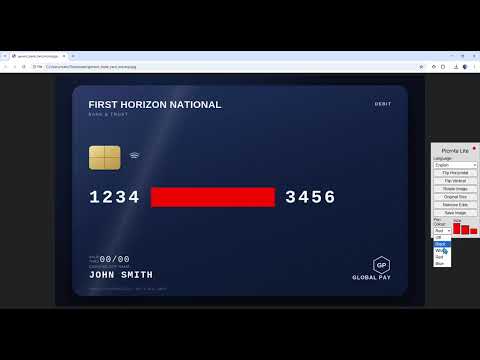
Mask sensitive data and inspect images directly inside Chrome.

Picrota Lite is a fast, lightweight image viewer and editor for Chrome, designed for everyday office workflows. 🛡️ Mask sensitive information in seconds Draw perfectly straight mask lines to quickly hide card numbers, personal details, or confidential data. 🔍 Zoom and inspect images with ease View documents and screenshots in detail without opening extra software. Also includes: • Mask • Zoom • Rotate • Flip • Auto-fit images • One-click Save & Download ⚡ Instant workflow Open an image in Chrome and Picrota is ready to use. 🛡️ 100% On-device privacy Your images never leave your browser. No uploads. No servers. No cloud processing. 💚 Built for real desktop work Perfect for: • KYC & compliance • Office administration • Customer support • Document review • Everyday image handling No learning curve. No clutter. Just the tools you actually need. 💚 Free to use Picrota Lite is free and supported by a small, unobtrusive ad to help fund development. Website & support: www.picrota.com Available in 33 languages: English (English) 中文 (Mandarin Chinese) Español (Spanish) العربية (Arabic) Português (Portuguese) Français (French) Deutsch (German) Русский (Russian) 日本語 (Japanese) 한국어 (Korean) Italiano (Italian) Nederlands (Dutch) Polski (Polish) Türkçe (Turkish) Українська (Ukrainian) Română (Romanian) Ελληνικά (Greek) Magyar (Hungarian) Svenska (Swedish) Čeština (Czech) Dansk (Danish) Norsk (Norwegian) Català (Catalan) Hrvatski (Croatian) Suomi (Finnish) Latviešu (Latvian) Lietuvių (Lithuanian) Български (Bulgarian) Српски (Serbian) فارسی (Persian/Farsi) עברית (Hebrew) Kiswahili (Swahili) Tiếng Việt (Vietnamese)

Details

  • Version
    1.55
  • Updated
    June 22, 2026
  • Offered by
    Picrota
  • Size
    1.27MiB
  • Languages
    English (United States)
  • Developer
    Email
    info@picrota.com
  • Non-trader
    This developer has not identified itself as a trader. For consumers in the European Union, please note that consumer rights do not apply to contracts between you and this developer.

Privacy

Manage extensions and learn how they're being used in your organization
The developer has disclosed that it will not collect or use your data. To learn more, see the developer’s privacy policy.

This developer declares that your data is

  • Not being sold to third parties, outside of the approved use cases
  • Not being used or transferred for purposes that are unrelated to the item's core functionality
  • Not being used or transferred to determine creditworthiness or for lending purposes

Support

For help with questions, suggestions, or problems, visit the developer's support site

Related

Continuum: Capture, Save & Resume AI Chats

5.0

Capture an AI chat session and resume it in a new chat on any supported platform — never lose context to message/length limits.

Editpal - AI Image Editor

5.0

The ultimate AI-powered image editing tool. Edit, create, and transform images with simple text prompts

BetterViewer

4.6

A browser extension for better image viewing experience

GetStarted - Minimal & Fast Startpage

5.0

Minimal & fast startpage for your browser.

Image Rotator

4.2

Rotate images with a right-click context menu.

Image Resizer

5.0

Resize and convert images rapidly locally.

Image editor

5.0

Image resizing,resolution adjustment,image rotation,image watermarking,image compression,image to PDF,poster generation,and more.

Flip-Rotate Image (Sempurna)

3.3

Klik kanan pada gambar untuk memutar atau membaliknya, atau gunakan popup untuk mengubah semua gambar.

RotateX – Image & Page Rotation

4.3

Rotate webpages, images & PDFs 90°, 180° or 270° with one click or keyboard shortcut. Instant, free, works on any Chrome tab.

Explanium - Instant Text Explainer

5.0

Get instant AI explanations for any selected text using Google's Gemini AI. Smart caching for fast repeat explanations.

Enhanced Image Viewer

4.5

Better Chrome image viewing experience

Image Manipulator

3.9

You can flip, rotate, enlarge, and view information about the image from a image context menu allows.

Continuum: Capture, Save & Resume AI Chats

5.0

Capture an AI chat session and resume it in a new chat on any supported platform — never lose context to message/length limits.

Editpal - AI Image Editor

5.0

The ultimate AI-powered image editing tool. Edit, create, and transform images with simple text prompts

BetterViewer

4.6

A browser extension for better image viewing experience

GetStarted - Minimal & Fast Startpage

5.0

Minimal & fast startpage for your browser.

Image Rotator

4.2

Rotate images with a right-click context menu.

Image Resizer

5.0

Resize and convert images rapidly locally.

Image editor

5.0

Image resizing,resolution adjustment,image rotation,image watermarking,image compression,image to PDF,poster generation,and more.

Flip-Rotate Image (Sempurna)

3.3

Klik kanan pada gambar untuk memutar atau membaliknya, atau gunakan popup untuk mengubah semua gambar.

Google apps